EOS
|
HD OPERATION
17
Dedicated Mode
Dedicated mode is designed to allow order takers to focus exclusively on one lane. It is a feature that is
only applicable with a Dual Lane base or a single lane base congured in Single/A2. When a car arrives
in a lane, one tone is heard for Lane 1 and two tones for Lane 2.
With Dedicated mode enabled, order takers will only hear the car arrival tone for their lane. Order
takers working Lane 1 will hear a single tone when a car arrives, dedicated to Lane 1 headsets only.
Order takers working Lane 2 will hear two tones when a car arrives, dedicated to Lane 2 headsets only.
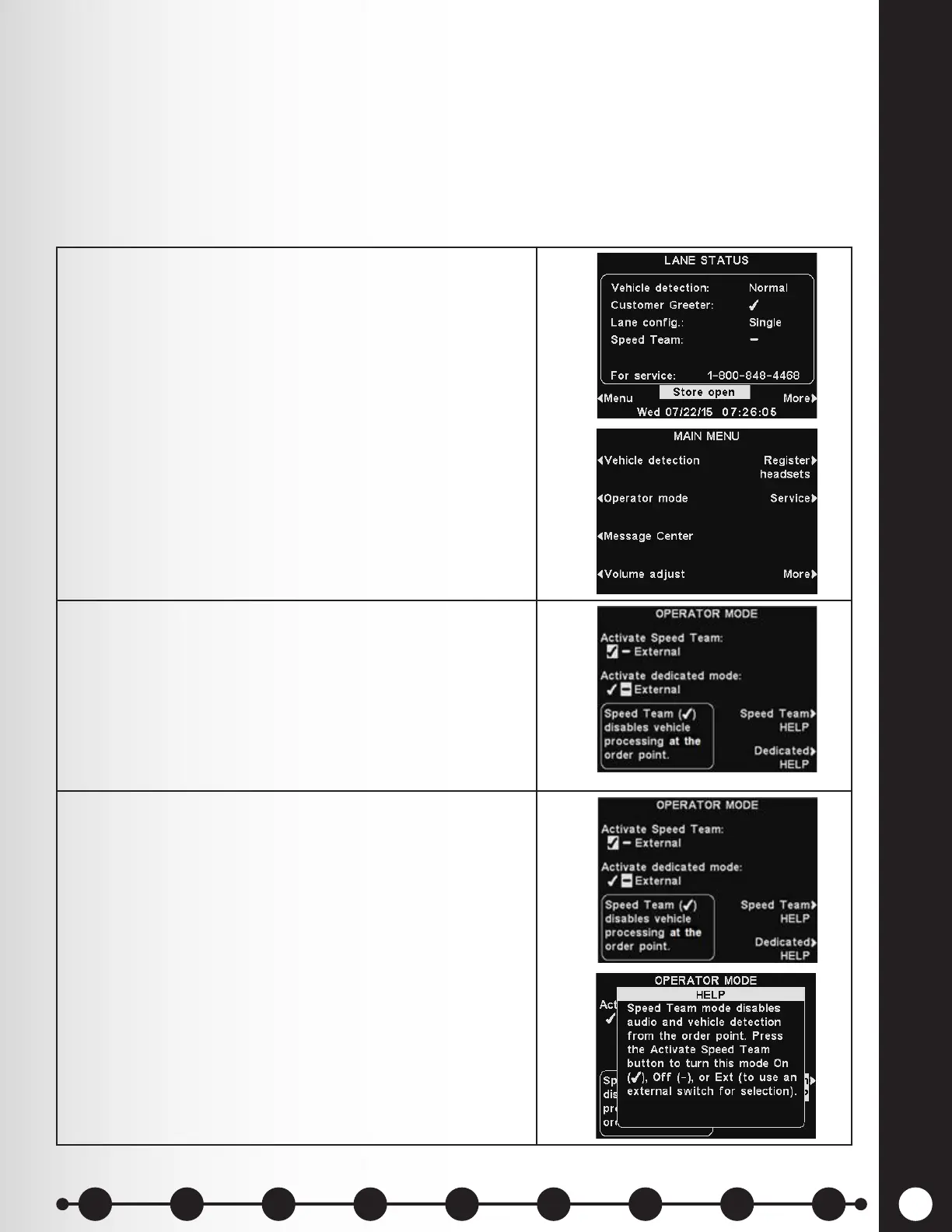
To enable Dedicated mode:
1. Select Menu on the LANE STATUS display and then
select Operator mode on the MAIN MENU.
2. On the OPERATOR MODE display, press the Activate
dedicated mode button to select ✔ (on).
3. When you want to return to normal operation, you
must select − (off).
If needed, press the Dedicated HELP button for
additional information.
1 2 3 4 5 6 7 8 9
Introduction
EOS|HD
Equipment
EOS|HD
Operation
Audio Processing
Functions
Equipment Care
and Cleaning
Troubleshooting
Equipment
Specications
EOS|HD Message
Center Guide
Important
Notices



 To Next Page