HEADSET USAGE
7
How to wear the Belt-Pac
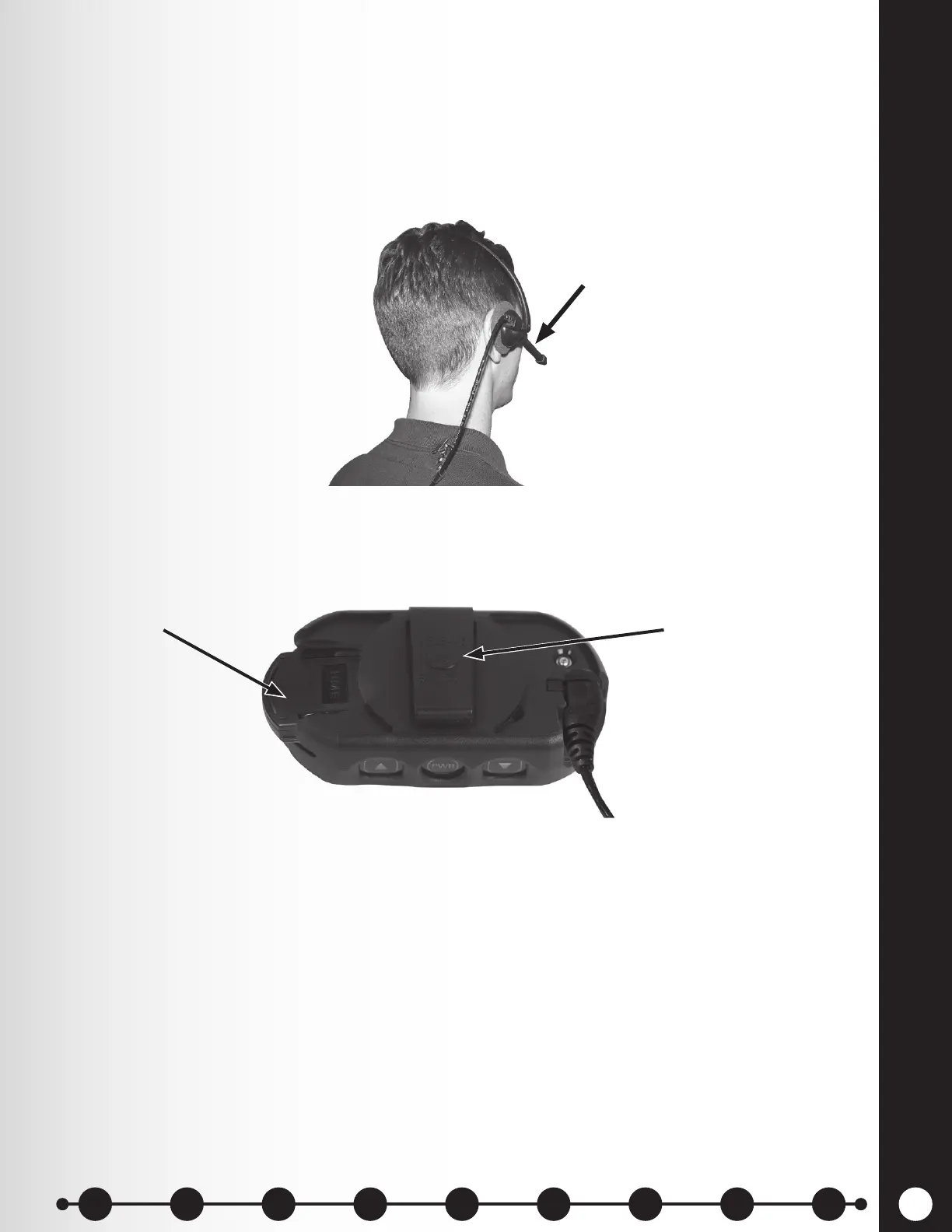
h The headset can be worn with the microphone on either side of your head.
h Wear the headset with its cable behind your back and attach the clothing clips to your collar
and shirt to keep the cable safely behind you, as shown in Figure 5.
h Hold the microphone boom at its base and adjust it so the microphone is near the side of
your mouth.
Battery Removal and Replacement
To change batteries:
If you hear “Battery low” or “Change battery”:
h Press the RELEASE BATTERY button on the belt clip of the pouch, and use your thumb to
slide the battery from the belt-pac.
h Place the battery in the battery charger for recharging.
h Install a fully charged battery in the belt-pac.
Note: You do not need to remove the pouch to remove or insert the battery
Figure 5. Correct wearing of the headset used with belt-pac
Hold microphone boom
here to adjust microphone
Battery-release button
Battery
Figure 6. Battery removal
1 2 3 4 5 6 7 8 9
Introduction
EOS|HD
Equipment
EOS|HD
Operation
Audio Processing
Functions
Equipment Care
and Cleaning
Troubleshooting
Equipment
Specications
EOS|HD Message
Center Guide
Important
Notices



 To Next Page