EOS
|
HD OPERATION
29
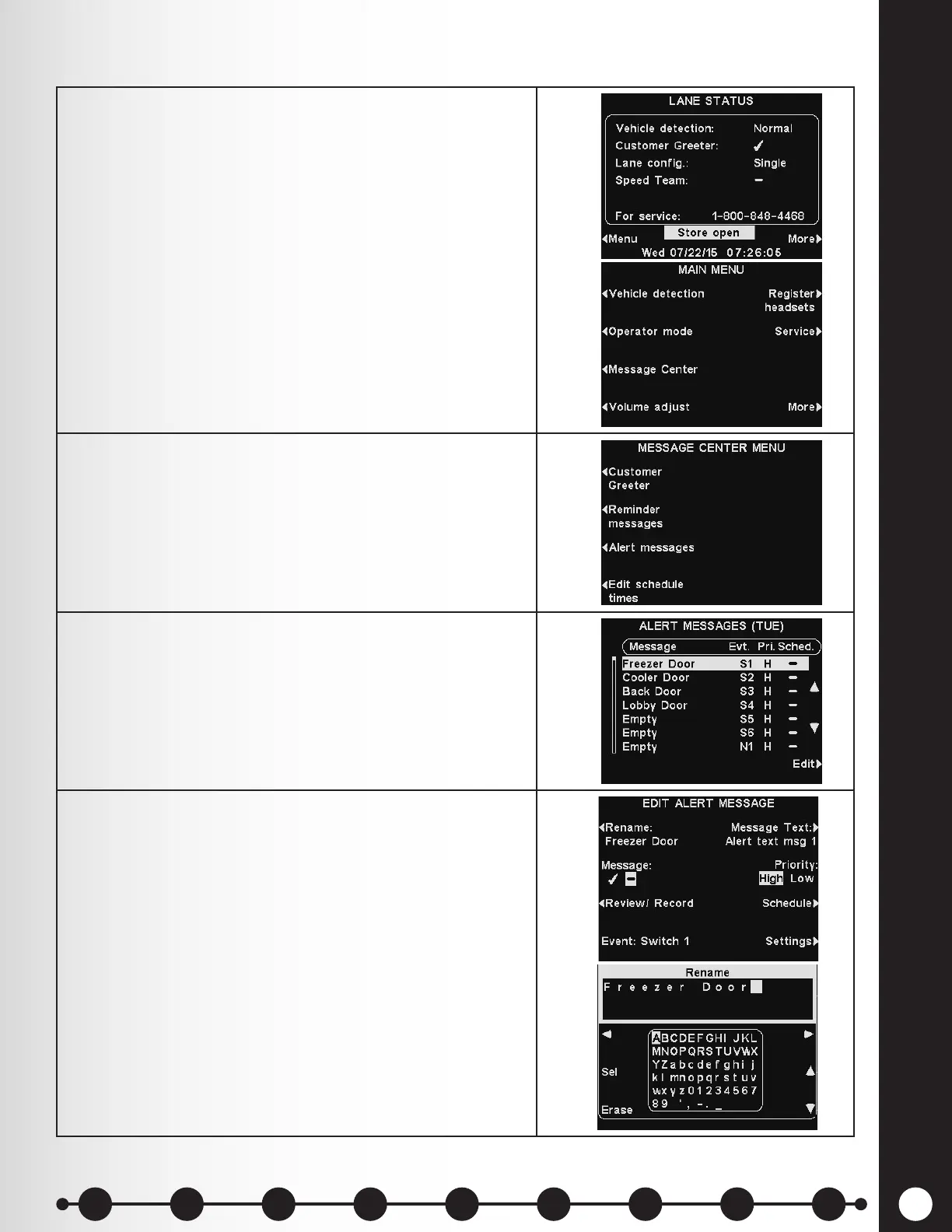
1. To set up the time periods and locations for Alert
messages to be played, or to name and/or record Alert
messages, press the Menu button on the base station
LANE STATUS display.
On the MAIN MENU press the Message Center
button.
2. Press the Alert messages button on the MESSAGE
CENTER MENU.
3. To select a message on the ALERT MESSAGES
display, press the ▲ (up) or ▼ (down) button to
highlight the desired message.
To edit a message, select the message and press the
Edit button.
4. To edit the name (optional) of the selected message
by pressing the Rename button on the EDIT ALERT
MESSAGE display.
On the Rename display, use the Erase button to clear
characters in the current name. Use the ◄, ►, ▲ and
▼ buttons to move the highlight to a character.
Use the Sel (select) button to insert each highlighted
character in the name eld.
When you are nished, press the Back button to save
the new name.
Alert Message Settings
1 2 3 4 5 6 7 8 9
Introduction
EOS|HD
Equipment
EOS|HD
Operation
Audio Processing
Functions
Equipment Care
and Cleaning
Troubleshooting
Equipment
Specications
EOS|HD Message
Center Guide
Important
Notices



 To Next Page