HEADSET USAGE
5
Headsets
Features and Controls
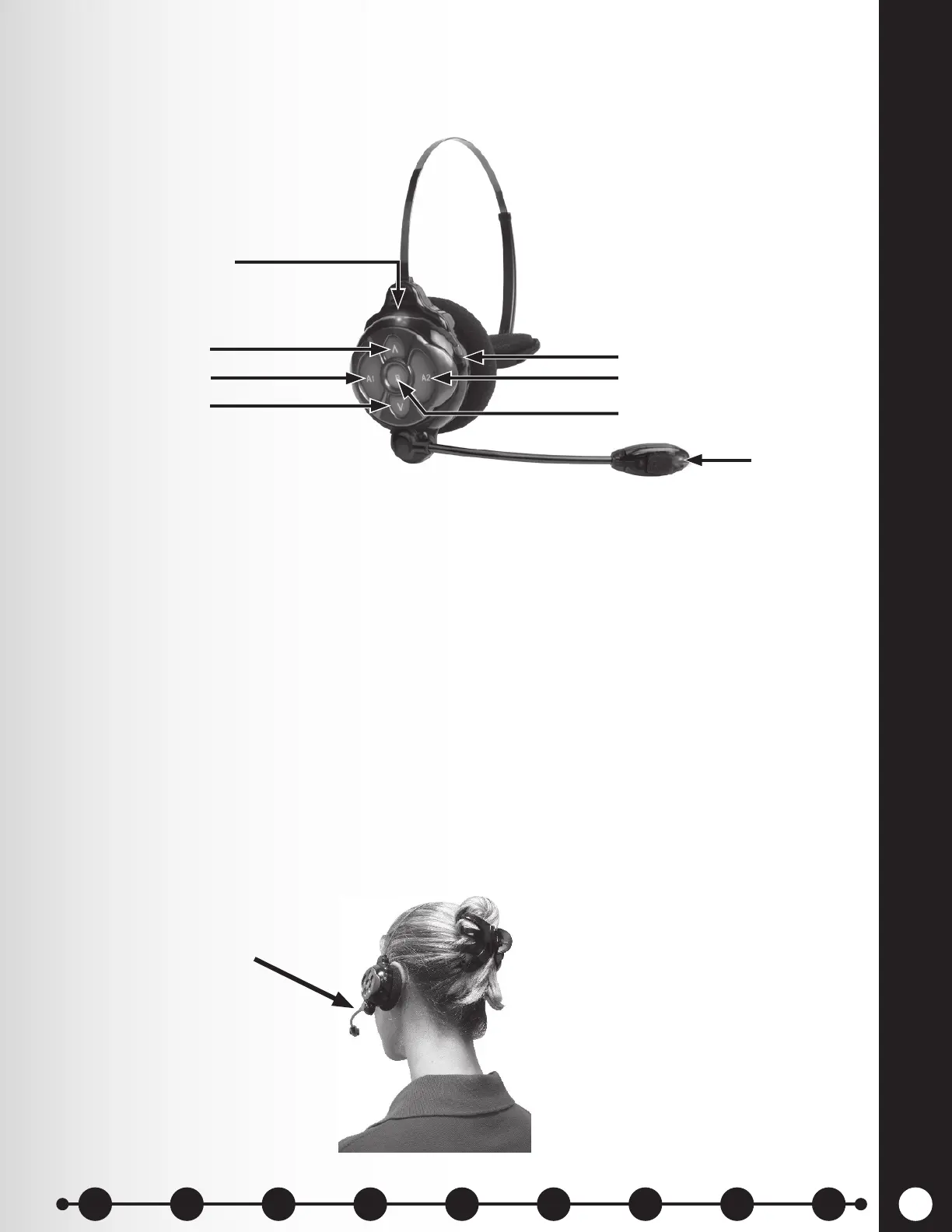
h Power On — Press and release the Power button. A voice prompt in the headset will say
“Headset #, Battery Full/Half/Low, Lane #”. If the headset was previously registered, the
green Power light will turn ON.
h Power Off — Press and hold the Power button for approximately 3 seconds. A voice prompt
in the headset will say “Headset off,” and the power light will turn off.
h Volume-Up or Down Adjustment — Press and release the volume Λ or V button. Each
time you press the button you will hear a beep in the earpiece as the volume increases or
decreases.
When you reach maximum or minimum volume, you will hear a double beep. If you continue holding
the volume Λ or V button, the beeps will continue until the button is released.
How to Wear the Headset
○ Wear the headset with the microphone to the right or left side of your mouth.
○ Adjust the headband and microphone boom as needed.
Figure 3. Headset controls
Power light
Power button
Volume-up button
Volume-down button
Channel “A1” Channel “A2”
Channel “B”
Transmit light
Figure 4. Correct wearing of the all-in-one headset
Hold microphone boom
here to adjust microphone
1 2 3 4 5 6 7 8 9
Introduction
EOS|HD
Equipment
EOS|HD
Operation
Audio Processing
Functions
Equipment Care
and Cleaning
Troubleshooting
Equipment
Specications
EOS|HD Message
Center Guide
Important
Notices


 To Next Page