EOS
|
HD OPERATION
61
Diagnostics
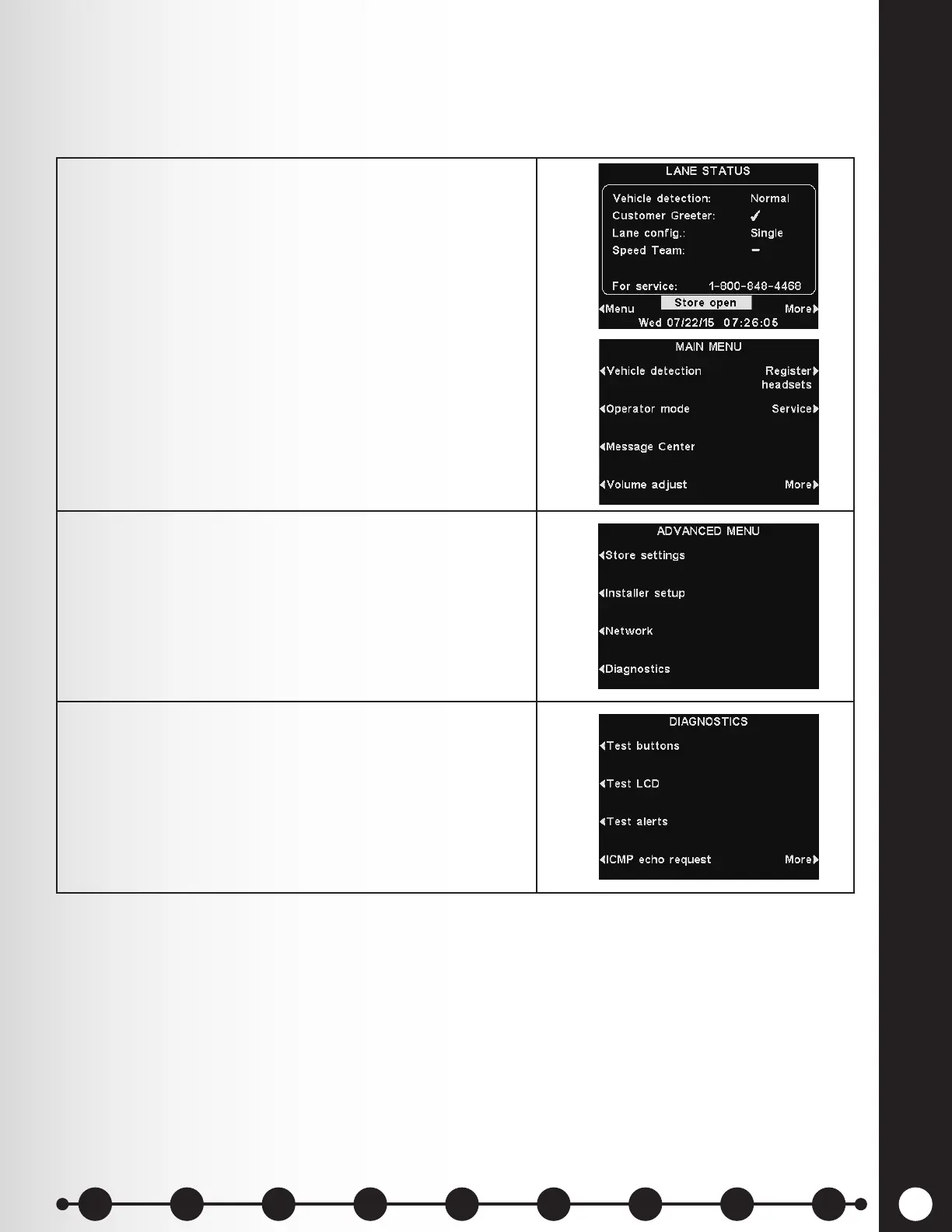
The Diagnostics button is available if you experience a problem with EOS|HD operation and you
need to call HME Technical Support. The Technical Support representative will guide you through the
automated diagnostics.
1. Select Menu on the base station LANE STATUS
display and then press the More button on the MAIN
MENU.
2. On the ADVANCED MENU, press the Diagnostics
button, and then select the test requested by the
Technical Support representative.
3. If requested, press the More button on the
DIAGNOSTICS display for additional diagnostics.
1 2 3 4 5 6 7 8 9
Introduction
EOS|HD
Equipment
EOS|HD
Operation
Audio Processing
Functions
Equipment Care
and Cleaning
Troubleshooting
Equipment
Specications
EOS|HD Message
Center Guide
Important
Notices



 To Next Page