EOS
|
HD OPERATION
14
Tandem Operation
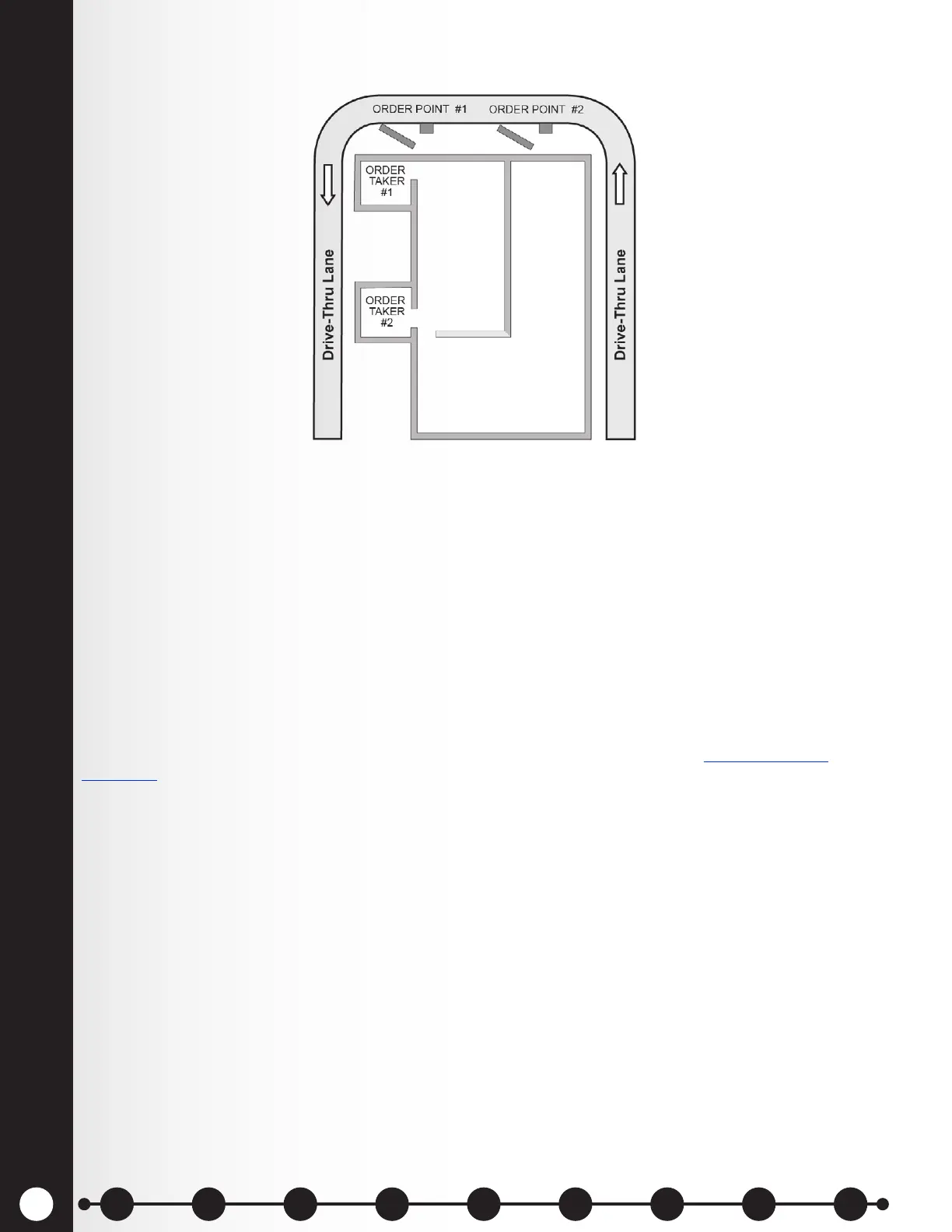
In Tandem operation, customers at Order Point #1 are served by Order Taker #1, and customers at
Order Point #2 are served by Order Taker #2.
If a customer arrives at Order Point #2 when there is no customer at Order Point #1, a “Please pull
forward” message will automatically be played from the Speaker Post or Menu Board #2.
When a customer arrives at Order Point #1, Order Taker #1 will be alerted.
If a customer arrives at Order Point #2 when there is already a customer at Order Point #1, Order Taker
#2 will be alerted.
Note: If you want to change the pre-recorded “Please pull forward” message, see Message Center
Operation, pg. 18.
CAUTION: In tandem operation, if Order Taker #2’s headset is set in the Auto Hands-Free mode, the
“Please pull forward” message will not be played at Order Point #2. If necessary, Order Taker #2 will
have to ask the customer at Order Point #2 to pull forward.
Figure 9. Typical tandem drive-thru
1 2 3 4 5 6 7 8 9
Introduction
EOS|HD
Equipment
EOS|HD
Operation
Audio Processing
Functions
Equipment Care
and Cleaning
Troubleshooting
Equipment
Specications
EOS|HD Message
Center Guide
Important
Notices



 To Next Page