Chapter 2 Introducing the Web Configurator
B222s User’s Guide
25
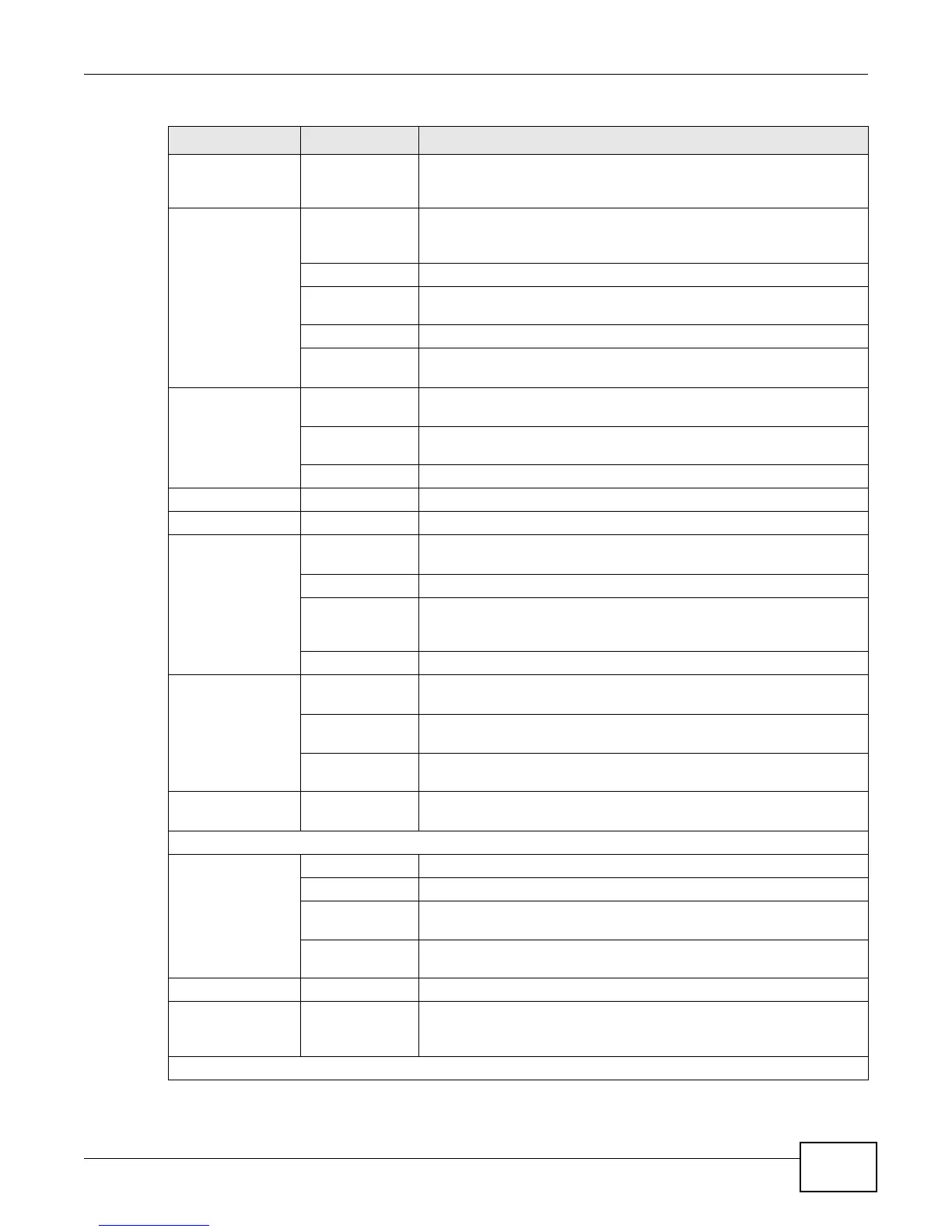
Broadband Broadband Use this screen to view and modify your WAN interface. You can also
configure ISP parameters, WAN IP address assignment, DNS servers
and other advanced properties.
Wireless General Use this screen to turn the wireless connection on or off, specify the
SSID(s) and configure the wireless LAN settings and WLAN
authentication/security settings.
More AP Use this screen to configure multiple BSSs on the LTE Device.
WPS Use this screen to use WPS (Wi-Fi Protected Setup) to establish a
wireless connection.
WMM Use this screen to enable or disable Wi-Fi MultiMedia (WMM).
Scheduling Use this screen to configure when the LTE Device enables or disables
the wireless LAN.
Home
Networking
LAN Setup Use this screen to configure LAN TCP/IP settings, and other advanced
properties.
Static DHCP Use this screen to assign specific IP addresses to individual MAC
addresses.
UPnP Use this screen to enable the UPnP function.
Static Route Static Route Use this screen to view and set up static routes on the LTE Device.
DNS Route DNS Route Use this screen to view and configure DNS routes.
QoS General Use this screen to enable QoS and decide allowable bandwidth using
QoS.
Queue Setup
Use this screen to configure QoS queue assignment.
Class Setup Use this screen to set up classifiers to sort traffic into different flows
and assign priority and define actions to be performed for a classified
traffic flow.
Monitor
Use this screen to view each queue’s statistics.
NAT Port Forwarding Use this screen to make your local servers visible to the outside
world.
DMZ Use this screen to configure the IP address of the LTE Device’s DMZ
interface.
Sessions Use this screen to limit the number of NAT sessions a single client can
establish.
Dynamic DNS Dynamic DNS Use this screen to allow a static hostname alias for a dynamic IP
address.
Security
Firewall General Use this screen to activate/deactivate the firewall.
Services Use this screen to view and configure services.
Access Control Use this screen to view and configure filter rules for incoming and
outgoing traffic.
DoS Use this screen to activate/deactivate Denial of Service (DoS)
protection.
MAC Filter MAC Filter Use this screen to allow specific devices to access the LTE Device.
Parental
Control
Parental Control Use this screen to define time periods and days during which the LTE
Device performs parental control and/or block web sites with the
specific URL.
VoIP
Table 2 Navigation Panel Summary (continued)
LINK TAB FUNCTION











 To Next Page