Chapter 3 Connection Status and System Info
B222s User’s Guide
33
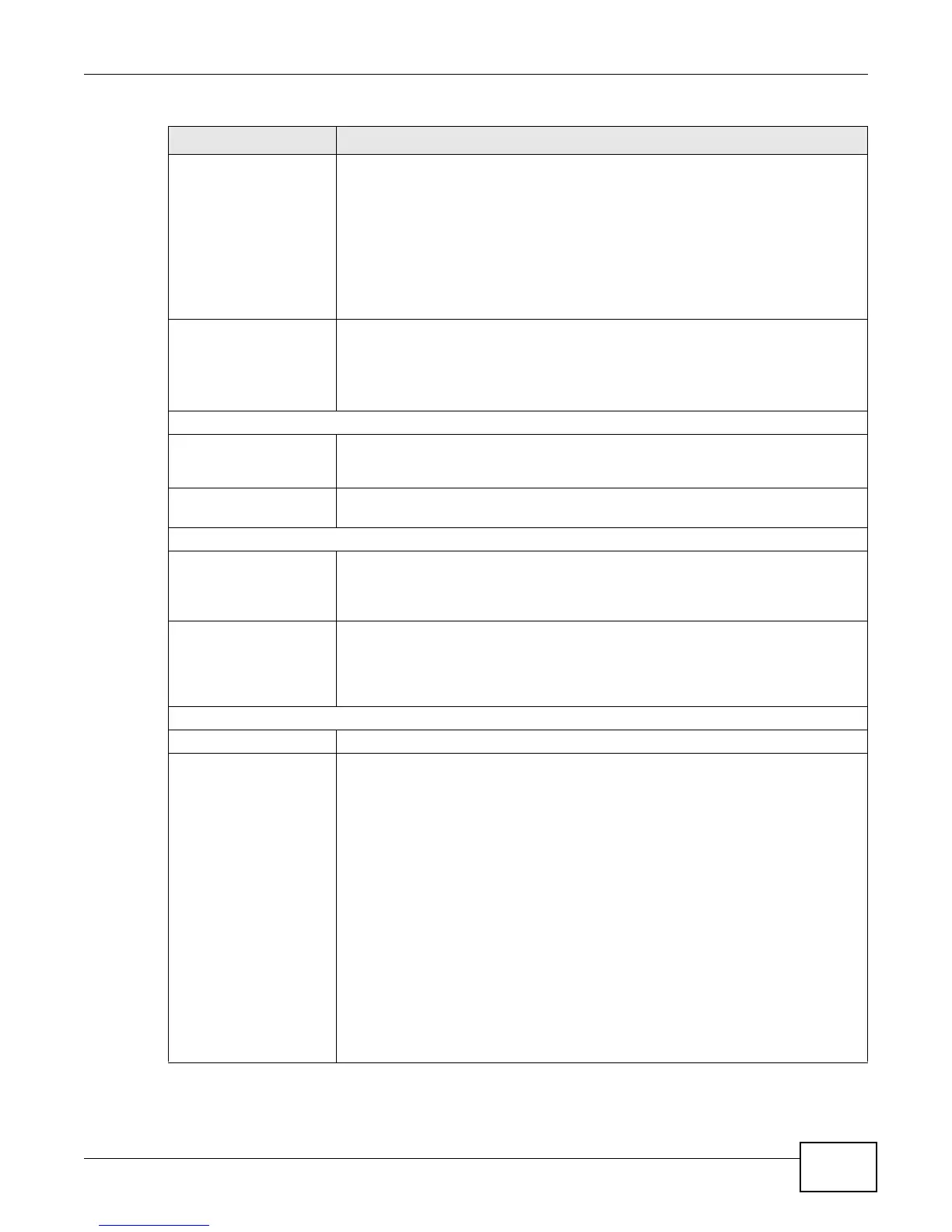
Status This field indicates whether or not the LTE Device is using the interface.
For the LTE WAN interface, this field displays Up when the LTE Device is connected
to an LTE network and Down when the LTE Device does not have an LTE
connection.
For the LAN interface, this field displays Up when the LTE Device is using the
interface and Down when the LTE Device is not using the interface.
For the WLAN interface, it displays Up when WLAN is enabled or Down when
WLAN is disabled.
Rate For the LTE WAN interface, this displays 4G LTE if there is an LTE connection.
For the LAN interface, this displays the port speed and duplex setting.
For the WLAN interface, it displays the maximum transmission rate when WLAN is
enabled or N/A when WLAN is disabled.
System Status
System Up Time This field displays how long the LTE Device has been running since it last started
up. The LTE Device starts up when you plug it in, when you restart it
(Maintenance > Reboot), or when you reset it (see Section 1.7 on page 20).
Current Date/Time This field displays the current date and time in the LTE Device. You can change this
in Maintenance > Time Setting.
System Resource
CPU Usage This field displays what percentage of the LTE Device’s processing ability is
currently used. When this percentage is close to 100%, the LTE Device is running
at full load, and the throughput is not going to improve anymore. If you want some
applications to have more throughput, you should turn off other applications.
Memory Usage This field displays what percentage of the LTE Device’s memory is currently used.
Usually, this percentage should not increase much. If memory usage does get close
to 100%, the LTE Device is probably becoming unstable, and you should restart
the device. See Chapter 24 on page 169, or turn off the device (unplug the power)
for a few seconds.
Registration Status
Account This column displays each SIP account in the LTE Device.
Action This field displays the current registration status of the SIP account. You have to
register SIP accounts with a SIP server to use VoIP.
If the SIP account is already registered with the SIP server,
•Click Unregister to delete the SIP account’s registration in the SIP server. This
does not cancel your SIP account, but it deletes the mapping between your SIP
identity and your IP address or domain name.
• The second field displays Registered.
If the SIP account is not registered with the SIP server,
•Click Register to have the LTE Device attempt to register the SIP account with
the SIP server.
• The second field displays the reason the account is not registered.
Inactive - The SIP account is not active. You can activate it in VoIP > SIP > SIP
Settings.
Register Fail - The last time the LTE Device tried to register the SIP account with
the SIP server, the attempt failed. The LTE Device automatically tries to register
the SIP account when you turn on the LTE Device or when you activate it.
Table 3 System Info Screen (continued)
LABEL DESCRIPTION











 To Next Page