Procedure
Step 1 Determine the position for installing the ground clip on the cable based on the actual cable route.
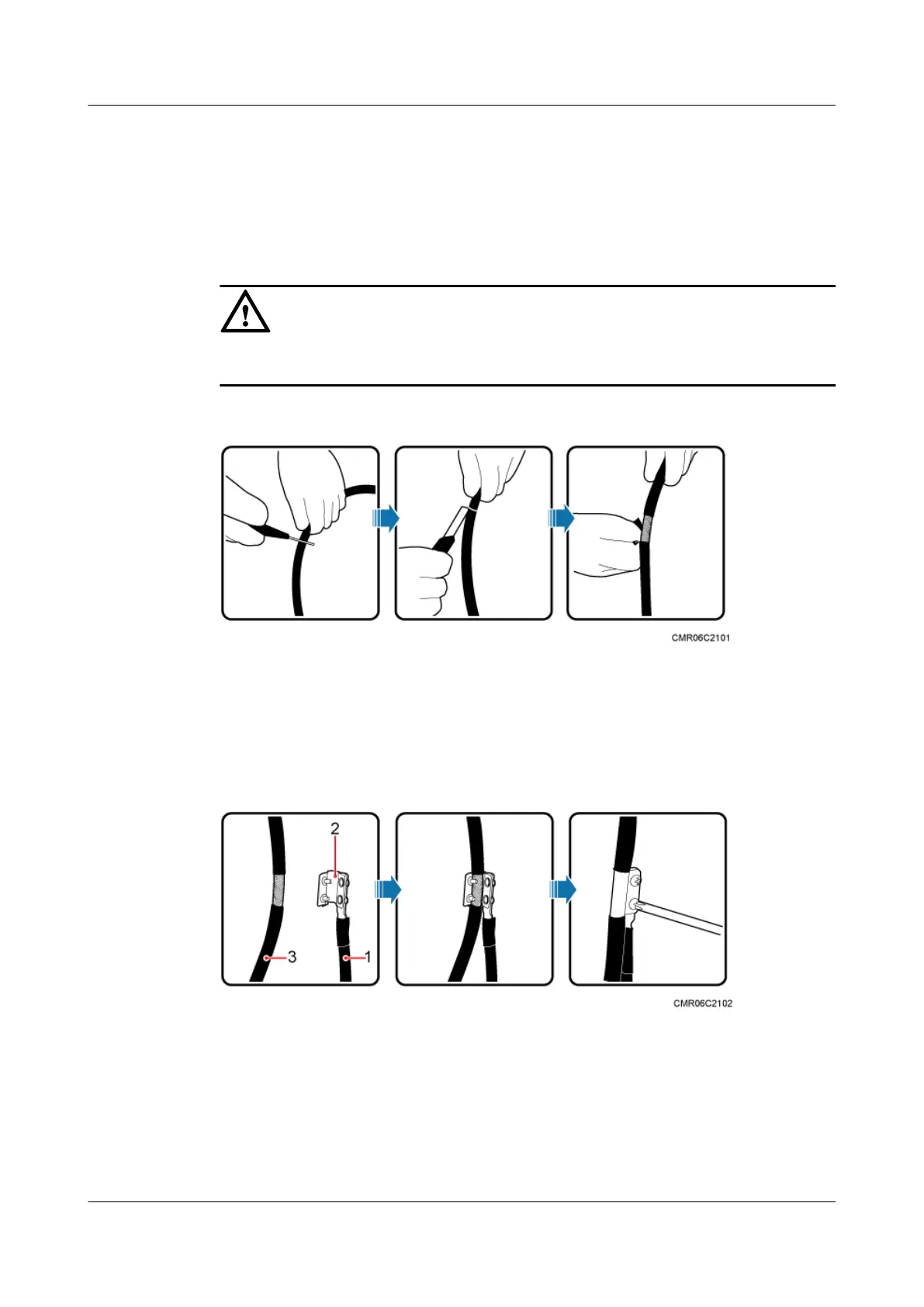
Step 2 Use a utility knife to strip the sheath off the FE/GE cable for about 32 mm to expose the shield
layer, as shown in Figure 9-34.
CAUTION
Do not damage the shield layer when stripping the sheath off the cable.
Figure 9-34 Stripping the sheath off the FE/GE cable
Step 3 Install the ground clip on the shield layer of the cable, and then use a screwdriver to tighten the
screws on the ground clip, as shown in Figure 9-35.
Figure 9-35 Tightening the screws on a ground clip
(1) Ground cable
(2) Ground clip (3) FE/GE cable
Step 4 Wrap three layers of waterproof tape and three layers of polyvinyl chloride (PVC) insulation
tape at the ground clip.
BTS3902E WCDMA
Installation Guide 9 Installing Cables
Issue Draft A (2011-06-30) Huawei Proprietary and Confidential
Copyright © Huawei Technologies Co., Ltd.
9-31









 To Next Page