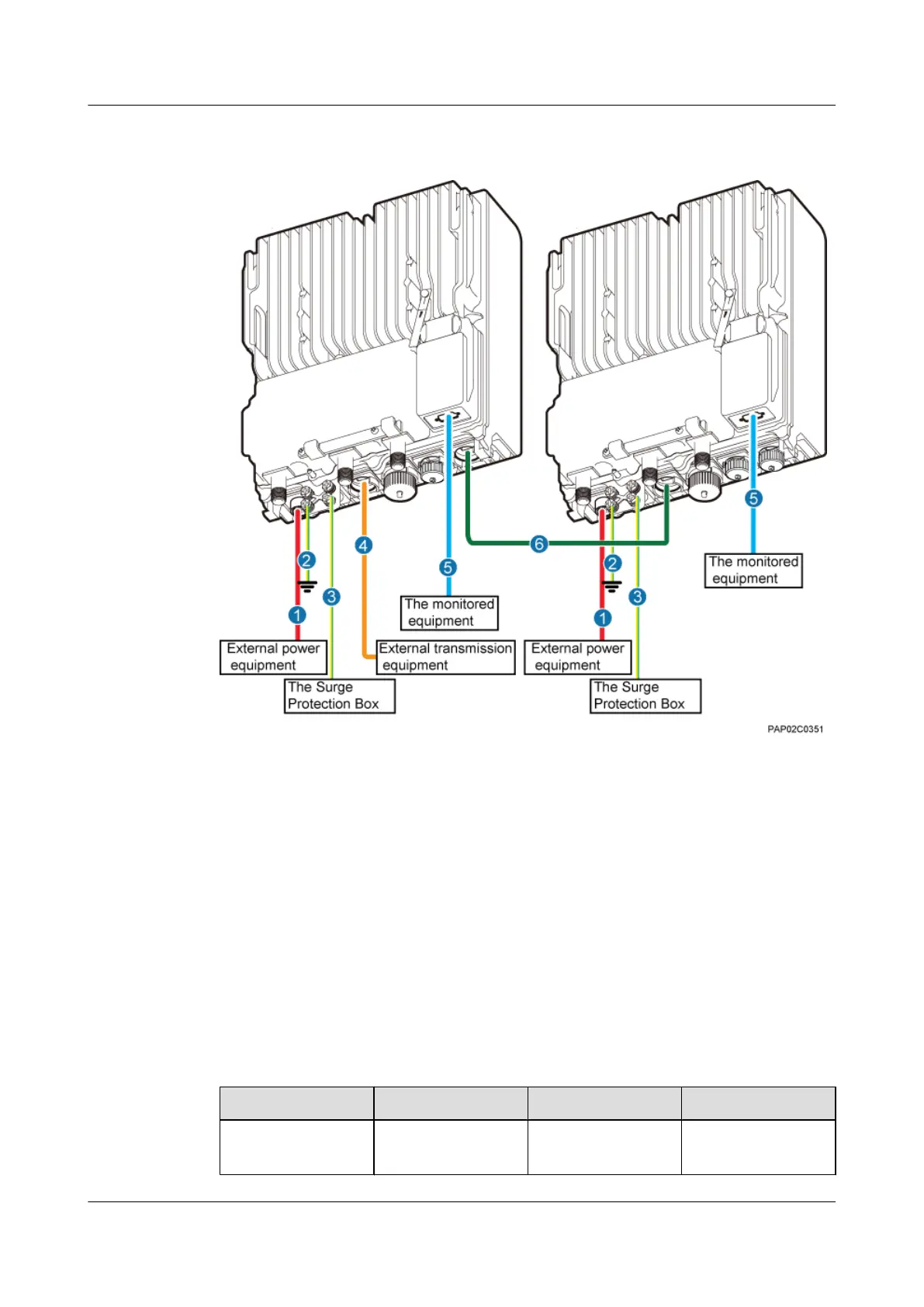
Figure 9-4 Cable connections of two BTS3902Es implementing transmission and cascading
using fiber optic cables
(1) BTS3902E power cable (2) PGND cable (optional) (3) Equipotential cable (optional)
(4) FE/GE fiber optic cable (5) BTS3902E monitoring signal
cable (optional)
(6) FE/GE fiber optic cable for
cascading
9.3 Installing a PGND Cable and Equipotential Cable
The protection ground (PGND) cable and equipotential cable must be installed based on actual
requirements.
Context
Table 9-1 lists the specifications of the PGND cable and equipotential cable.
Table 9-1 Specifications of the BTS3902E PGND cable and equipotential cable
Cable
One End The Other End Remarks
PGND cable OT terminal (M6, 16
mm
2
[0.025 in.
2
])
OT terminal (M6, 16
mm
2
[0.025 in.
2
])
Green and yellow
9 Installing Cables
BTS3902E WCDMA
Installation Guide
9-8 Huawei Proprietary and Confidential
Copyright © Huawei Technologies Co., Ltd.
Issue Draft A (2011-06-30)









 To Next Page