NetCol5000-A 42 kW Air Cooled In-row Precision Air
Conditioner
User Manual
Huawei Proprietary and Confidential
Copyright © Huawei Technologies Co., Ltd.
If a power failure occurs and the precision air conditioner is powered on again, the
precision air conditioner automatically restores to the original state (start or shutdown)
before the power failure.
The hardware port for controlling the status of the remote dry contact or On/Off status on
remote is reserved on the ACC. The status of the remote dry contact and On/Off status on
remote is on by default.
The operations that start the air conditioner successfully by the display button or by
element management system (EMS) is effective only when the remote dry contact or
On/Off status on remote is on the status of on.
Prerequisites
Download the Service Expert app from Huawei app store and runs on Android.
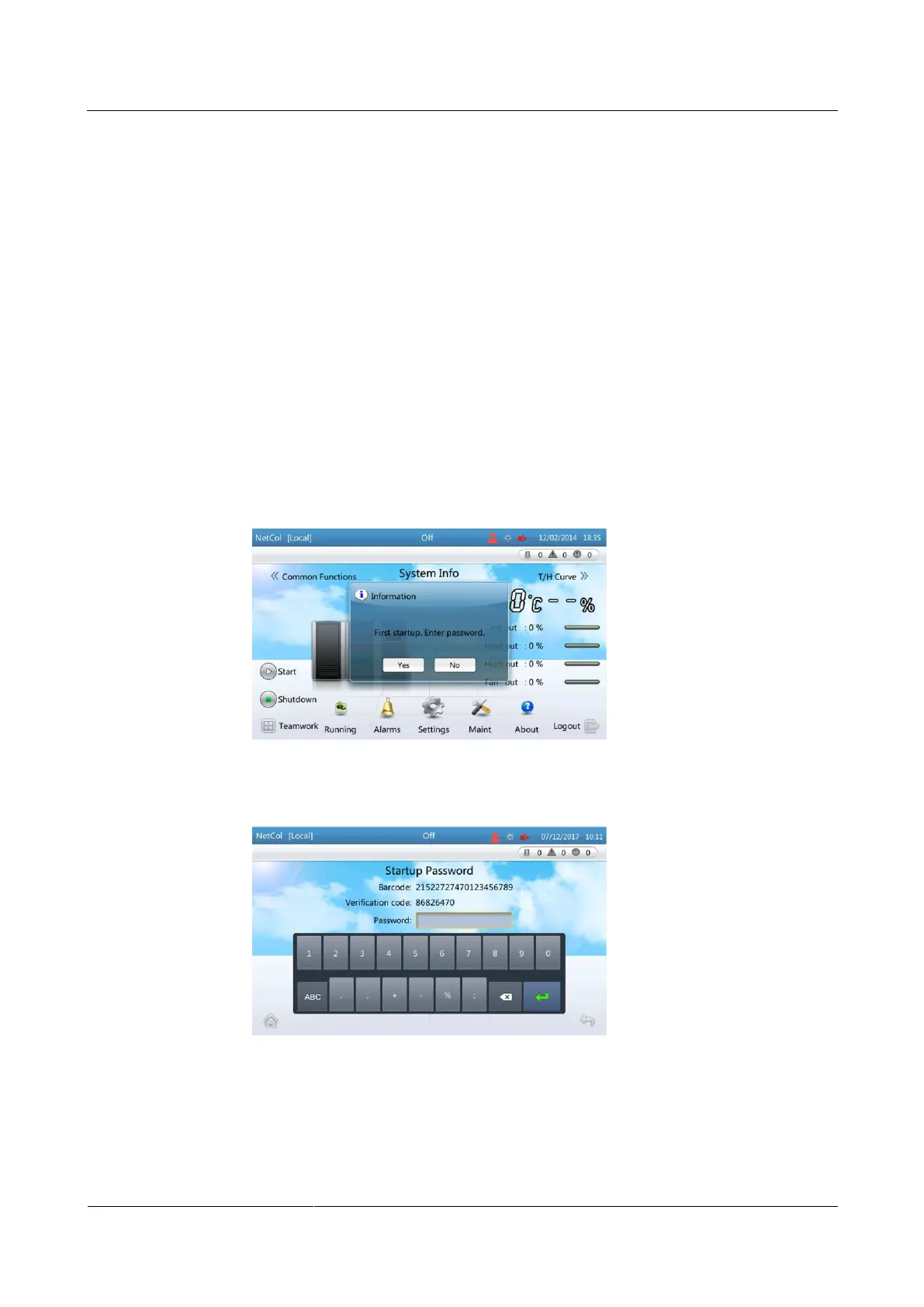
Step 1 Tap Start on the home screen of the ACC.
If the screen shown in Figure 4-26 is displayed, tap yes. Indicating initial startup,
perform Step 2 for initial startup verification.
Figure 4-26 Initial startup
Figure 4-27 Password screen
If the screen shown in Figure 4-28 is displayed, indicating not initial startup, tap Yes to
start the air conditioner.







 To Next Page