94
HDK-99 1803 VER1 (E)
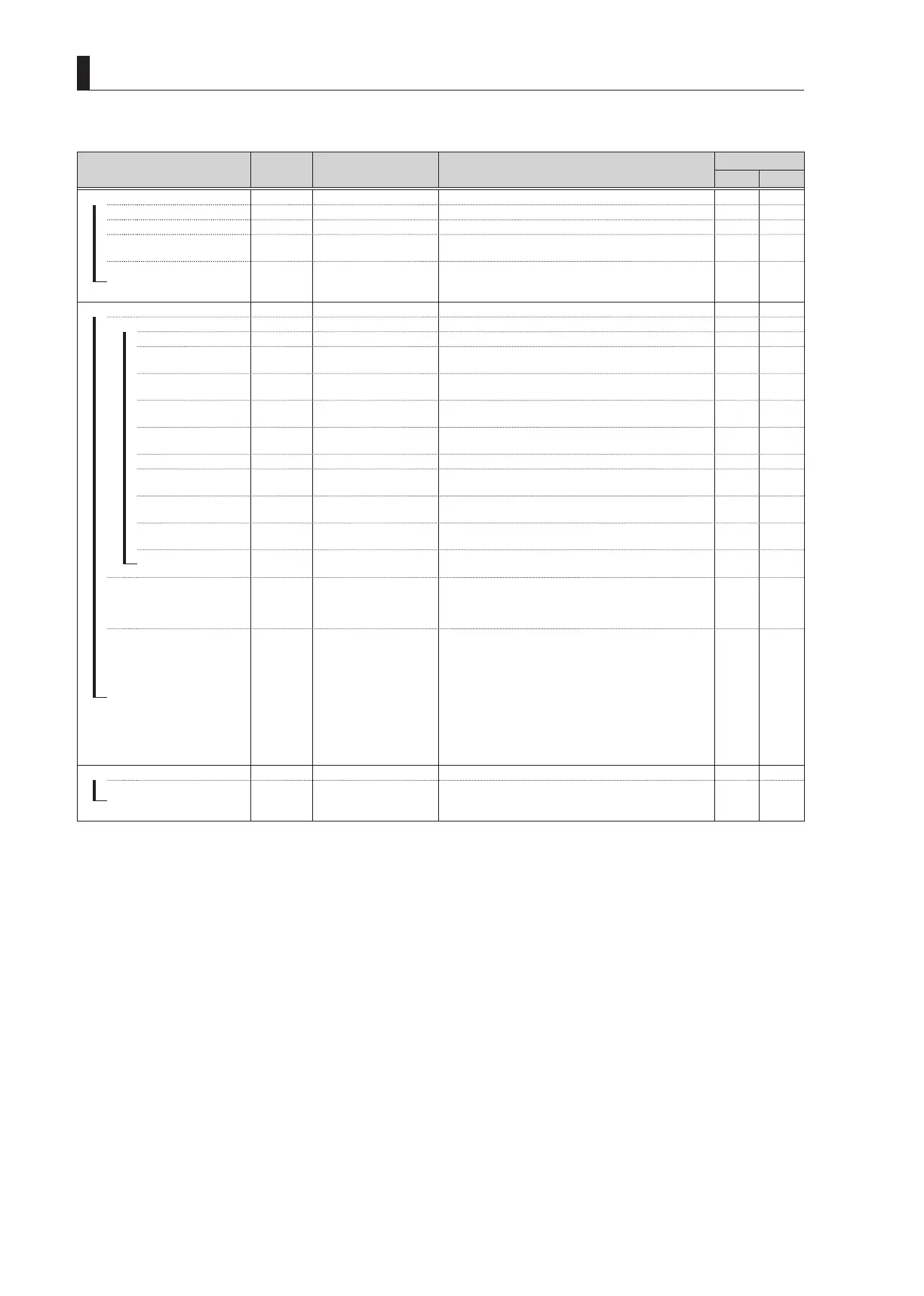
5.2 Settings from the Menu
■
MENU (4/4)
Menu Item
Initial
Setting
Setting Value Description, Remarks
MENU DATA
ALL VF
DIGITAL EXTENDER MODE
―
DIGITAL EXTENDER
OFF OFF, ON It selects ON/OFF of the digital extender.
✔ ‐
―
MAGNIFICATION
x1.5 x1.5, x2, x3, x4 It selects a magnification of the digital extender.
✔ ‐
―
HEAD SW CONTROL
DISABLE ENABLE, DISABLE
It sets whether the digital extender control is accepted or
prohibited by using a switch on the camera body.
✔ ‐
PUSH SET SW
ON/OFF ON/OFF, MAG
When controlling the digital extender by using the switch on
the camera, it sets whether the setting is effective only for
ON/OFF setting or effective also for magnification control.
✔ ‐
INCOM SETUP
―
RECEIVE
―
INCOM1 L/R CH
―
INCOM1
BOTH BOTH, LEFT, RIGHT
Do the Assignment Settings to the head set of INCOM1
channel.
✔ ‐
―
INCOM2
BOTH BOTH, LEFT, RIGHT
Do the Assignment Settings to the head set of INCOM2
channel.
✔ ‐
―
PGM1
BOTH BOTH, LEFT, RIGHT
Do the Assignment Settings to the head set of PGM1
channel.
✔ ‐
―
PGM2
BOTH BOTH, LEFT, RIGHT
Do the Assignment Settings to the head set of PGM2
channel.
✔ ‐
―
INCOM2 L/R CH
―
INCOM1
BOTH BOTH, LEFT, RIGHT
Do the Assignment Settings to the head set of INCOM1
channel.
✔ ‐
―
INCOM2
BOTH BOTH, LEFT, RIGHT
Do the Assignment Settings to the head set of INCOM2
channel.
✔ ‐
―
PGM1
BOTH BOTH, LEFT, RIGHT
Do the Assignment Settings to the head set of PGM1
channel.
✔ ‐
PGM2
BOTH BOTH, LEFT, RIGHT
Do the Assignment Settings to the head set of PGM2
channel.
✔ ×
―
PGM FRONT VR
PGM1 PGM1, PGM2
It selects a PGM channel to control by using the INCOM
PGM control dial on the right side of the camera.
However, PGM1 or PGM2 is selected from the line selected
with the INCOM SEL switch on the back of the camera.
✔ ‐
FRONT MIC ON SEL
SW SEL SW SEL, INC1, INC2
It sets the operation of the INCOM MIC button on the right
side of the camera and for the lens VTR switch.
SW SEL
: It operates the microphone of the line selected
by the INCOM SEL switch on the back of the
camera by using the INCOM MIC button.
INC1
: It operates INCOM1 with the INCOM MIC
button.
INC2
: It operates INCOM2 with the INCOM MIC
button.
(The INCOM MIC switch on the rear panel operates
regardless of the selected setting.)
✔ ‐
MENU MODE
ENGINEER MENU
OFF OFF, ON
Set to ON to display the ENGINEER menu.
* If the camera power is turned OFF, this menu setting
returns to OFF.
‐ ‐



 To Next Page