EasyManua.ls Logo

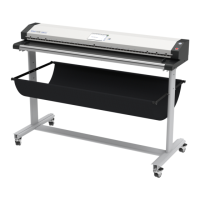
Image Access WideTEK 36 - User Manual

Image Access WideTEK 36
124 pages
Print Icon
To Next Page IconTo Next Page
Loading...
Manual
This device is compliant.

Table of Contents

Other manuals for Image Access WideTEK 36

Questions and Answers

  • K
    Kimberly Houston DVMSep 10, 2025
    What to do if my Image Access Scanner shows a color shift towards red?
    • G
      Grace CastroSep 10, 2025
      If your Image Access Scanner's images show a red tint, and the target used for white balance is more blue than the scanning target, go to the RGB adjustments and lower the gain on red.
  • G
    Gary WilliamsSep 12, 2025
    Why does my Image Access Scanner show a color shift towards red (tint)?
    • K
      Kathy ShermanSep 12, 2025
      If your Image Access Scanner's images show a red tint, it might be because the scanner is receiving significant amounts of infrared light (like sunlight or spotlights) that aren't visible to the eye. Try changing the scanner's position, closing the blinds, or dimming or shutting off any bright spotlights.
  • W
    Willie LutzSep 14, 2025
    What causes a blue tint in images from my Image Access Scanner?
    • R
      Renee SmithSep 14, 2025
      If your Image Access Scanner's images display a blue tint, it's likely because the target used for white balance is more red than the scanning target. To resolve this, go to the RGB adjustments and decrease the gain on blue.
  • D
    David ThomasSep 16, 2025
    How to fix vertical stripes or streaks on my Image Access Scanner?
    • D
      Denise RobertsSep 16, 2025
      If images from your Image Access Scanner have vertical stripes or streaks, this could be due to an improper white balance. Perform the White Balance procedure to correct this issue.

Summary

Introduction

About this Manual

Manual Types

Describes the content and purpose of the operation and setup manuals.

Version History

Hardware

Safety, Certification, and General Notice

Covers safety warnings, markings, compliance standards, and general manual information.

Safety Precautions

Essential precautions for safe operation and to prevent device damage.

Power Source Connection

Guidance on connecting the scanner to the power source.

Device Location Requirements

Guidance on selecting an appropriate operational location for the scanner.

Maintenance and Repair

Information on scanner upkeep and user-unserviceable repair procedures.

Software

Integrated User Interface

Accessing the scanner's web-based user interface and its start screen.

Main Screen Structure

Explains the three-part layout of the main interface screen.

Options Screen

Details on paper feed delay, transport speed, document output, and scan modes.

Properties Screen: Color Mode and File Format

Configuring color modes, file formats, resolution, and stitching.

Tests and Troubleshooting

Troubleshooting Matrix

Table mapping problems, causes, and recommended actions for troubleshooting.

Error Codes

Lists scanner error messages, their application equivalents, and problem descriptions.

Technical Data

Scanner Specifications

Provides details on optical system, resolution, and illumination.

Ambient Conditions and Electrical Specs

Specifies operating temperature, humidity, noise level, voltage, and frequency.

Dimensions, Weight, and Declarations

Details physical size, weight, and CE/FCC declarations of conformity.

Image Access WideTEK 36 Specifications

General IconGeneral
BrandImage Access
ModelWideTEK 36
CategoryScanner
LanguageEnglish

Related product manuals