Chapter 4 SYSTEM MODE
4-24 IP-EMZ Service Manual
4.8 PRINT ITEM SETTING
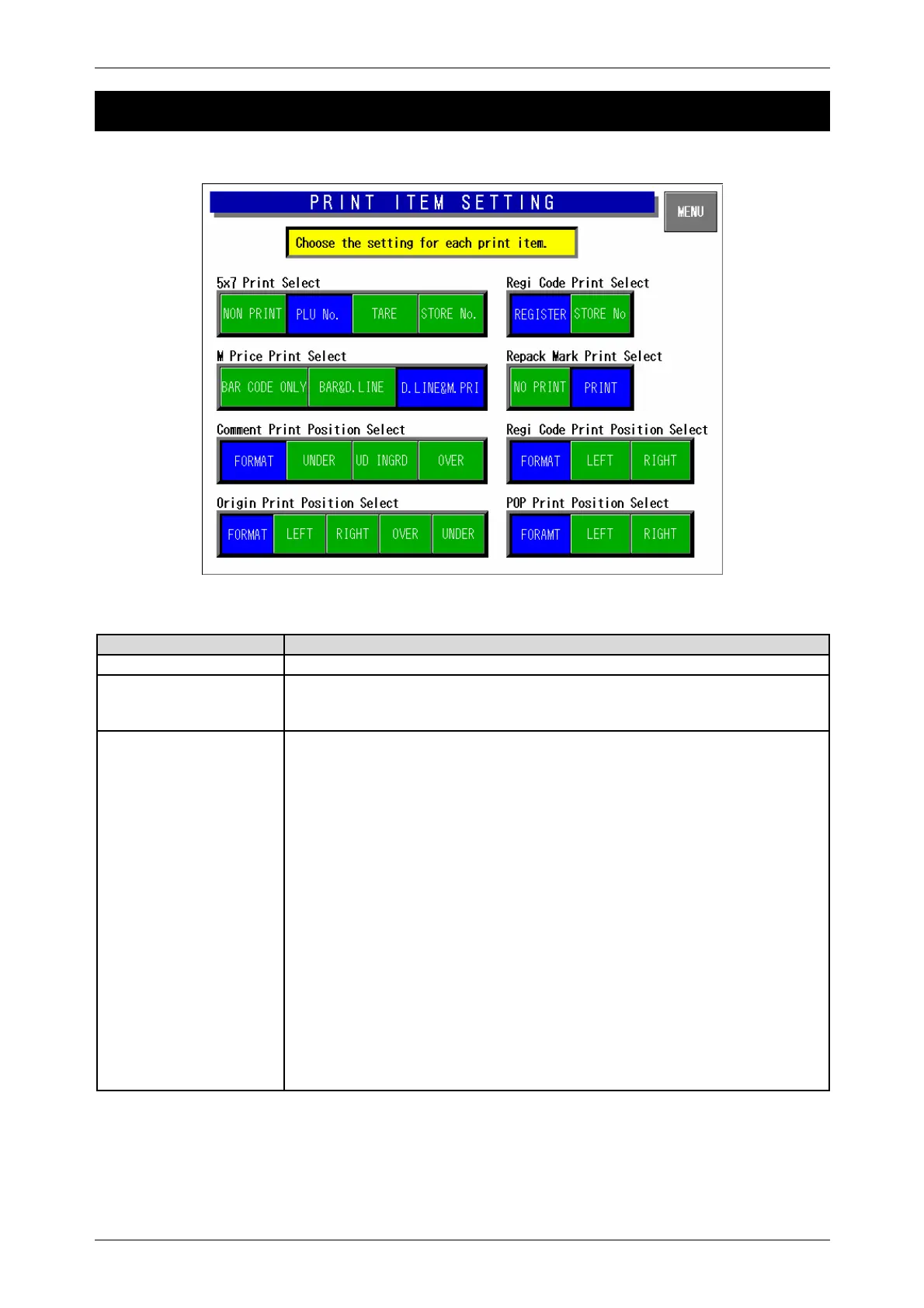
On this Print Item Setting screen, select the setting for each print item.
Print Item Setting Screen
Buttons/Display Fields Function
MENU Apply the set data and return to the Setup Menu 1/2 screen.
5 X 7 Print Select Select one of the print items to be printed in 5 X 7 size.
Press the desired button to select the item and change the button color to
blue.
M Price Print Select Select either “Label print price” or “Barcode price” when printing the mark
down price label. Select one of the following 3 types:
Barcode Only:
The markdown price is reflected only in the barcode, and the normal
price (before markdown) is printed in the price print field.
Barcode and Double line
The markdown price is reflected only in the barcode, and two strikeout
lines are printed over the normal price (before markdown).
Double line and M price:
The markdown price is reflected in the barcode and two strikeout lines
are printed on the normal price (before markdown) and the price after
markdown is printed.
Press the desired button to select the type and change the button color to
blue.
Default data: “Double line and M price”
Note: Two strikeout lines and the markdown price are printed for commodities
which the markdown price is registered.



 To Next Page