Chapter 3 TEST MODE
3-30 IP-EMZ Service Manual
3.13.2 FROM DATA REFERENCE
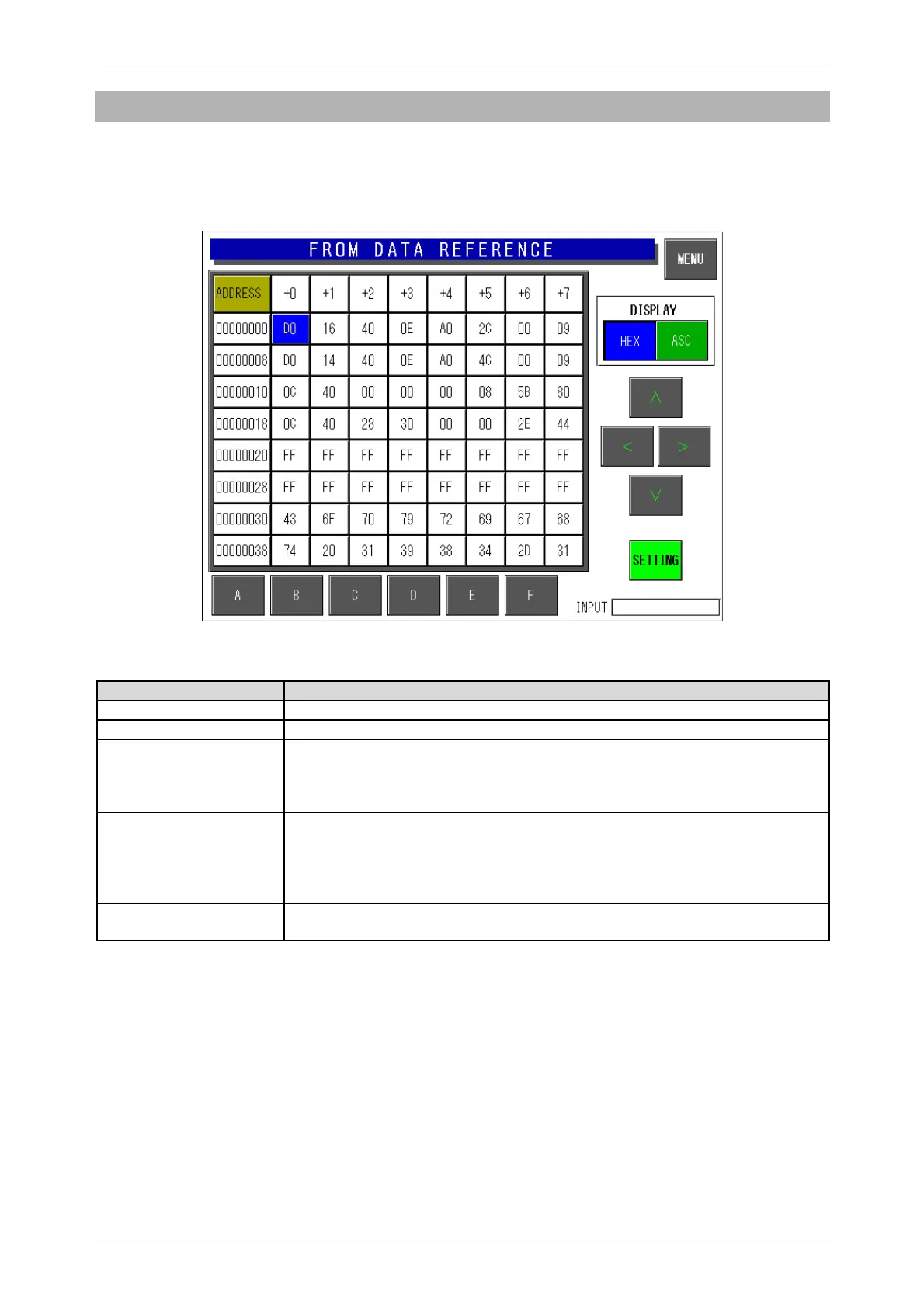
Press the [FROM Data Reference] button on the Memory Data Change Menu screen. Then, the
FROM Data Reference screen appears. This procedure is used to confirm FROM data on the memory
dump list.
FROM Data Reference Screen
Buttons/Display Fields Function
MENU Returns to the Memory data change menu screen.
FROM Data Button Press any button to change its color to blue and display the set memory data.
Display Select either “HEX” or “ASC” data formats.
Press one of these buttons to select the data format and the selected button
will change to blue. The data display format will change in the FROM data
display field.
Up/Down
Left/Right
Press these buttons to move the displayed FROM data position.
Press these buttons without a numeric entry to move the cursor in the desired
direction.
Press one of these buttons after a numeric entry to move the cursor to the
entered address position.
SETTING This screen is used only for data reference and an error will occur if this
button is pressed.



 To Next Page