Chapter 3 TEST MODE
3-10 IP-EMZ Service Manual
3.6 MEMORY INITIALIZATION
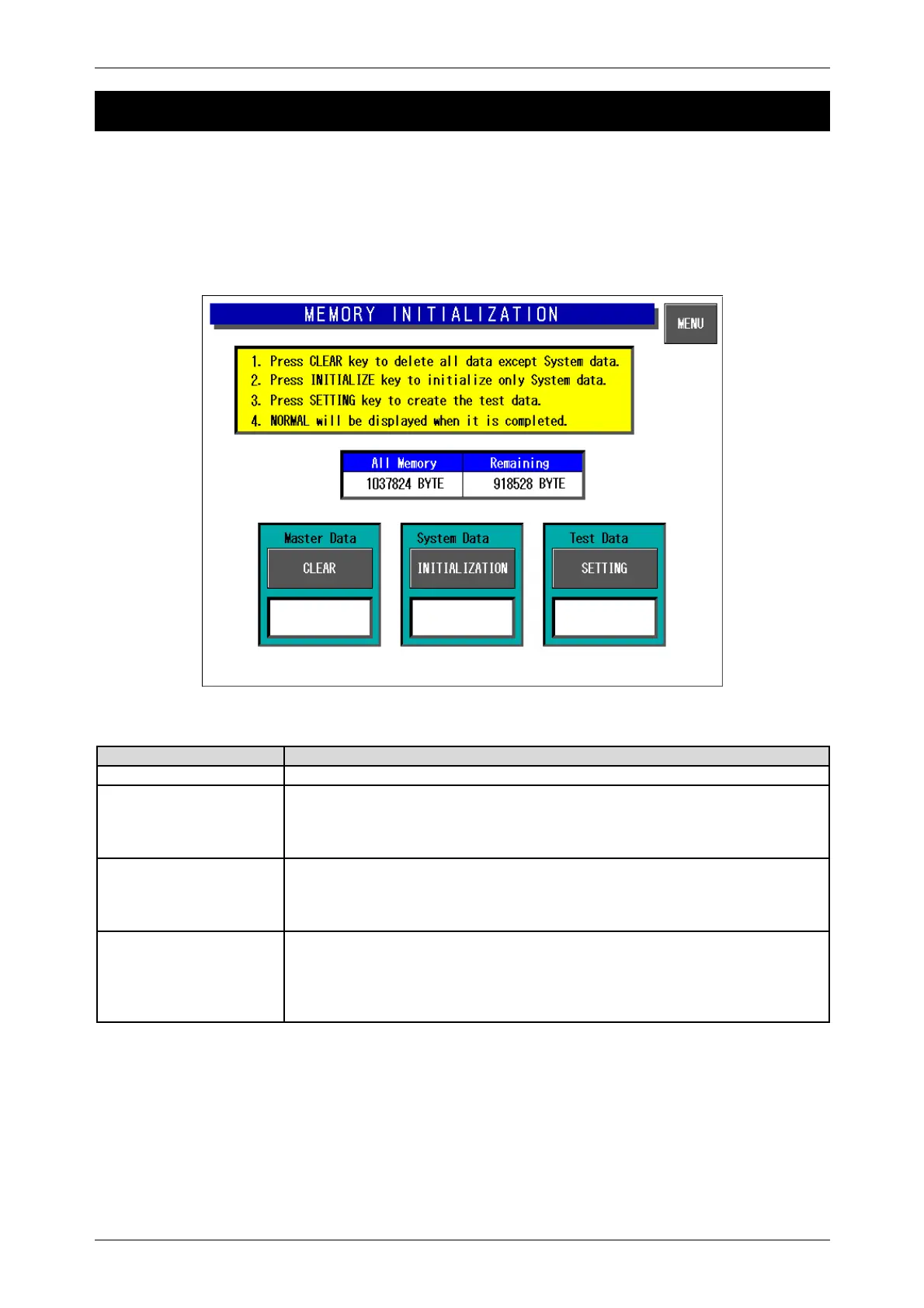
Press the [Memory Initialization] button on the Test Menu screen. Then, the Memory Initialization
screen appears.
This procedure is used to delete all data except system data, initialize system data only, and create
test data.
Note: Repeat the procedure if memory initialization ends abnormally.
Memory Initialization Screen
Buttons/Display Fields Function
MENU Returns to the Test Menu 1/2 screen.
Master Data
CLEAR
Clear master data.
“Processing” is displayed during execution.
“Normal” is displayed when the execution has ended normally.
“Abnormal” is displayed when execution has ended abnormally.
System Data
INITIALIZATION
Initialize system data (system master and machine master data).
“Processing” is displayed during execution.
“Normal” is displayed when the execution has ended normally.
“Abnormal” is displayed when execution has ended abnormally.
Tes t Data
SETTING
Set test data after master data has been cleared and system data has been
initialized.
“Processing” is displayed during execution.
“Normal” is displayed when the execution has ended normally.
“Abnormal” is displayed when execution has ended abnormally.
Note: Repeat the procedure if memory initialization ends abnormally.



 To Next Page