Chapter 2 SETUP MODE
2-20 IP-EMZ Service Manual
2.12 PLU UPDATE SETTING
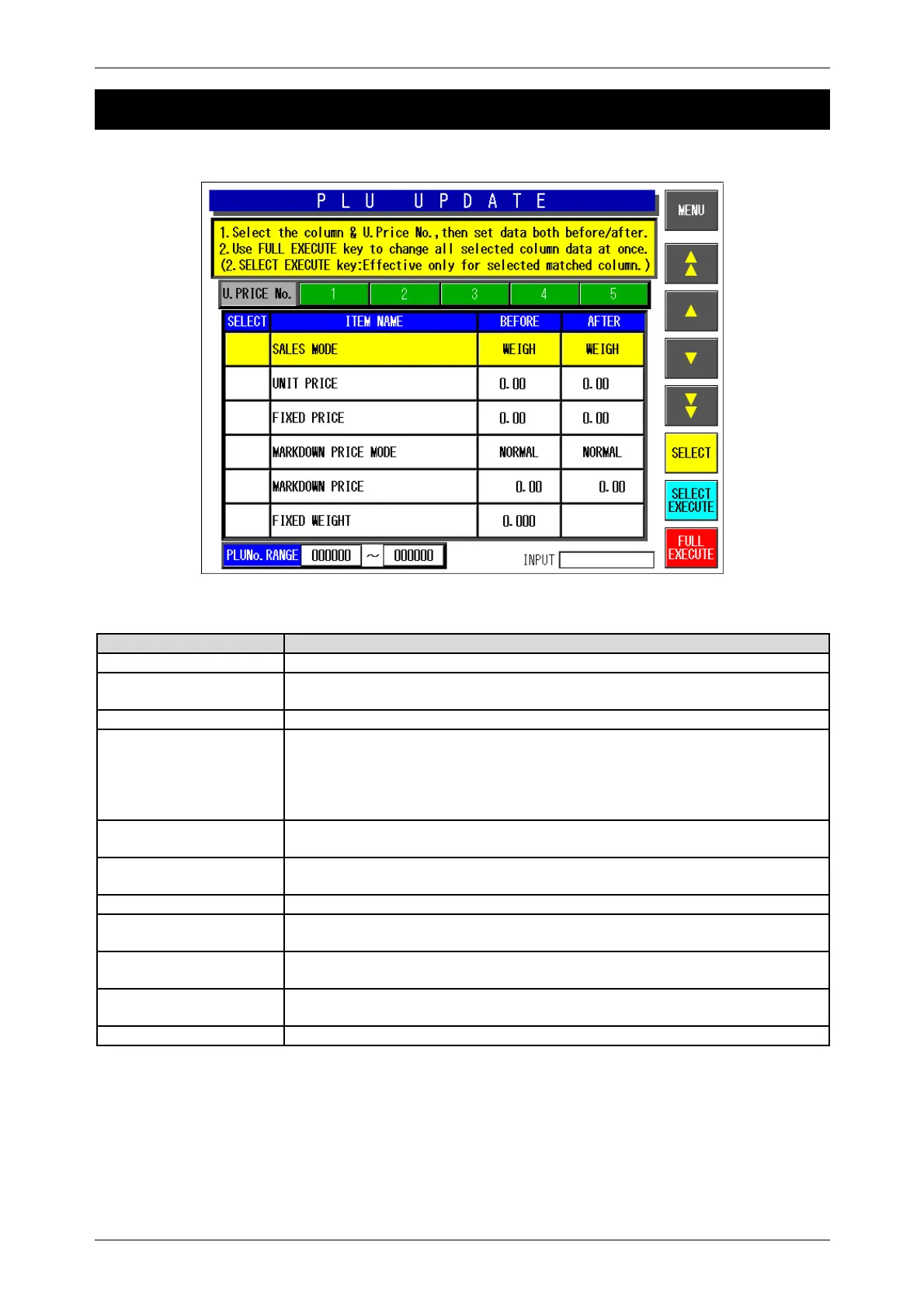
PLU Update Screen
Buttons/Display Fields Function
MENU Determines the settings and returns to the first screen of the Setup Menu.
S T
S T
Changes to the previous or next screen.
S T Moves the cursor up or down.
SELECT Selection can be made for items to be collectively changed.
Master data at the cursor position is selected.
When selected, “z” is displayed in the selected filed at the cursor position on
the list.
Selection cannot be made when no data is set in “After” field.
SELECT EXECUTE Executes changes in “After” field for the selected items only to the PLU
master file of which “Before” data matches.
FULL EXECUTE Executes changes in “After” field for the selected items only to all PLU master
files.
Unit Price No. Select the desired unit price master file among “1” through “5”.
Item Name The name of master item to be collectively changed is displayed. (See the
master name list below)
Before Data can be set in this field when pressed after numeric entry.
Selection items appear when pressed without numeric entry.
After Data can be set in this field when pressed after numeric entry.
Selection items appear when pressed without numeric entry.
PLU No. Range Specifies the PLU range to be collectively changed.



 To Next Page