– 33 –
7-2. Setting the deviation amount of the pen pricking device
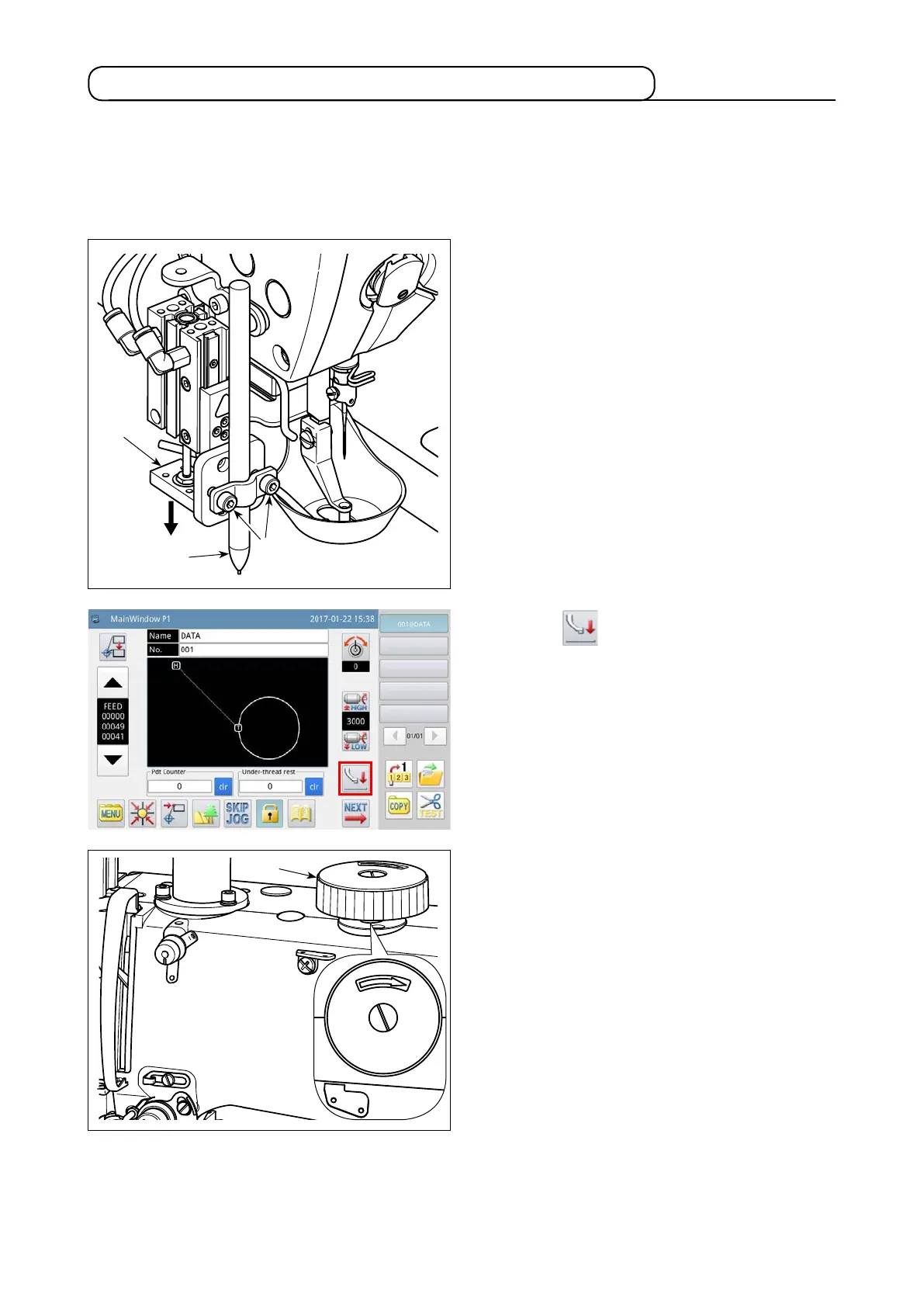
In the case of using the pen pricking device, it is necessary to set the deviation amount of the pen from its
origin (needle entry) rst.
Set the deviation amount of the pen as described below.
(1) Measuring the deviation amount of the pen
❷
❶
❸
1) Close the air cock to discharge air from the ma-
chine.
2) Place a piece of white paper on the sewing ma-
chine. (Secure the paper with adhesive tape or
the like.)
3) Attach pen
❶
to the pen pricking device. Press
down air cylinder
❷
by hand to lower it to its
lower end. Adjust the height of pen
❶
. Tighten
setscrews
❸
.
4) Press down air cylinder
❷
by hand to lower it to
its lower end. Put a mark on the paper.
5) Open the air cock to supply air to the machine.
7) Turn hand pulley
❹
to allow the needle to pene-
trate the paper to leave a needle hole in it.
8) Measure with a ruler the deviation amount of the
pen mark [Step 4] with respect to the needle hole
[Step 7] in both of the X and Y directions.
6) Press the key on the main screen P1.
❹



 To Next Page