– 6 –
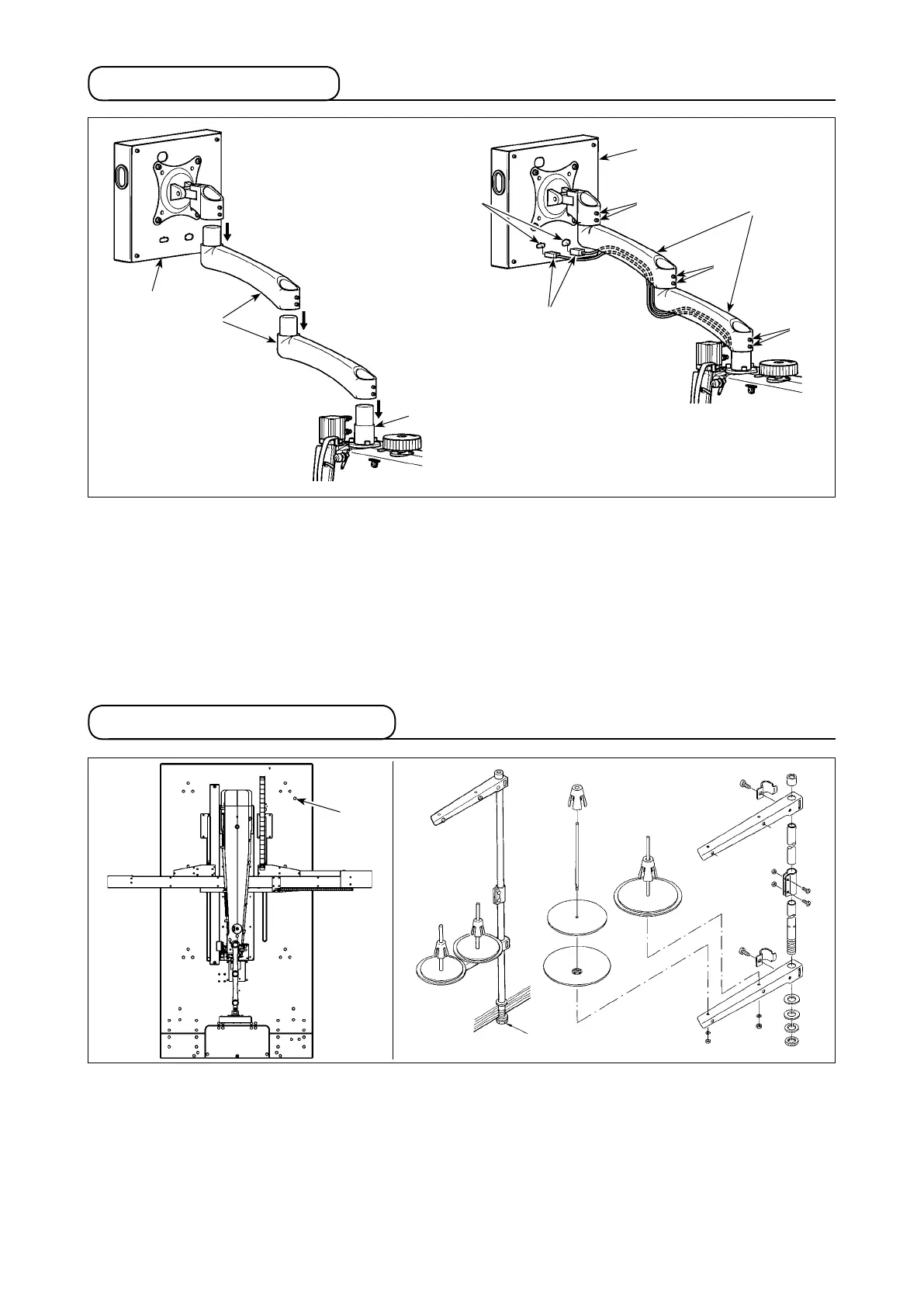
3-3. Installing the panel
1) Take out operation panel
❶
and extension arm
❷
from the package. Attach them to seat
❸
of the sewing
machine head in the written order.
2) Connect signal cable
❹
and signal cable terminal
A
of operation panel
❶
. Then, pass signal cable
❹
through the groove on the lower side of extension arm
❷
. After the adjustment, tighten setscrew
❺
. At
this time, carefully tighten the setscrew to such an extent as to allow the extension arm to move smoothly
according to the actual use. Be careful not to fully tighten setscrew
❺
to allow operation panel
❶
to be
operated with ease during use.
3-4. Installing the thread stand
1) Assemble thread stand. Set the assembled thread stand device in hole
A
located at the upper right of
table.
2) Tighten locknut
❶
to x the thread stand.
❶
❸
❶
❷
❺
❶
❺
❺
❹
❷
A
A



 To Next Page