– 57 –
2-4-3. Enlargement / reduction of sewing patterns
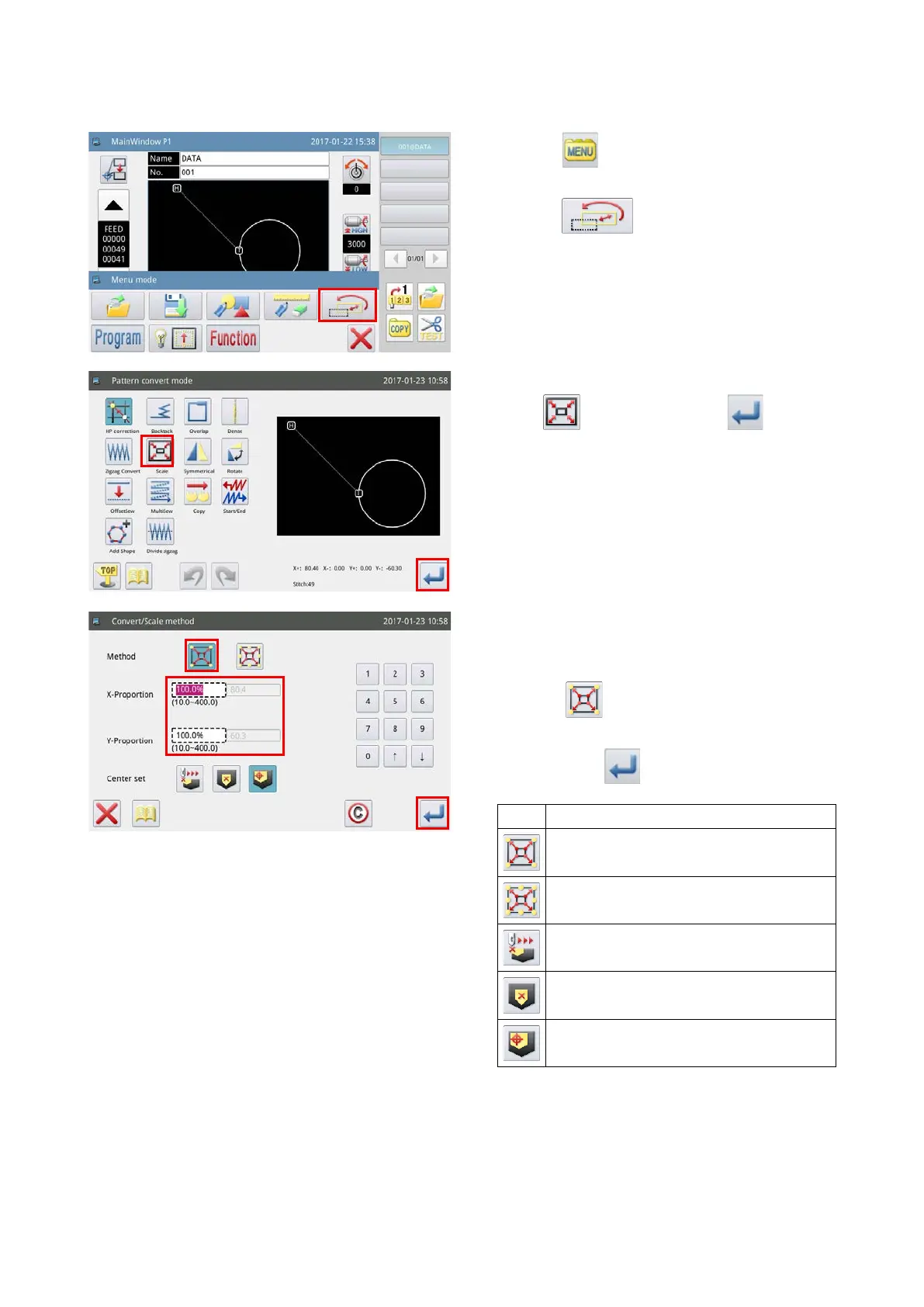
Method to enlarge / reduce the sewing pattern displayed on the main screen P1 is described below.
1) Press the key on the main screen P1 to
display the "Menu screen".
2) Press the key to enter the "Sewing pat-
tern conversion mode".
3) Select "Enlargement / reduction mode" by press-
ing the
key. Then, press the key.
4) Example : In the case of enlarging / reducing a
sewing pattern using the "number of stitches x-
ing method"
Select the key. Enter a numerical value in
the horizontal / vertical directions respectively.
Then, press the
key.
Key Enlargement / reduction method
Enlargement / reduction with the number
of stitches xed
Enlargement / reduction with the stitch-
ing pitch xed
Enlargement / reduction from the speci-
ed position
Enlargement / reduction from the center
point of sewing pattern
Enlargement / reduction from the point of
origin



 To Next Page