EasyManua.ls Logo

JVC KY-D29 - Page 10

JVC KY-D29
56 pages
Print Icon
To Next Page IconTo Next Page
To Previous Page IconTo Previous Page
Loading...
2.
CONTROLS,
CONNECTORS
AND
INDICATORS
2-1
CAMERA
HEAD
(KY-D29)
(Cont'd)
®
[REMOTE]
Local
Remote
control
connector
(6pin)
This
remote
connector
allows
the
connection
of
the
RM-LP80/
LP35/LP37
local
remote
control
unit
(optional)
and
the
VC-P891/
VC-P892
interface
cable
(optional)
Reference
“Connection
with
a
local
remote
control
unit”
on
page
49.
€@
[MONITOR
OUTPUT]
monitor
output
connector
=)
‘=
]
Video
output
is
for
camera
composite
video
only.
Return
video
signals
from
the
VCR
are
not
output.
The
function
display
on
the
viewfinder
can
be
selected
with
[DISP
MIX]@.
[GENLOCK
INPUT]
Sync
signal
input
connector
External
reference
composite
video
or
black
burst
video
input.This
camera
cannot
be
genlocked
with
the
VCR
play-
back
signal.
Reference
“Connection
to
the
switcher’
on
page
45.
[PHASE
H]
Horizontal
phase
control
Use
this
control
to
adjust
the
H
sync
phase
while
the
genlock
signal
is
input.
€@)
[PHASE
SC
FINE]
Color
sub-carrier
phase
control
Use
this
control
to
fine-adjust
the
SC
phase
while
the
genlock
signal
is
input.
@
[PHASE
SC
COARSE]
Color
sub-carrier
phase
coarse
ad-
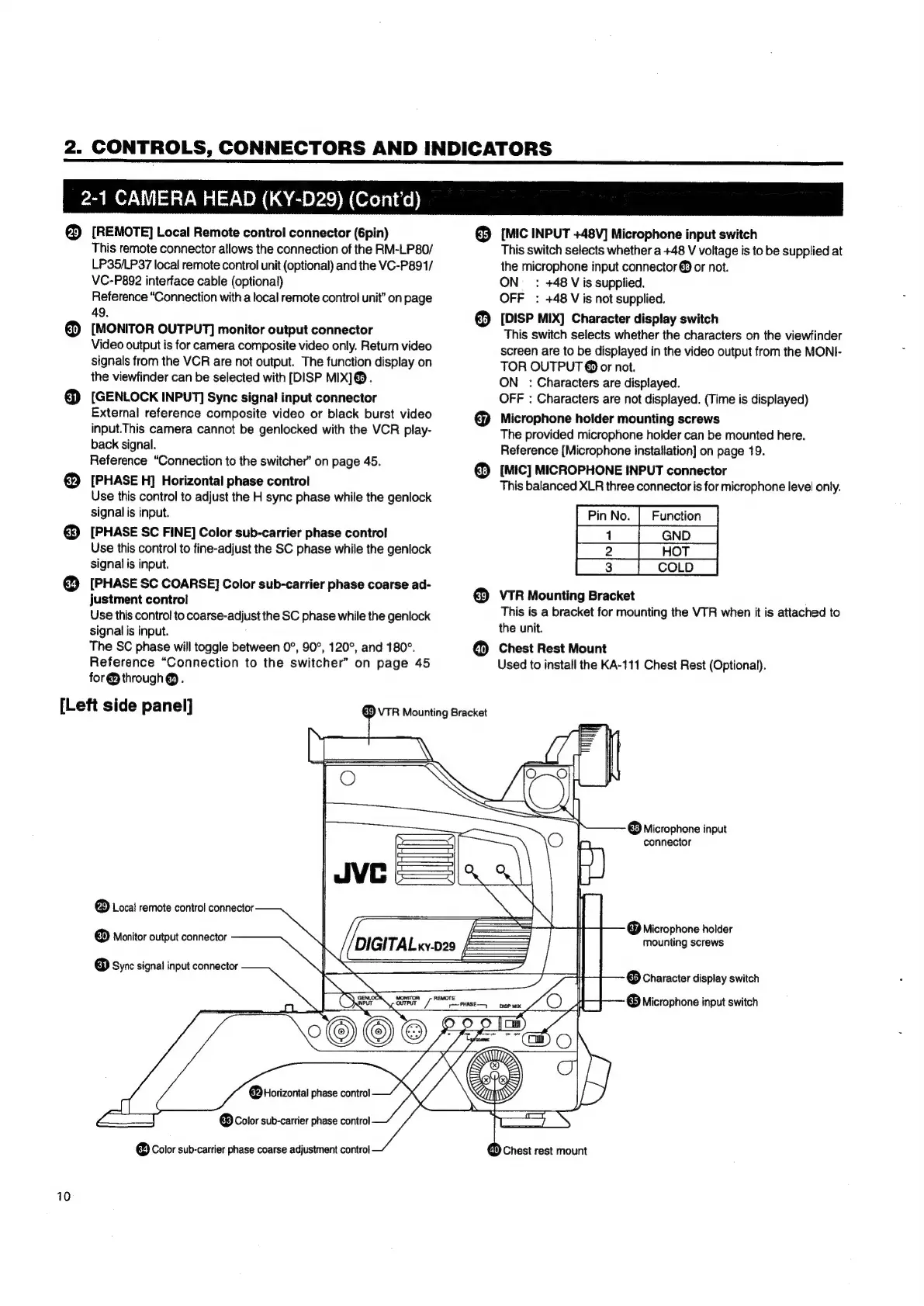
[Left
side
panel]
10
justment
control
Use
this
control
to
coarse-
adjust
the
SC
phase
while
the
genlock
signal
is
input.
The
SC
phase
will
toggle
between
0°,
90°,
120°,
and
180°.
Reference
“Connection
to
the
switcher”
on
page
45
for
@
through
@.
&)
VTR
Mounting
Bracket
(35)
[MIC
INPUT
+48V]
Microphone
input
switch
This
switch
selects
whether
a
+48
V
voltage
is
to
be
supplied
at
the
microphone
input
connector
@
or
not.
ON
_
:
+48
Vis
supplied.
OFF
:
+48
Vis
not
supplied.
[DISP
MIX]
Character
display
switch
This
switch
selects
whether
the
characters
on
the
viewfinder
screen
are
to
be
displayed
in
the
video
output
from
the
MONI-
TOR
OUTPUT
@
or
not.
ON:
Characters
are
displayed.
OFF
:
Characters
are
not
displayed.
(Time
is
displayed)
Microphone
holder
mounting
screws
The
provided
microphone
holder
can
be
mounted
here.
Reference
[Microphone
installation]
on
page
19.
[MIC]
MICROPHONE
INPUT
connector
This
balanced
XLR
three
connector
is
for
microphone
level
only.
COLD
VTR
Mounting
Bracket
This
is
a
bracket
for
mounting
the
VTR
when
it
is
attached
to
the
unit.
Chest
Rest
Mount
Used
to
install
the
KA-111
Chest
Rest
(Optional).
®
Microphone
input
connector
®
Local
remote
control
connector
®
Monitor
output
connector
@
Microphone
holder
mounting
screws
ome
DS
@
Sync
signal
input
connector
(36)
Character
display
switch
@
Microphone
input
switch
@)
Color
sub-carrier
phase
coarse
adjustment
control
«)
Chest
rest
mount

Table of Contents

Related product manuals