EasyManua.ls Logo

JVC KY-D29 - Page 9

JVC KY-D29
56 pages
Print Icon
To Next Page IconTo Next Page
To Previous Page IconTo Previous Page
Loading...
2.
CONTROLS,
CONNECTORS
AND
INDICATORS
2-1
CAMERA
HEAD
(KY-D29)
(Cont'd)
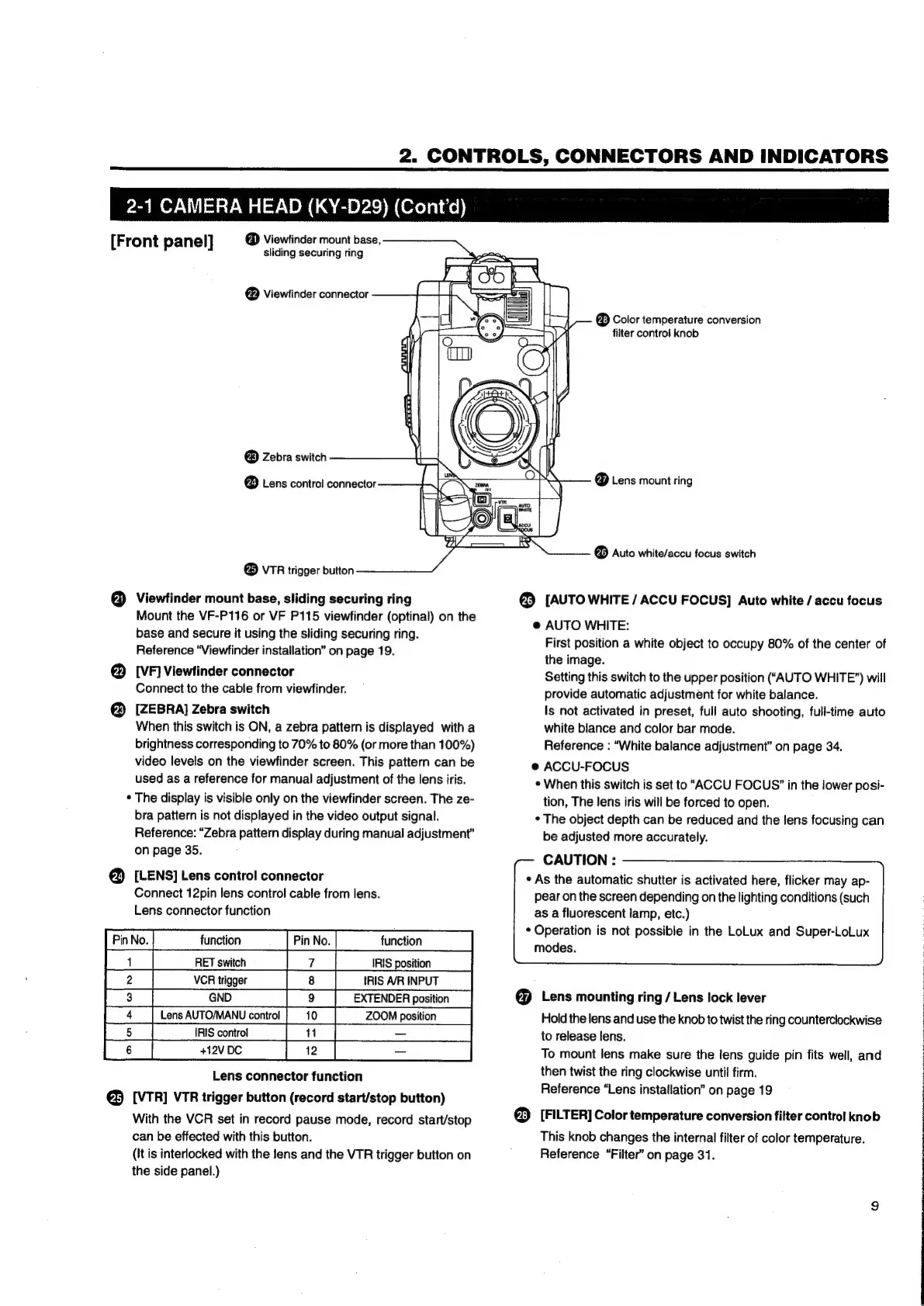
@
Viewtinder
mount
base,
sliding
securing
ring
[Front
panel]
®
Viewfinder
connector
®
Zebra
switch
@
Lens
control
connector
®
VTR
trigger
button
@
Viewfinder
mount
base,
sliding
securing
ring
Mount
the
VF-P116
or
VF
P115
viewfinder
(optinal)
on
the
base
and
secure
it
using
the
sliding
securing
ring.
Reference
“Viewfinder
installation”
on
page
19.
@
[VF]
Viewfinder
connector
Connect
to
the
cable
from
viewfinder.
[ZEBRA]
Zebra
switch
When
this
switch
is
ON,
a
zebra
pattern
is
displayed
with
a
brightness
corresponding
to
70%
to
80%
(or
more
than
100%)
video
levels
on
the
viewfinder
screen.
This
pattern
can
be
used
as
a
reference
for
manual
adjustment
of
the
lens
iris.
*
The
display
is
visible
only
on
the
viewfinder
screen.
The
ze-
bra
pattern
is
not
displayed
in
the
video
output
signal.
Reference:
“Zebra
pattern
display
during
manual
adjustment”
on
page
35.
@
[LENS]
Lens
control
connector
Connect
12pin
lens
control
cable
from
lens.
Lens
connector
function
[pane
|
tneton
[Far
a
a
el
eC
Lens
AUTO/MANU
control
|
5
|
IRIS
control
ie
ee
ye
|
6
fies
ee
eo
+12V
DC
Lens
connector
function
@
[VTR]
VTR
trigger
button
(record
start/stop
button)
With
the
VCR
set
in
record
pause
mode,
record
start/stop
can
be
effected
with
this
button.
(It
is
interlocked
with
the
lens
and
the
VTR
trigger
button
on
the
side
panel.)
@
Color
temperature
conversion
filter
control
knob
@
Lens
mount
ring
@
Auto
white/accu
focus
switch
®
[AUTO
WHITE
/
ACCU
FOCUS]
Auto
white
/
accu
focus
@
AUTO
WHITE:
First
position
a
white
object
to
occupy
80%
of
the
center
of
the
image.
Setting
this
switch
to
the
upper
position
(‘AUTO
WHITE”)
will
provide
automatic
adjustment
for
white
balance.
Is
not
activated
in
preset,
full
auto
shooting,
full-time
auto
white
blance
and
color
bar
mode.
Reference
:
“White
balance
adjustment”
on
page
34.
e
ACCU-FOCUS
*
When
this
switch
is
set
to
“ACCU
FOCUS’
in
the
lower
posi-
tion,
The
Jens
iris
will
be
forced
to
open.
*
The
object
depth
can
be
reduced
and
the
lens
focusing
can
be
adjusted
more
accurately.
CAUTION
:
*
As
the
automatic
shutter
is
activated
here,
flicker
may
ap-
pear
on
the
screen
depending
on
the
lighting
conditions
(such
as
a
fluorescent
lamp,
etc.)
*
Operation
is
not
possible
in
the
LoLux
and
Super-LoLux
modes.
€@
Lens
mounting
ring
/
Lens
lock
lever
Hold
the
lens
and
use
the
knob
to
twist
the
ring
counterclockwise
to
release
lens.
To
mount
lens
make
sure
the
lens
guide
pin
fits
well,
and
then
twist
the
ring
clockwise
until
firm.
Reference
“Lens
installation”
on
page
19
®
[FILTER]
Color
temperature
conversion
filter
control
knob
This
knob
changes
the
internal
filter
of
color
temperature.
Reference
“Filter”
on
page
31.

Table of Contents

Related product manuals