EasyManua.ls Logo

JVC KY-D29 - Page 8

JVC KY-D29
56 pages
Print Icon
To Next Page IconTo Next Page
To Previous Page IconTo Previous Page
Loading...
2.
CONTROLS,
CONNECTORS
AND
INDICATORS
rr
a
2-1
CAMERA
HEAD
(KY-D29)
(Cont'd)
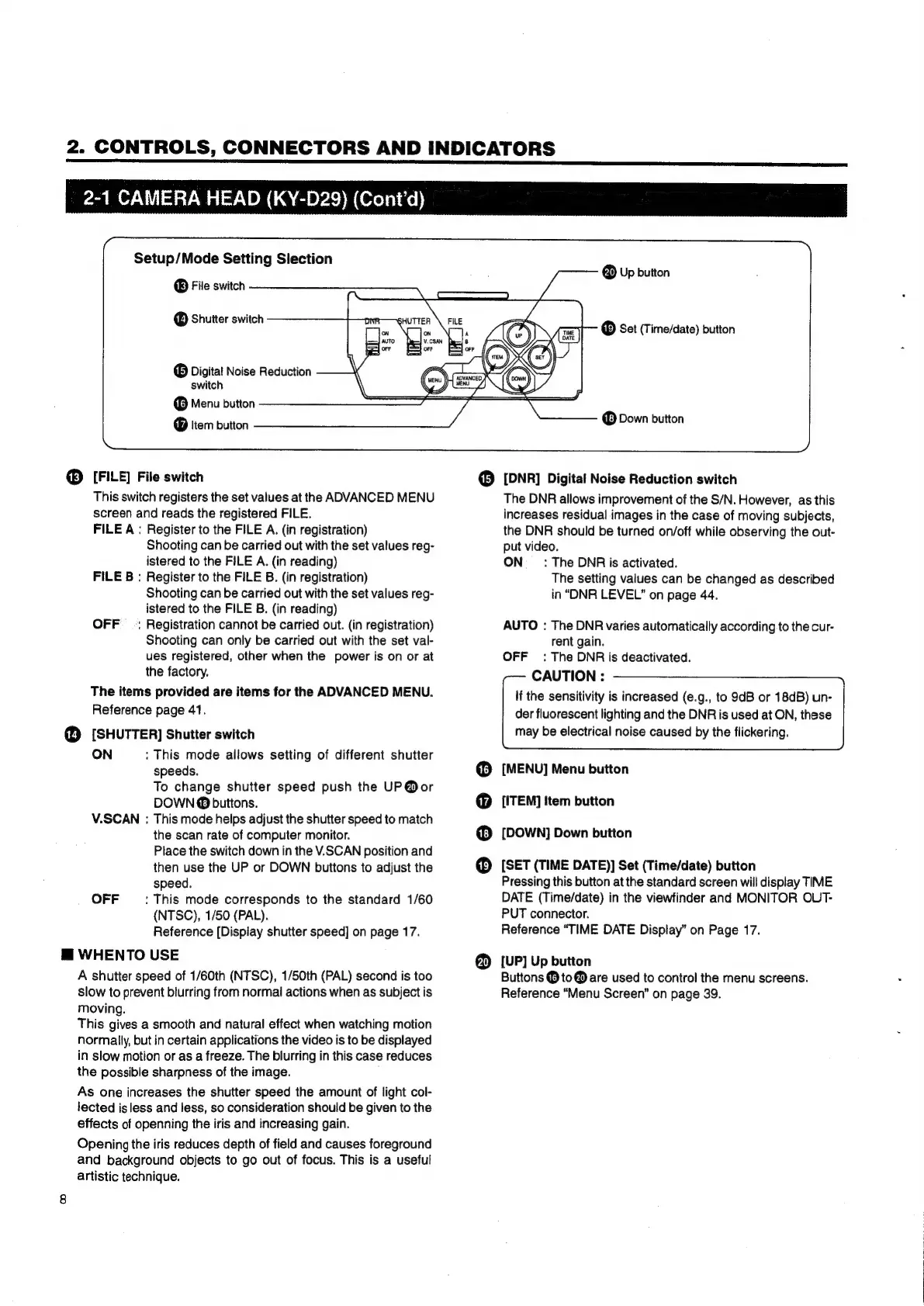
Setup/Mode
Setting
Slection
®
File
switch
Shutter
switch
®
Digital
Noise
Reduction
switch
Menu
button
®
Item
button
®
[FILE]
File
switch
This
switch
registers
the
set
values
at
the
ADVANCED
MENU
screen
and
reads
the
registered
FILE.
FILE
A:
Register
to
the
FILE
A.
(in
registration)
Shooting
can
be
carried
out
with
the
set
values
reg-
istered
to
the
FILE
A.
(in
reading)
FILE
B
:
Register
to
the
FILE
B.
(in
registration)
Shooting
can
be
carried
out
with
the
set
values
reg-
istered
to
the
FILE
B.
(in
reading)
OFF
_ :
Registration
cannot
be
carried
out.
(in
registration)
Shooting
can
only
be
carried
out
with
the
set
val-
ues
registered,
other
when
the
power
is
on
or
at
the
factory.
The
items
provided
are
items
for
the
ADVANCED
MENU.
Reference
page
41.
@
[SHUTTER]
Shutter
switch
ON
:
This
mode
allows
setting
of
different
shutter
speeds.
To
change
shutter
speed
push
the
UP@or
DOWN
buttons.
V.SCAN
:
This
mode
helps
adjust
the
shutter
speed
to
match
the
scan
rate
of
computer
monitor.
Place
the
switch
down
in
the
V.SCAN
position
and
then
use
the
UP
or
DOWN
buttons
to
adjust
the
speed.
OFF
:
This
mode
corresponds
to
the
standard
1/60
(NTSC),
1/50
(PAL).
Reference
[Dispiay
shutter
speed]
on
page
17.
@
WHENTO
USE
A
shutter
speed
of
1/60th
(NTSC),
1/50th
(PAL)
second
is
too
slow
to
prevent
blurring
from
normal
actions
when
as
subject
is
moving.
This
gives
a
smooth
and
natural
effect
when
watching
motion
normally,
but
in
certain
applications
the
video
is
to
be
displayed
in
slow
motion
or
as
a
freeze.
The
blurring
in
this
case
reduces
the
possible
sharpness
of
the
image.
As
one
increases
the
shutter
speed
the
amount
of
light
col-
lected
is
less
and
less,
so
consideration
should
be
given
to
the
effects
of
openning
the
iris
and
increasing
gain.
Opening
the
iris
reduces
depth
of
field
and
causes
foreground
and
background
objects
to
go
out
of
focus.
This
is
a
useful
artistic
technique.
@
Up
button
®
Set
(Time/date)
button
Down
button
[DNR]
Digital
Noise
Reduction
switch
6690
8
The
DNR
allows
improvement
of
the
S/N.
However,
as
this
increases
residual
images
in
the
case
of
moving
subjects,
the
DNR
should
be
turned
on/off
while
observing
the
out-
put
video.
ON
_
_:
The
DNR
is
activated.
The
setting
values
can
be
changed
as
described
in
“DNR
LEVEL”
on
page
44.
AUTO
:
The
DNR
varies
automatically
according
to
the
cur-
rent
gain.
OFF:
The
DNR
is
deactivated.
CAUTION
:
if
the
sensitivity
is
increased
(e.g.,
to
9dB
or
18dB)
un-
der
fluorescent
lighting
and
the
DNR
is
used
at
ON,
these
may
be
electrical
noise
caused
by
the
flickering.
[MENU]
Menu
button
[ITEM]
Item
button
[DOWN]
Down
button
[SET
(TIME
DATE)]
Set
(Time/date)
button
Pressing
this
button
at
the
standard
screen
will
display
TIME
DATE
(Time/date)
in
the
viewfinder
and
MONITOR
OUT-
PUT
connector.
Reference
“TIME
DATE
Display”
on
Page
17.
[UP]
Up
button
Buttons
@
to
@
are
used
to
control
the
menu
screens.
Reference
“Menu
Screen”
on
page
39.

Table of Contents

Related product manuals