Kavo 3D eXam ® Operators’ Manual
K990400 16 April 2008
6-12
To acquire a PAN scan:
1. Place Chair in the upper slots so that chair back does not impede
Patient’s ability to sit with an Erect posture.
2. Seat the Patient in the chair with an Erect posture. Their neck
must be as straight as possible to avoid the spine getting in the
view.
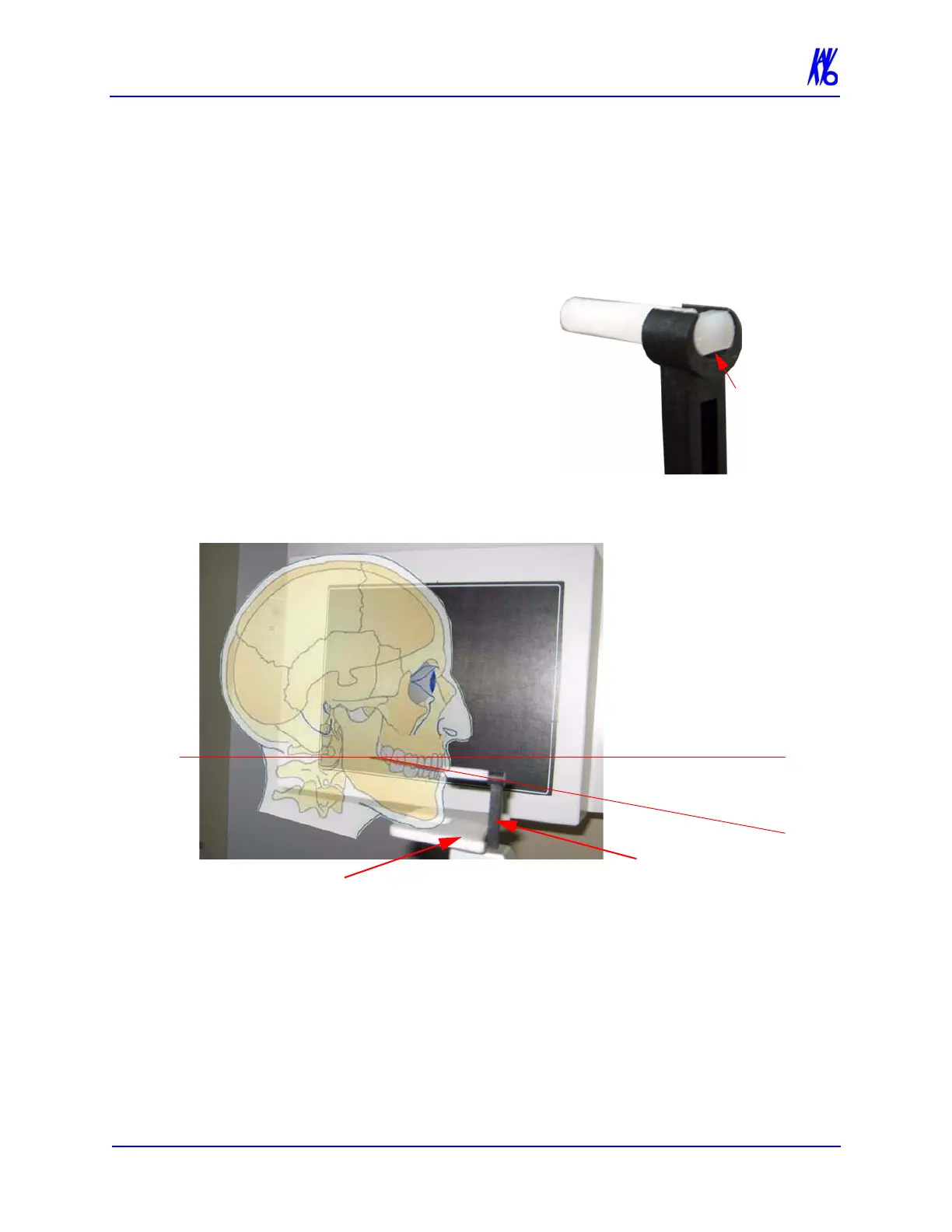
3. Prepare the Bite Tip by inserting
the narrow edges of white Bite
Tip down into Bite Tip Holder
uprights. Then turn the Bite Tip
a 1/4 turn to lock into place.
The Patient will be biting on the
grove of the white Bite Tip
during the scan.
4. Insert the Chin Rest and Bite Tip
Holder into the Positioning Block as shown below.
5. Adjust Patient height using the buttons on Patient Alignment
Panel so that the Patient’s chin is on the Chin Rest, but Erect
posture is maintained.
6. Tilt the patient’s head downward so that the occlusal plane forms
roughly a 10
o
angle to the horizontal laser line.
NOTE: Patient positioning is critical for a quality image. Refer to the
illustration above for a visual of tilting the Patient. Using the Sagittal
Laser (front center laser), ensure that the Patient is centered and
facing straight forward.
Patient Tilted
Downward
10
o
Chin Rest
Bite Tip
Holder
Horizontal Laser
O
c
c
l
u
s
a
l
P
l
a
n
e



 To Next Page