13 Global menus and settings | 155
• UTILITY: Opens the MIDI Utility page.
• PORT CONNECT: Opens the MIDI port configuration page.
MIDI Configuration Edit
This function is available by pressing the EDIT button from the main page of the MIDI
MENU, as you saw in the previous paragraph.
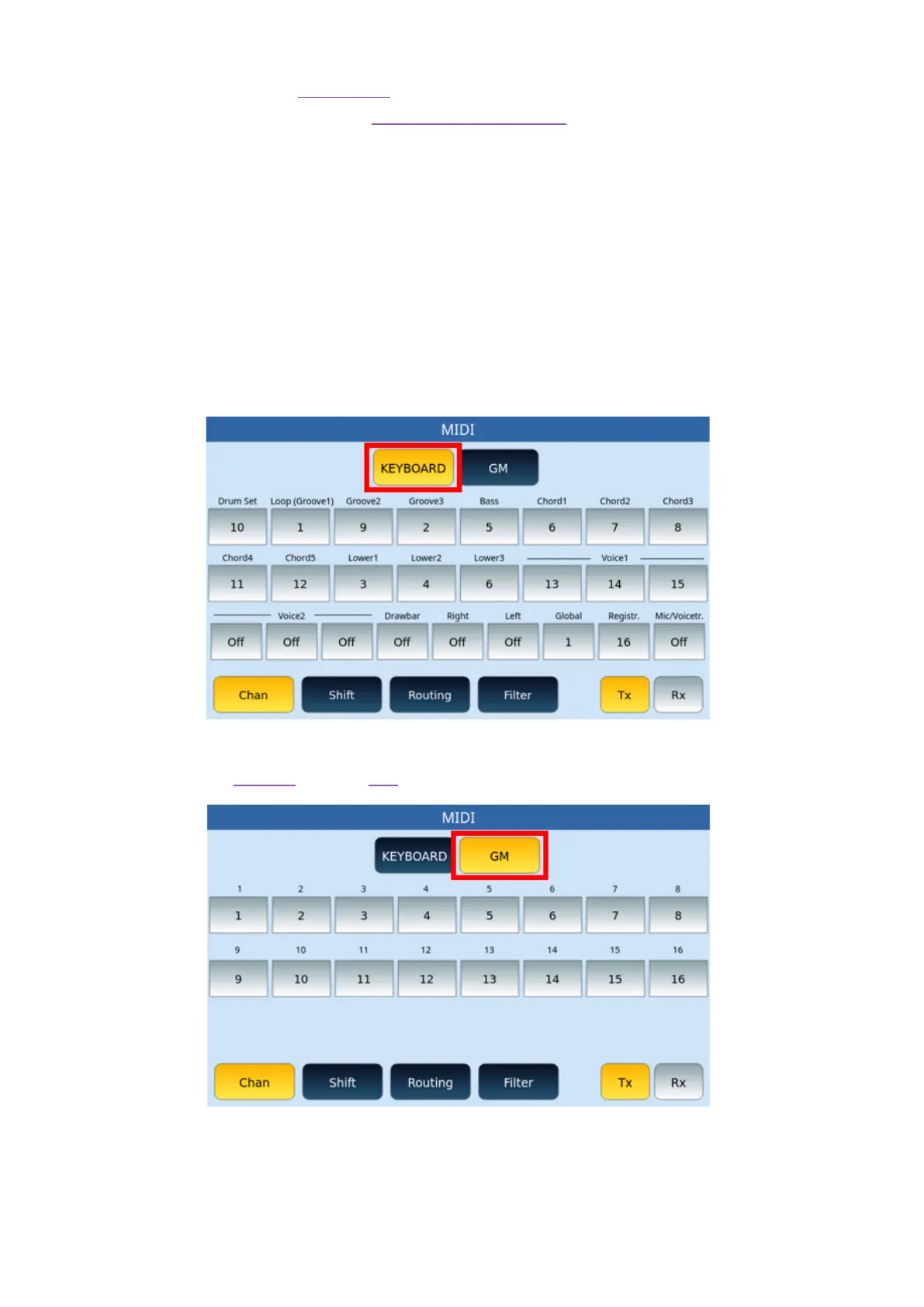
The instrument manages the configuration of two MIDI modules: KEYBOARD and GM.
Depending on the choice, two different pages may appear.
If you have chosen KEYBOARD, then you are working on the MIDI configuration of what
happens regarding keyboard driven parts or accompaniment styles (Drum, Bass, Chord,
Groove, Voice1, Voice2 and so on).
If you have chosen GM instead, then you are working on the MIDI configuration regarding
the 16 parts of the PLAYER and the GM functionality.
The initial condition in reception is with the Global section activated on channel 01. This
condition allows you to control both the accompaniment styles and the Voice of EVENT-X
with a single MIDI channel using an external master keyboard.
Options:



 To Next Page