Measurement
161
∆L
Indicates the length of the sweep parameter from the
sweep center value to the cutoff point on the left.
However, it indicates the length of the sweep
parameter from the sweep parameter value of the
fixed ∆ marker to the cutoff point on the left only
when the fixed ∆ marker is present.
∆R
Indicates the length of the sweep parameter from the
sweep center value to the cutoff point on the right.
However, it indicates the length of the sweep
parameter from the sweep parameter value of the
fixed ∆ marker to the cutoff point on the right only
when the fixed ∆ marker is present.
Define the Cutoff Point in Trace Bandwidth Analysis
When trace bandwidth analysis is performed, the Agilent E4990A searches
for the cutoff points on both sides with respect to the sweep parameter
shaft starting from the main marker position. The cutoff point used for this
search is defined by the following steps:
1. Activate the trace for which you want to analyze trace bandwidth.
2. Press the Marker Search key to display the Marker Search menu.
3. Press Widths Def to display the trace bandwidth analysis definition
menu.
4. Select the definition of the cutoff point in trace bandwidth analysis
from the following:
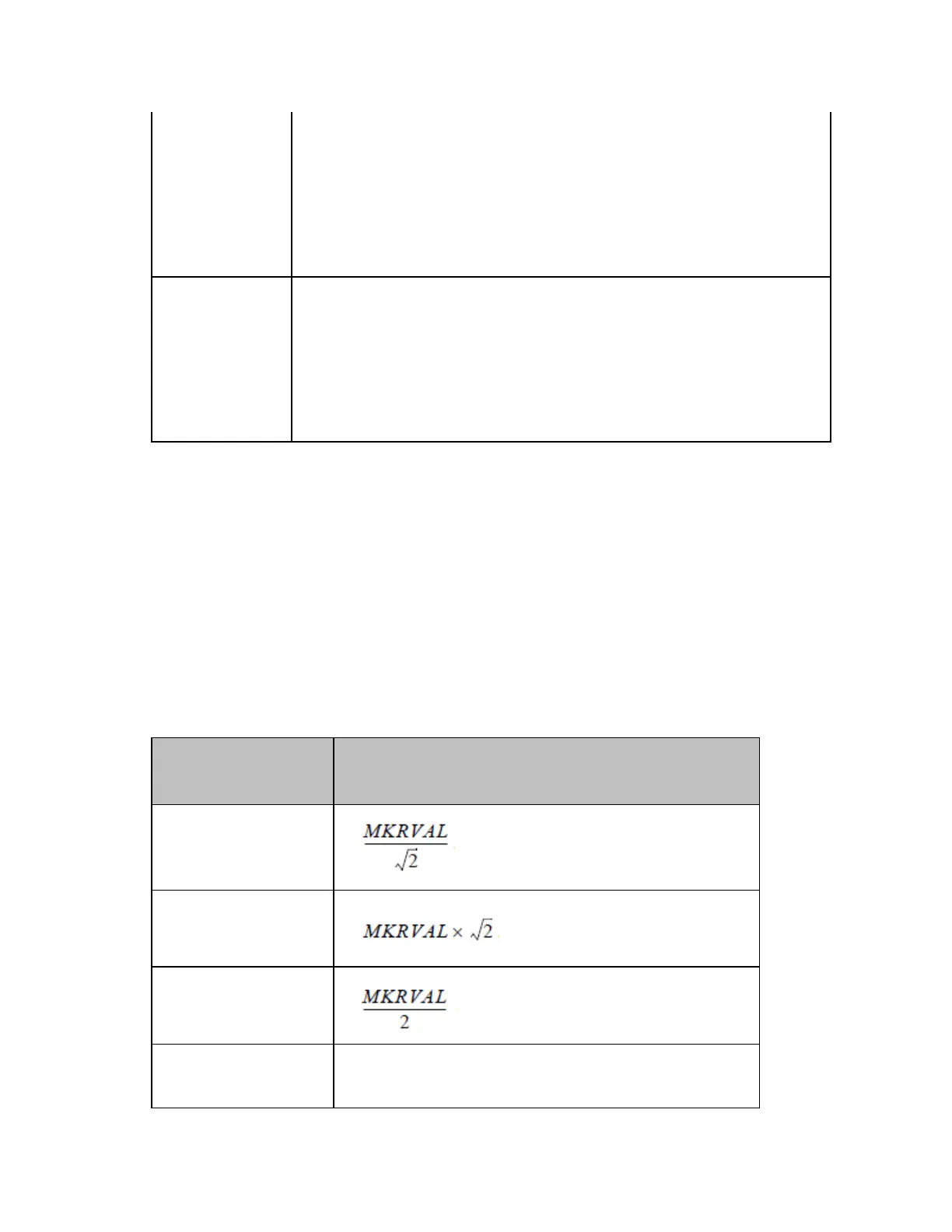
Parameter Definition of cutoff point
1
MkrVal/sqrt(2)
MkrVal*sqrt(2)
MkrVal/2
MkrVal*2
MKRVAL x 2














 To Next Page