Programming
249
OK. If you select Keep Blocking on firewall setting, you need to
unblock for the remote server in Windows firewall to use the telnet
server.
Conversational control using telnet (using port 5024)
You can use telnet to perform conversational control by sending SCPI
commands to the E4990A on a message-by-message basis. For telnet, the
socket of port 5024 is used for communications.
In this example, in order to show you the control procedure using telnet,
you control the E4990A (IP address: 192.168.0.2 and host name: E4990A)
from the external controller in the Windows environment.
1. Open the MS-DOS command prompt screen.
2. At the MS-DOS prompt, type telnet 192.168.0.2 5024 and press the
return key.
3. The telnet screen opens.
4. Type a command and press the return key; it is sent to the E4990A
and executed. If you enter a command that queries some data, the
query response is displayed below the line you have entered the
command.
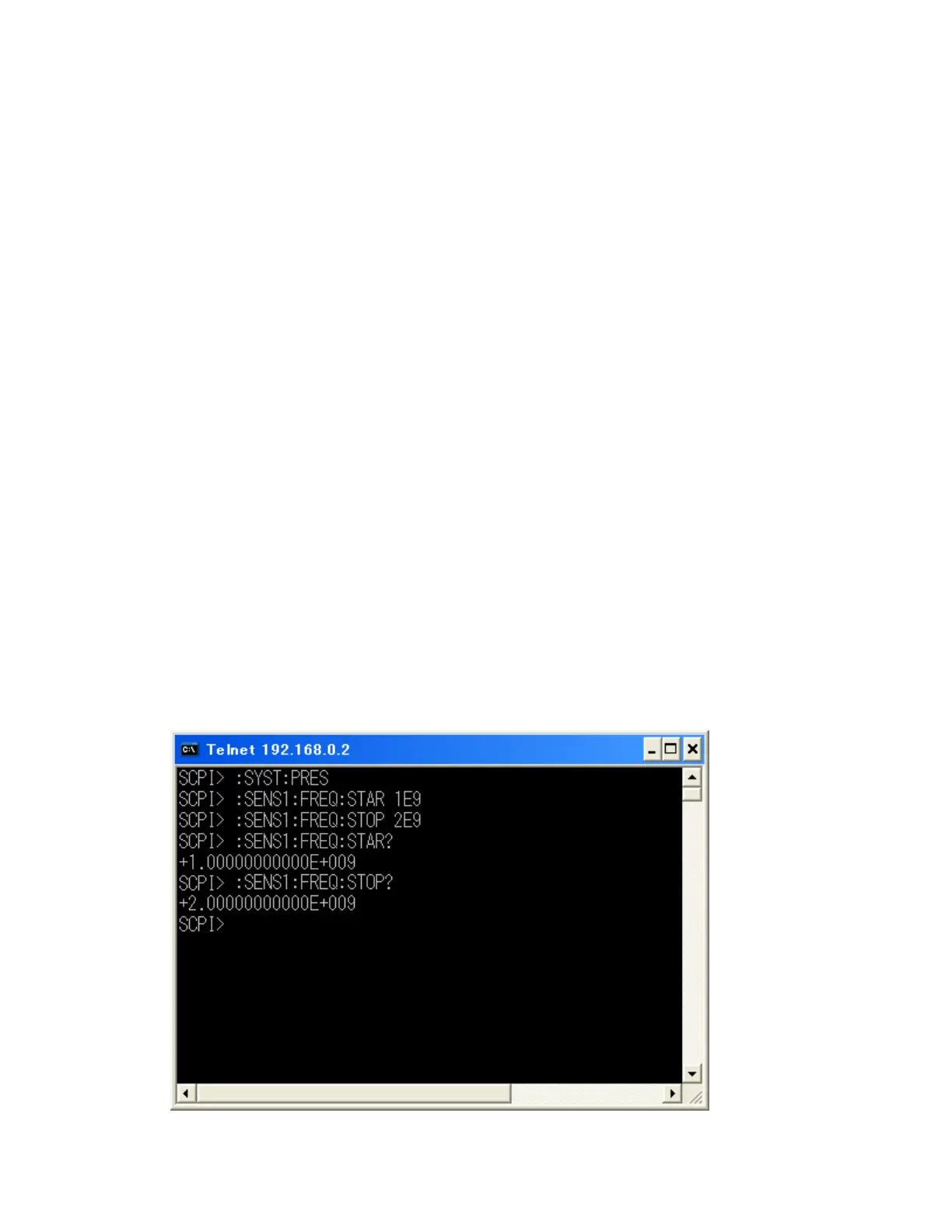
5. The following figure shows the screen after using the :SYST:PRES
command to reset, the :SENS1:FREQ:STAR command and
:SENS1:FREQ:STOP commands to set the sweep start value and stop
value to 1 GHz and 2 GHz respectively, and checking the settings.
Example of control using telnet














 To Next Page