99
KMHA 500-000099
Revision D
KDR
TM
AU-DDR Advanced U-Arm System with
Dynamic Digital Radiography (KDR AU DDR)
IV. SOFTWARE
22.0 SETTINGS AND ADJUSTMENTS
22.1 Adjust the Annotation Order in Settings
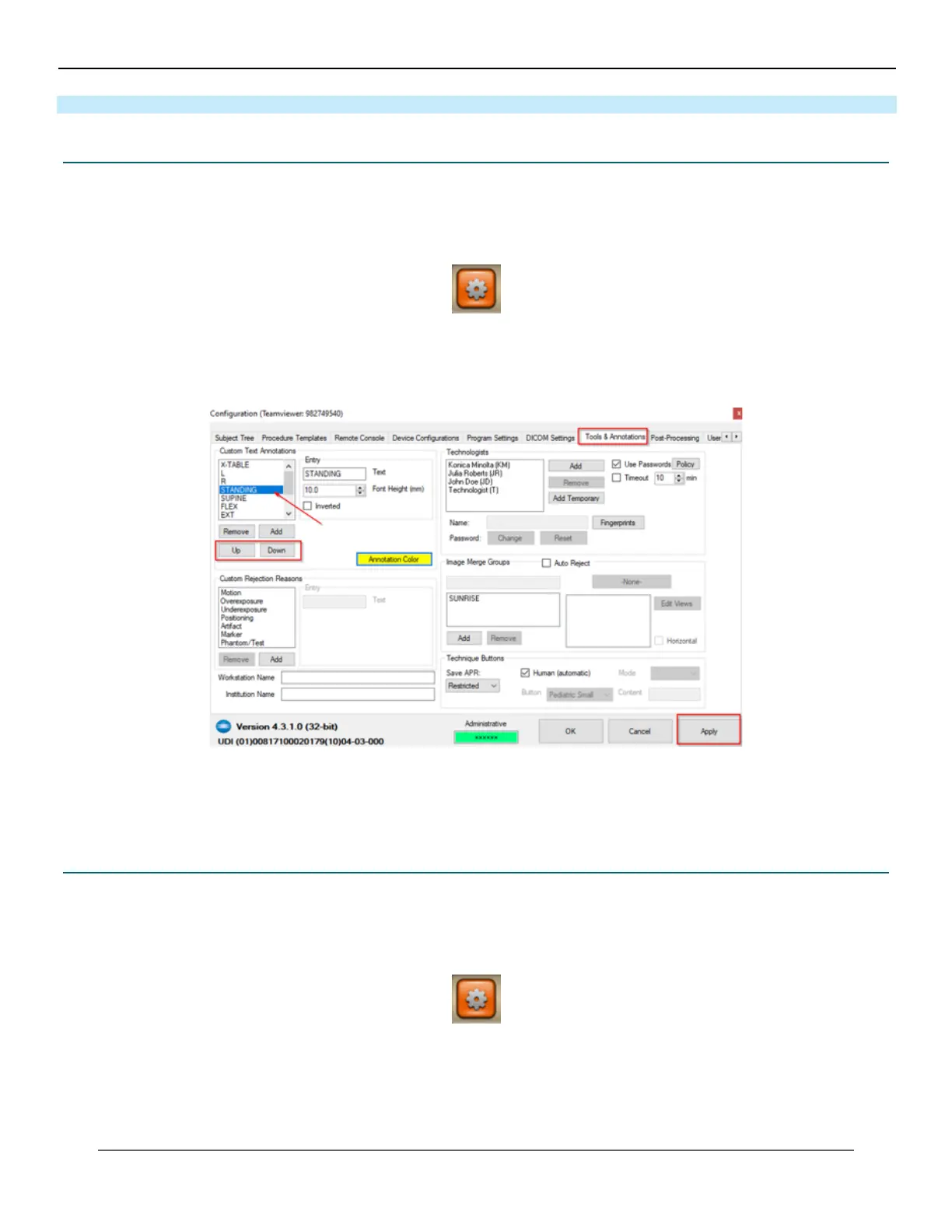
The order of annotations displayed in the annotations dialog of the acquisition screen can be congured in the settings
page.
1. Click the Options button
2. Select the Tools & Annotations tab from the Options menu.
3. Select an annotation from the list under Custom Text Annotations.
4. Click the Up or Down button to highlight the annotation higher or lower in the list.
5. Click on Apply to apply the changes made.
6. Click OK to close the Conguration screen.
22.2 Adjust the Annotation Text Color in Settings
The text color of annotations displayed after adding them to the image in the acquisition screen can be congured in the
settings page.
1. Click the Options button.
2. Select the Tools & Annotations tab from the Options menu.
3. Click on Annotation Color.



 To Next Page
 Loading...




