107
KMHA 500-000099
Revision D
KDR
TM
AU-DDR Advanced U-Arm System with
Dynamic Digital Radiography (KDR AU DDR)
1. Acquire an image.
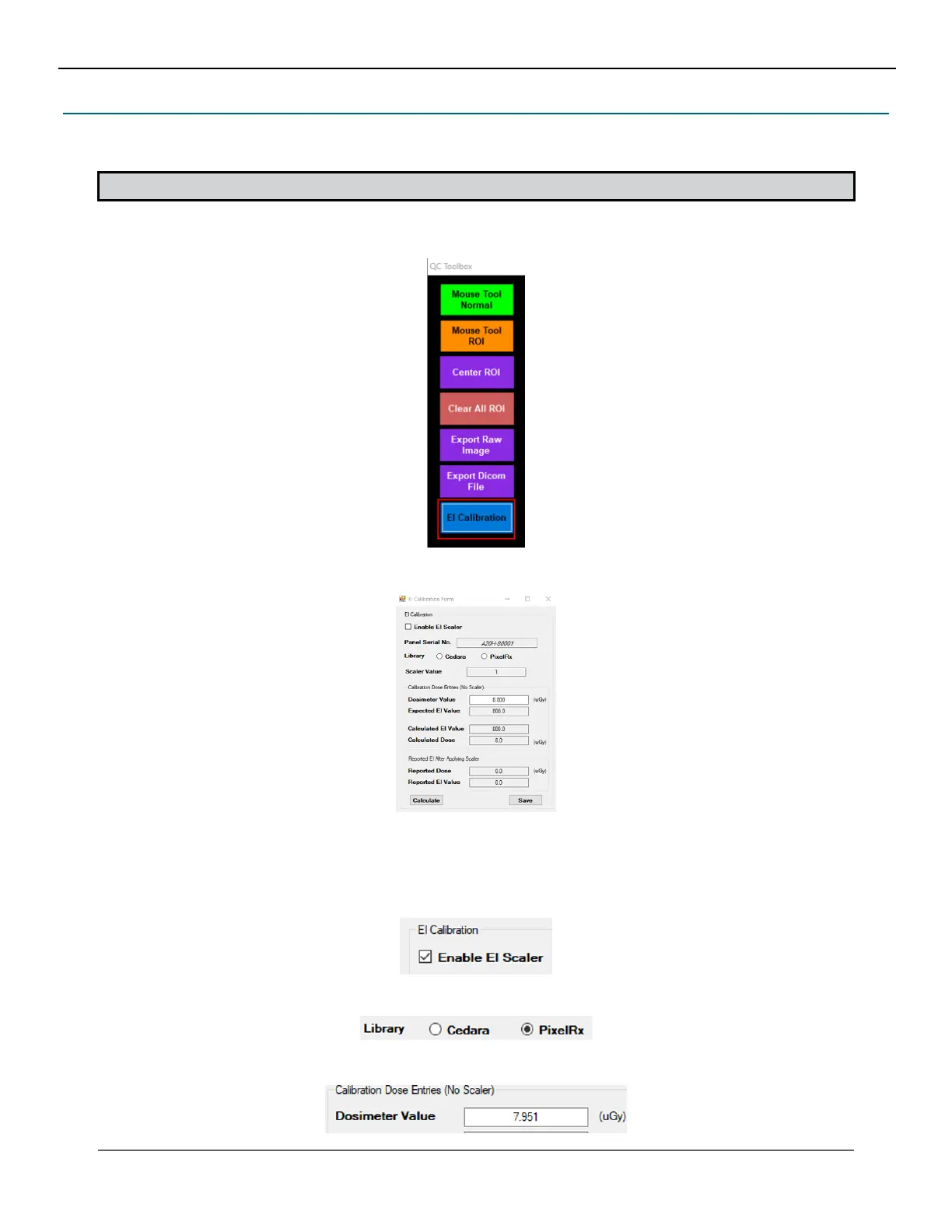
2. In acquisition screen, right click on the Annotation button. The QC toolbox displays.
22.8 EI Calibration Tool
EI Calibration Tool allows user to congure, maintain per-panel EI scaling capability and able to enter/modify ne-tune
parameters per-panel.
NOTE: This option must be enabled in advanced settings.
3. Click on EI Calibration. The EI Calibration form is displayed.
4. The dose/EI values of the selected ROI is reported from the Regius EI Calculation Framework for Aero panels.
The dose/EI reported for the central ROI to perform the EI Fine-Tune Calibration Per-Panel procedure for Regius
EI Calculation Framework.
a. To enable EI Scalar, check the option Enable EI Scaler.
b. Select the desired EI calculation framework library Cedera or PixelRx.
c. Adjust the calibrated dosimeter value (µGy).
IV. SOFTWARE



 To Next Page
 Loading...




