EasyManua.ls Logo

Konica Minolta magicolor 8650 - Page 259

Konica Minolta magicolor 8650
569 pages
Print Icon
To Next Page IconTo Next Page
To Previous Page IconTo Previous Page
Loading...
9
Settings for control panel
9-6 magicolor 8650
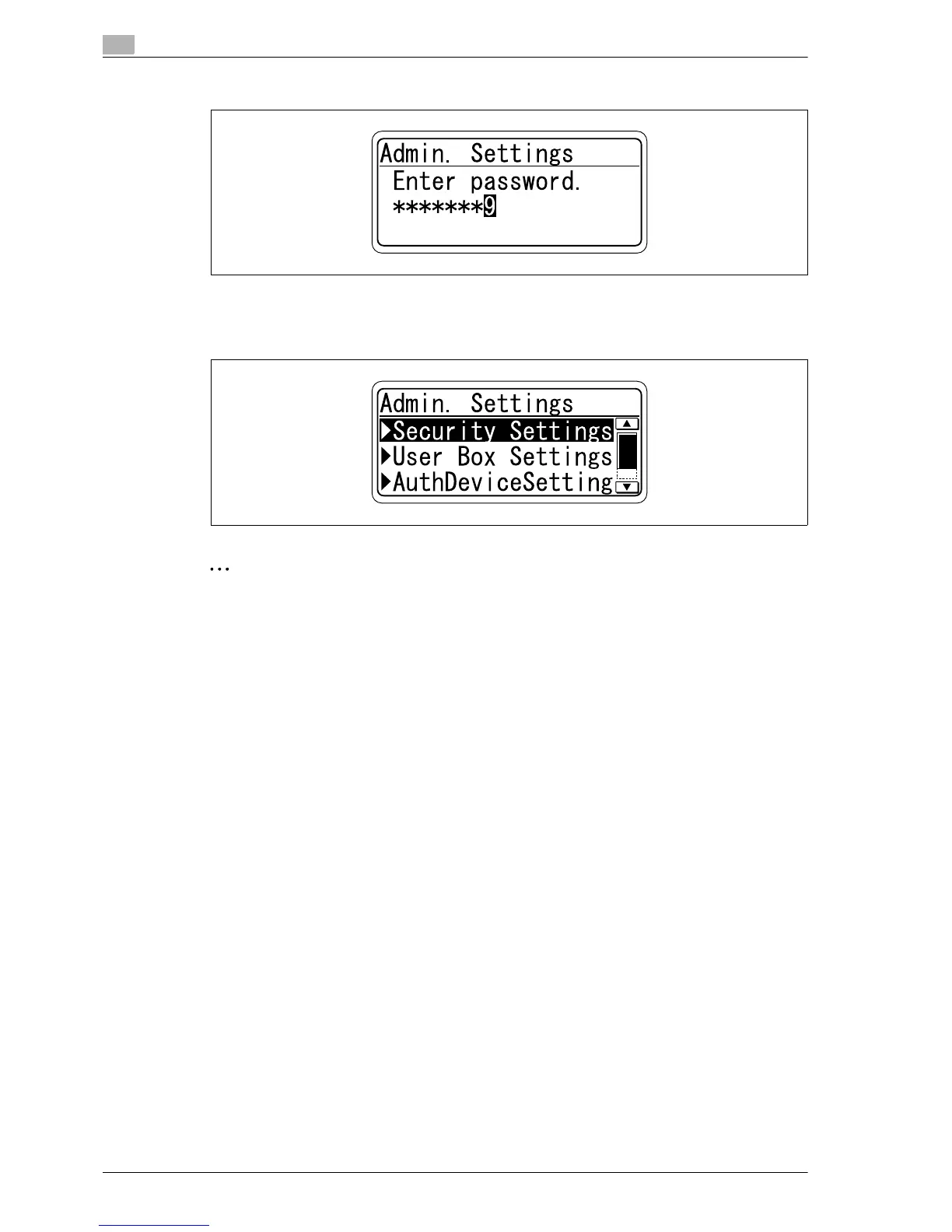
5 Repeat steps 3 and 4 to specify values for all digits of the password.
6 After entering the password, press the [Menu/Select] key.
The Admin. Settings Menu appears where the desired Administrator Setting parameter can be
changed.
2
Note
When selecting a menu or item, you can press the [)] key instead of the [Menu/Select] key.
To display the Admin. Settings Menu, the password is required.
The factory default password is "1 2 3 4 5 6 7 8".
Specify the password in [Admin. Password] accessed by selecting [Admin. Settings] - [Security
Settings].
EDNord - Istedgade 37A - 900 Aalborg - telefon 9633 3500

Table of Contents