Maintenance & Supplies 8-9
Maintenance & Supplies
Loading Paper (continued)
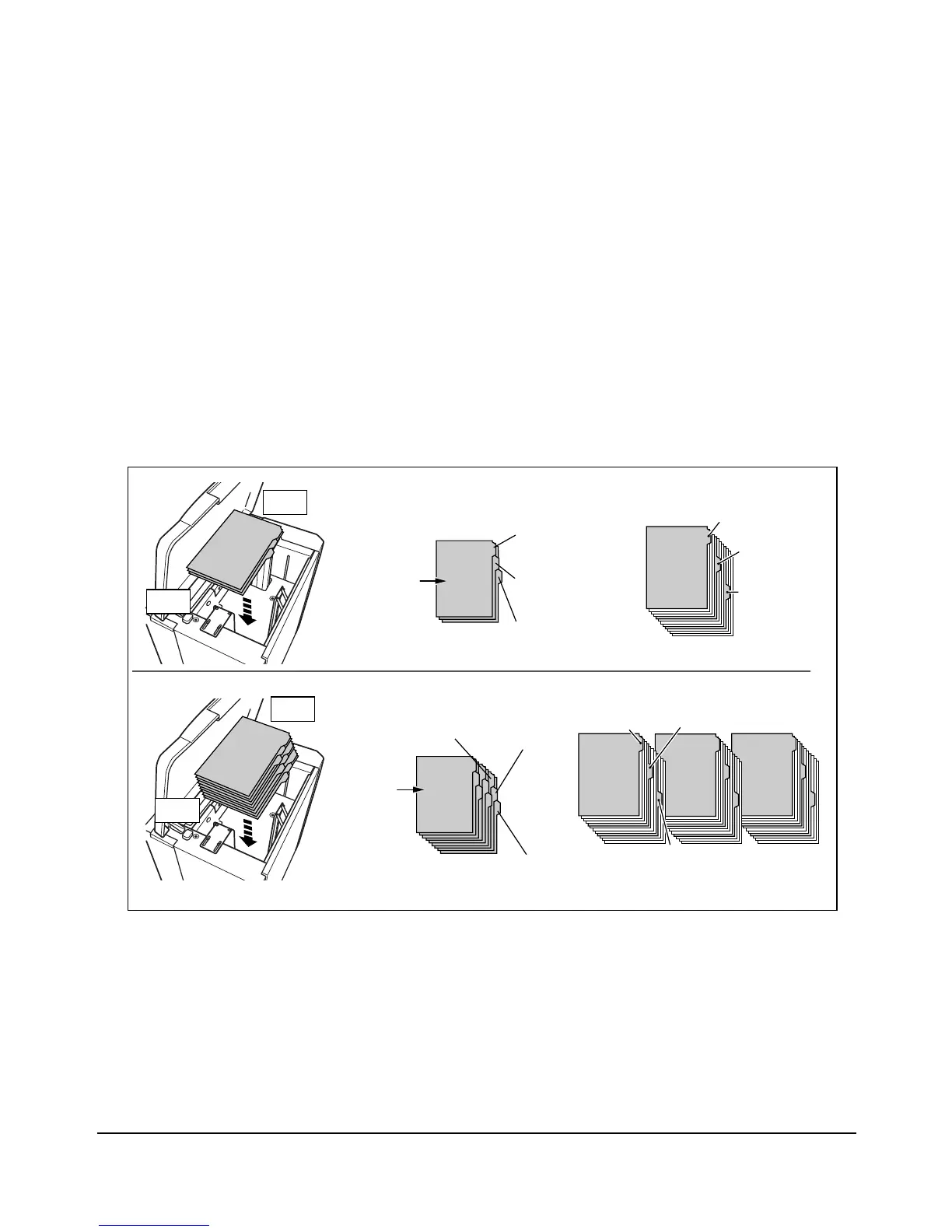
Loading Tabbed Sheets in LCT (LT-402/LT-412)
Load offset tabbed sheets so that the tab extensions are on the right at the rear (not front)
of the tray. The tab extension width should be 0.5" (12.5 mm) or less.
When loading tabbed sheets in the tray, be sure to specify the paper type as TAB in the
Key Operator mode; otherwise mishandled paper may occur.
The top sheet is designated face up as the first tab of the finished set. Subsequent offset
tab sheets follow in sequence.
Section 1
Introduction
Section 1
Introduction
Section 1
Introduction
Section 1
Introduction
Section 1
Introduction
Section 1
Introduction
Section 1
Introduction
Section 1
Introduction
ONE FINISHED SET
THREE FINISHED SETS
Example: 3 Tabbed sheets loaded in position for one finished set.
Example: 9 Tabbed sheets loaded in position for 3 finished sets.
Printed
set
Printed
set
1st TAB
1st TAB
1st TAB
1st TAB
2nd TAB
2nd TAB
2nd TAB
2nd TAB
3rd TAB
3rd TAB
3rd TAB
3rd TAB
Rear
Front
Rear
Front














 To Next Page