7-6 Web Utilities
Web Utilities
Environment Setup Mode
To Set E-Mail Transmission Function
Perform the setting concerning the network environment using the web browser.
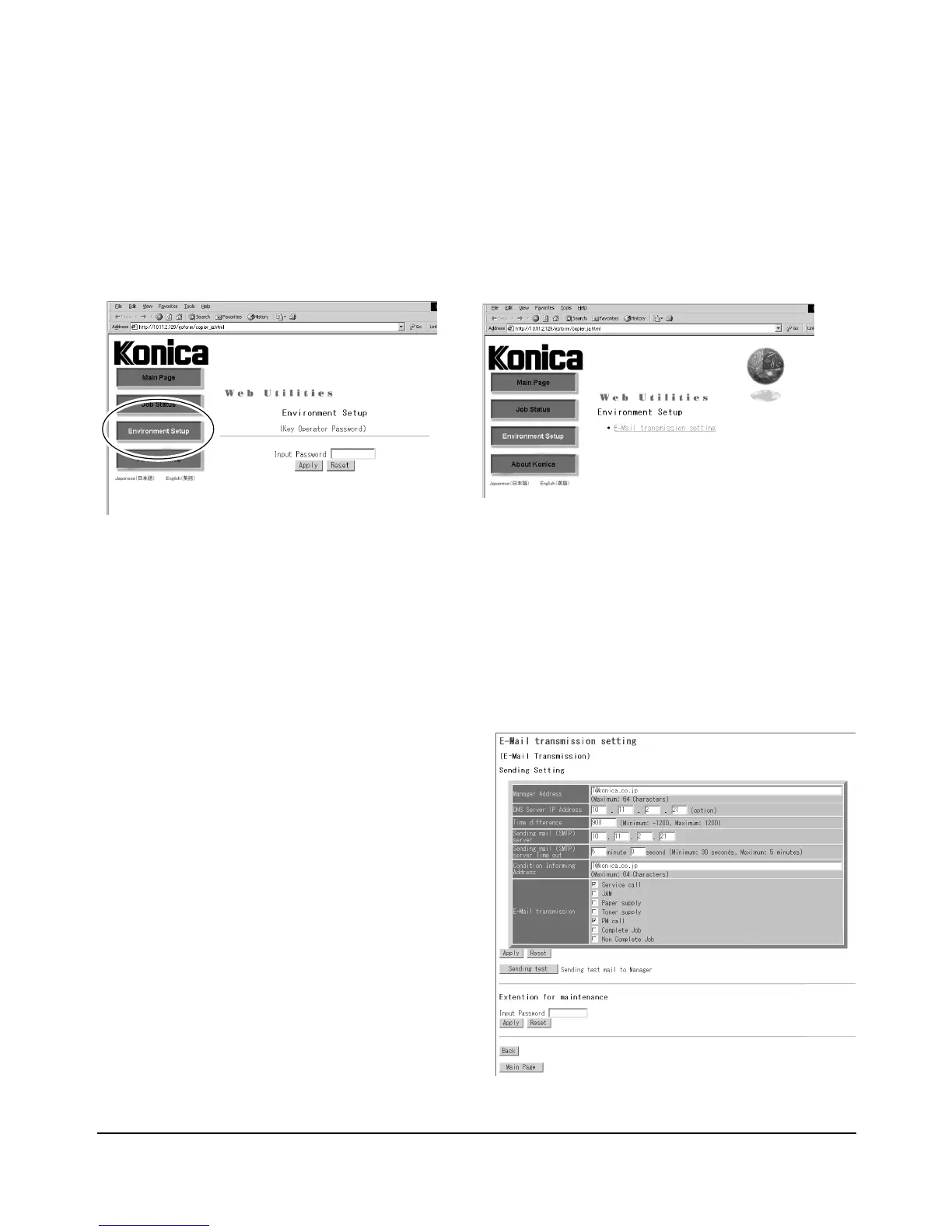
Web Utilities Window
1 Open the Web Utilities window.
NOTE: See p. 7-2 for detailed procedure to access the Web Utilities.
2 Click on [Environment Setup].
3 Display the E-Mail Transmission Setting window.
Enter the 4-digit Key Operator password, then click on [Apply].
Click on [E-Mail transmission setting]. The E-Mail Transmission Setting window will be
displayed.
4 Make the setting.
Enter the IP address of the mail server, IP
address of the DNS server (if needed),
time difference, and E-mail address to be
informed of the machine status.
Click on the check box of the desired
transmission item.
Click on [Apply] to complete the setting
and return to the Web Utilities window.
Clicking on [Reset] will void the setting and
restore the Web Utilities window.
Clicking on [Sending test] will send a test
mail to the manager.
NOTE: The Extension for maintenance option will be
exclusively used by a service representative.
E-Mail Transmission Setting Window














 To Next Page