Basic Operation
3-17
3
• Binding Left/Right: Images on the second sides
are not rotated.
• Binding Top: Images on the second sides are
rotated 180°.
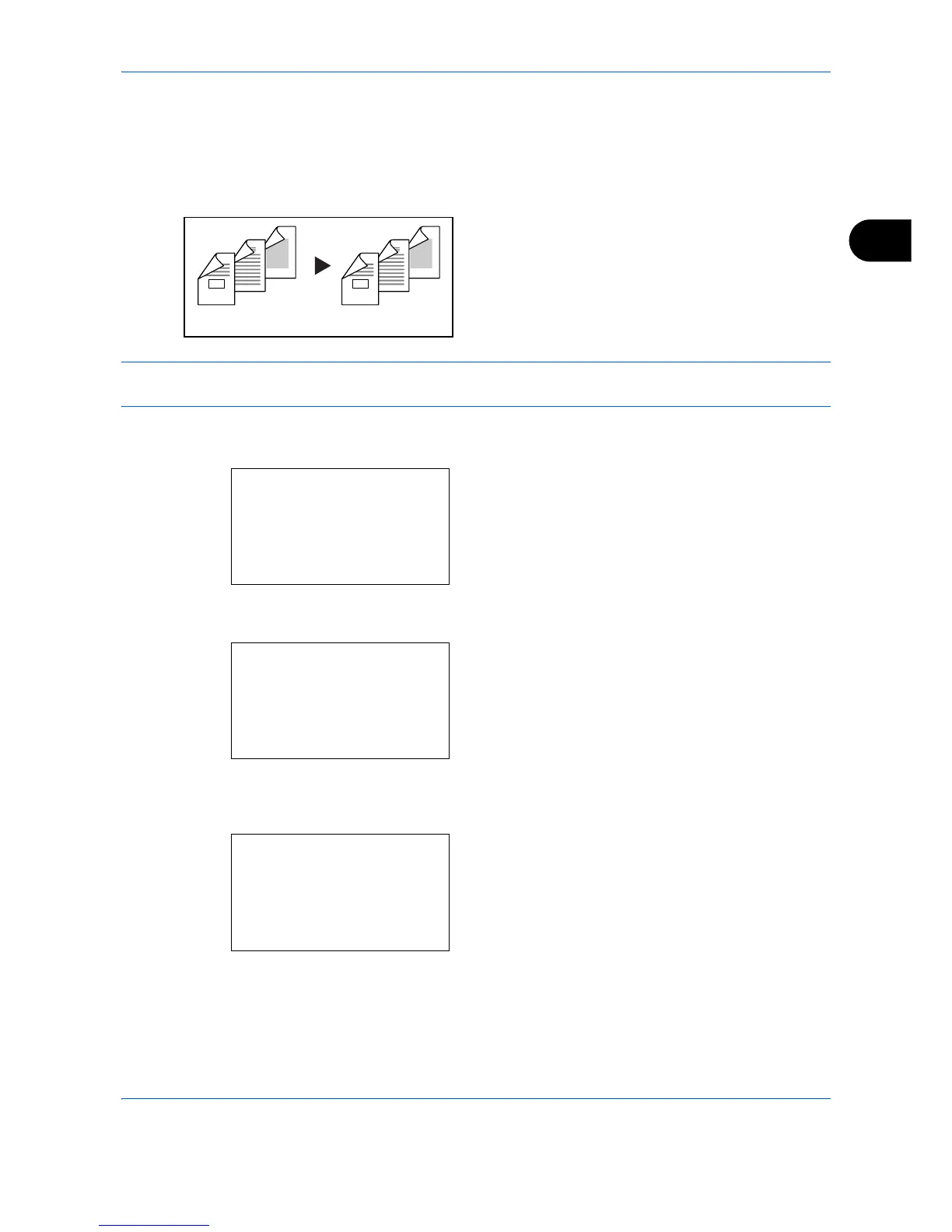
Two-sided to Two-sided
Produces two-sided copies from two-sided originals.
The document processor is required.
NOTE: The paper sizes supported in Two-sided to Two-sided are Legal, Letter, Oficio II, Executive, A4, B5,
A5 and Folio.
The procedure for using two-sided/duplex copying is explained below.
1 Press the Function Menu key. Function Menu
appears.
2 Press the U or V key to select [Duplex].
3 Press the OK key. Duplex appears.
4 Press the U or V key to select the desired duplex
copying mode.
If you select [1-sided>>2-sided], press [Detail] (the
Right Select key) and you can select the binding
edge of the finished copies and the original setting
orientation.
Original Copy
5
3
4
1
2
5
3
4
1
2
Function Menu:
a
b
*********************
2
Collate
T
3
Duplex
T
[ Exit ]
1
Paper Selection
g
Duplex:
a
b
*********************
2
1-sided>>2-sided
3
2-sided>>1-sided
1
*1-sided>>1-sided
Finish. Binding:
a
b
*********************
2
p
Top
1
*
o
Left/Right


 To Next Page
 Loading...