RS-232C Protocol
B-8
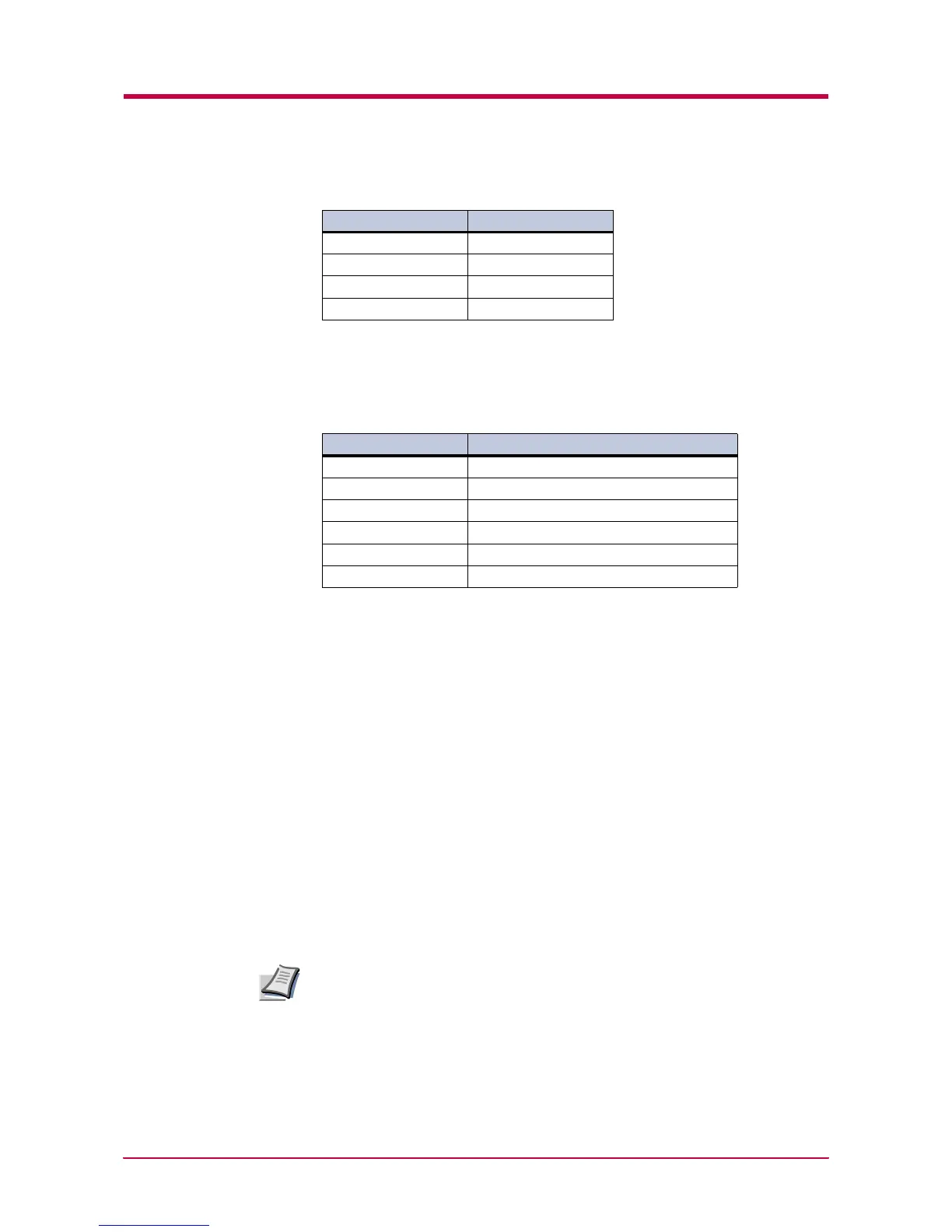
H4: Parity
The factory setting is “None” (0 on the status printout).
H5: Protocol logic
The factory setting is 0.
H6: Buffer nearly-full threshold
This is a percentage from 0 to 99. The factory setting is 90.
H7: Buffer nearly-empty threshold
This is a percentage from 0 to 99. The factory setting is 70.
The factory settings of the buffer nearly-full and nearly-empty thresholds
(H6 and H7) are subject to change without notification.
The gap between the nearly-full and nearly-empty thresholds allows the
computer to send a fairly large amount of data in a continuous stream.
H8: Received-data buffer size
This is the size of the input buffer, specified in units of 10 Kbytes. The
factory-set value is 6, meaning 60 Kbytes.
Since DTR/DSR protocol is not used with the RS-422A standard, select a
parameter value other than 0, 1, or 2 for the H5 setting when using the
RS-422A interface.
Parameter value Meaning
0 None
1Odd
2Even
3 Ignore
Table B-6
Parameter value Meaning
0 Combination of 1 and 3 below
1DTR/DSR, positive logic
2 DTR/DSR, negative logic
3 XON/XOFF
4ETX/ACK
5 XON/XOFF recognized only as protocol
Table B-7
Note


 To Next Page
 Loading...