Faxing
46
2
Limitation
❒ Group destination can be used only
for Memory Transmission; it cannot
be used for Immediate Transmission.
The machine automatically chang-
es to Memory Transmission when
you use group destination.
❒ You cannot specify more than 500
destinations for multiple groups.
Note
❒ To check the contents of Destina-
tion keys, print the destination list.
See “Administrator Tools”, General
Settings Guide.
❒ A stored name can be printed out
on the first page of a received fax at
the other end. See p.74 “Label In-
sertion”, Facsimile Reference <Ad-
vanced Features> .
❒ To check the contents of the Groups,
print the list. See “Administrator
Tools”, General Settings Guide.
A Press to switch the destination
between fax number, e-mail address,
and IP-Fax number.
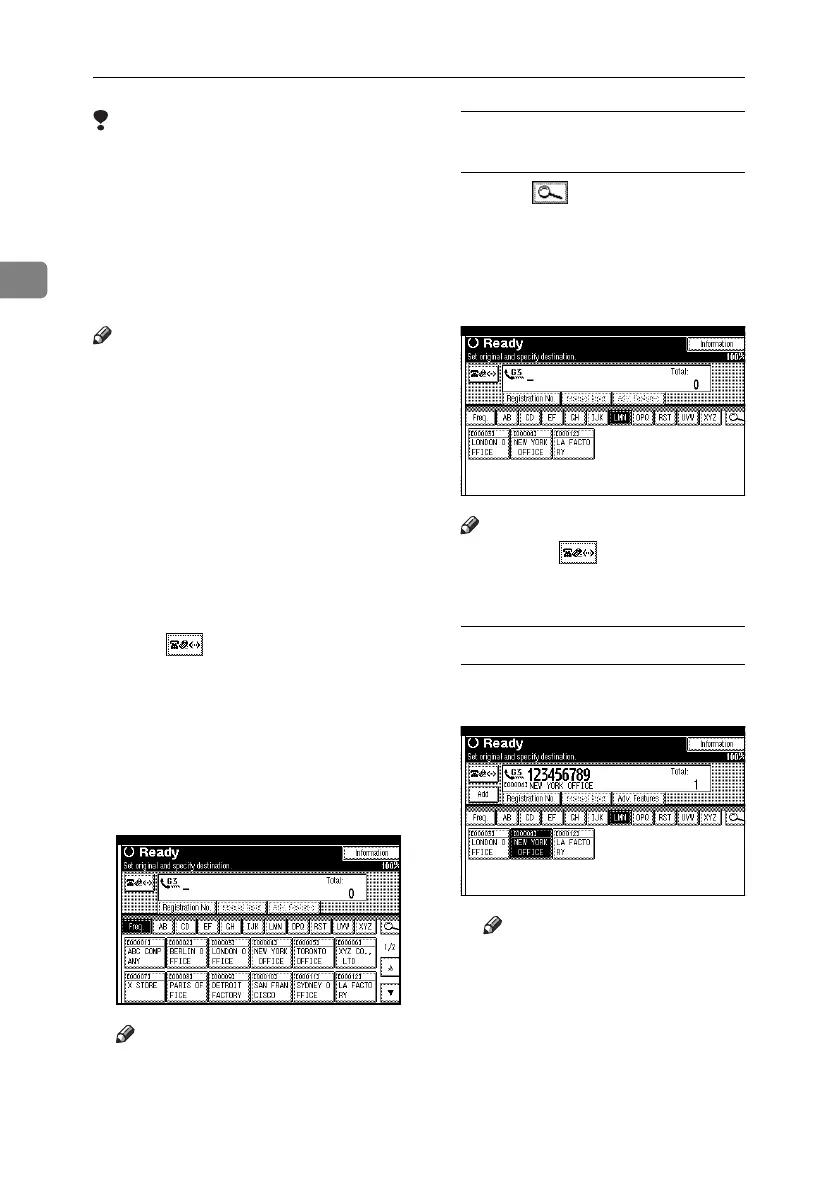
B Press the title word key where the
desired destination is programmed.
For example, if you want to specify
“NEW YORK OFFICE” programmed
in “LMN”, press [LMN].
Note
❒ There are three types of titles for
destination lists; “Title 1”, “Title
2”, and “Title 3”. The above dis-
play shows “Title 1”.
Switching the titles of destination
lists
A Press , the magnifier icon.
B Press [Switch Title].
C Select the type of the title, and
then press [Exit].
C Select a destination.
Note
❒ Pressing switches the des-
tination list between fax number,
e-mail address, and IP-Fax number.
Specifying a single destination
A
Press the Destination key programmed
with the desired destination
.
Note
❒ If the desired Destination key
is not shown, press [U] and
[T] to look through the list.
❒ To cancel the selection, press the
selected Destination key again.
You can also press the {Clear /
Stop} key to cancel the selection.
❒ To select more destinations,
repeat steps
B
and
C
.
RussianC4-EN_Combine-F_FM.book Page 46 Wednesday, April 27, 2005 2:01 PM



 To Next Page