EasyManua.ls Logo

Lanmage 6600C - History Interface; Query Criteria Area

Default Icon
101 pages
Print Icon
To Next Page IconTo Next Page
To Previous Page IconTo Previous Page
Loading...
6600 Product Manual
Operator Manual
59
Bottom left
Display the exposure parameters used in the patient examination: kV,
mA, ms;
Top right
Display the collection mode, and display the inspection area during
ordinary filming;
Bottom right
Display current image window width,
When switching the interface, a prompt message about whether to save the image
operation will pop up. Click "yes" to save the processed image, and click "no" to cancel
the operation of the image.
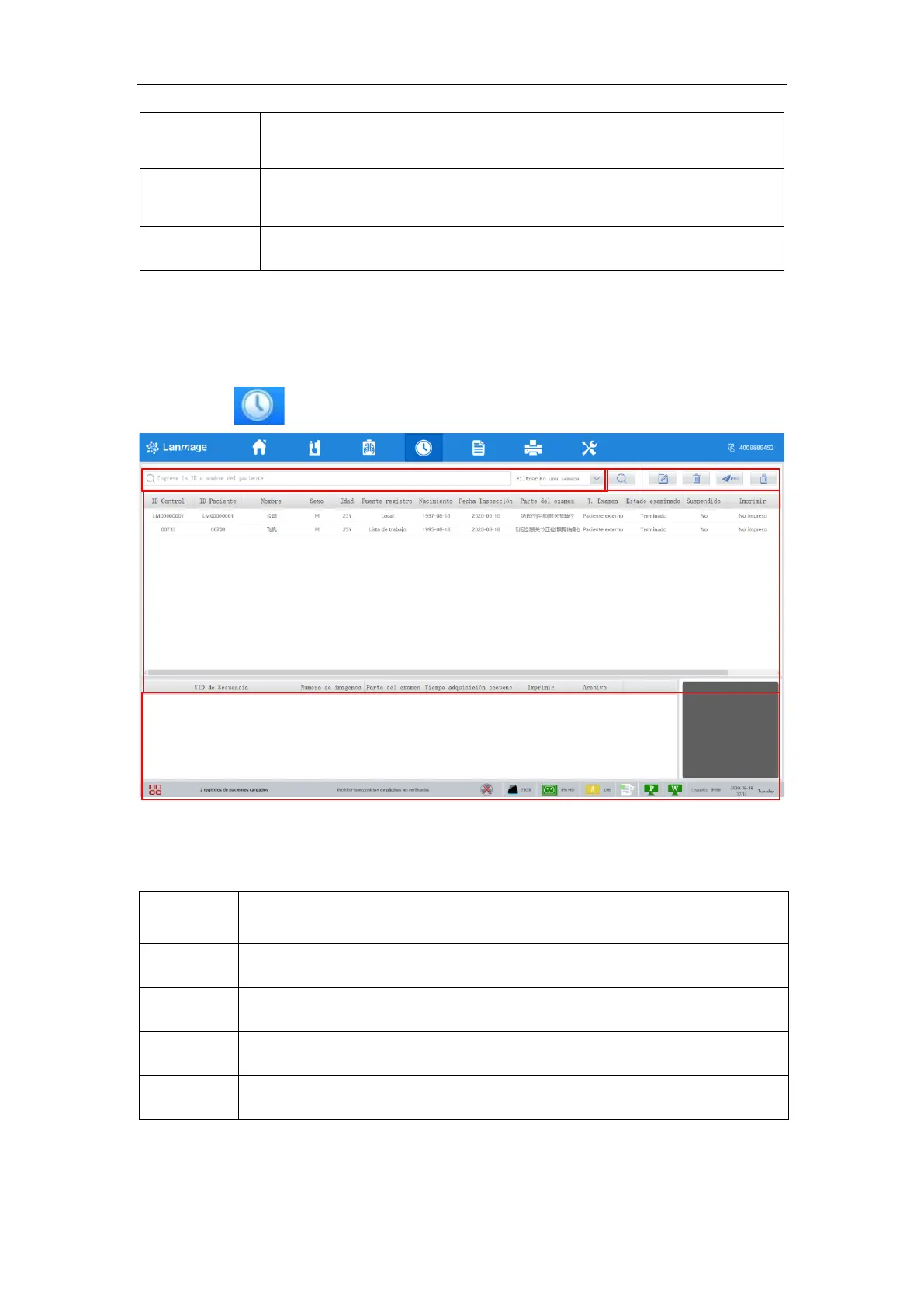
6.7 History interface
Click the button enter the checked patient list interface.
Figure 6-12
History image interface consists of history data list area, inquiry function area, toolbar
area, thumbnails area.

No.
Name
1
Inquiry function area
2
Toolbar area
3
History data list area
6
Thumbnails area
6.7.1 Query criteria area
Please refer to the registration screen
1
3
2
4

Table of Contents