Fault
Code
Fault Description
85 Output Fault, Lights
86 Output Fault, Propel High Gear
87 Output Fault, Left Propel Forward
88 Output Fault, Left Propel Reverse
89 Output Fault, Right Propel Forward
90 Output Fault, Right Propel Reverse
91 Output Fault, Screed Down
92 Output Fault, Screed Up
93 Output Fault, Left Slope Down
94 Output Fault, Left Slope Up
95 Output Fault, Right Slope Down
96 Output Fault, Right Slope Up
97 Output Fault, Left Sonic Enable
98 Output Fault, Right Sonic Enable
99 Output Fault, Spray Down Pump
100 Output Fault, Left Tow Down
101 Output Fault, Left Tow Up
102 Output Fault, Right Tow Down
103 Output Fault, Right Tow Up
104 Output Fault, Vibrator
105 Engine Shut Down, Low Oil Pressure
106
Engine Shut Down, High Coolant
Temperature
107 Propel Pump Charge Pressure Low
108 Engine Oil Pressure Low
109 Water in Fuel
110 Engine Coolant High Temperature
111 Hydraulic Oil Temperature
112 Primary/Secondary Processor Mismatch
113 No Valid Parameter File Loaded
114 Output Fault, Track Tension Unloader
115 Left Radio Receiver Time Out
116 Single/Right Radio Receiver Time Out
Operator Settings ScreenOperator Settings Screen
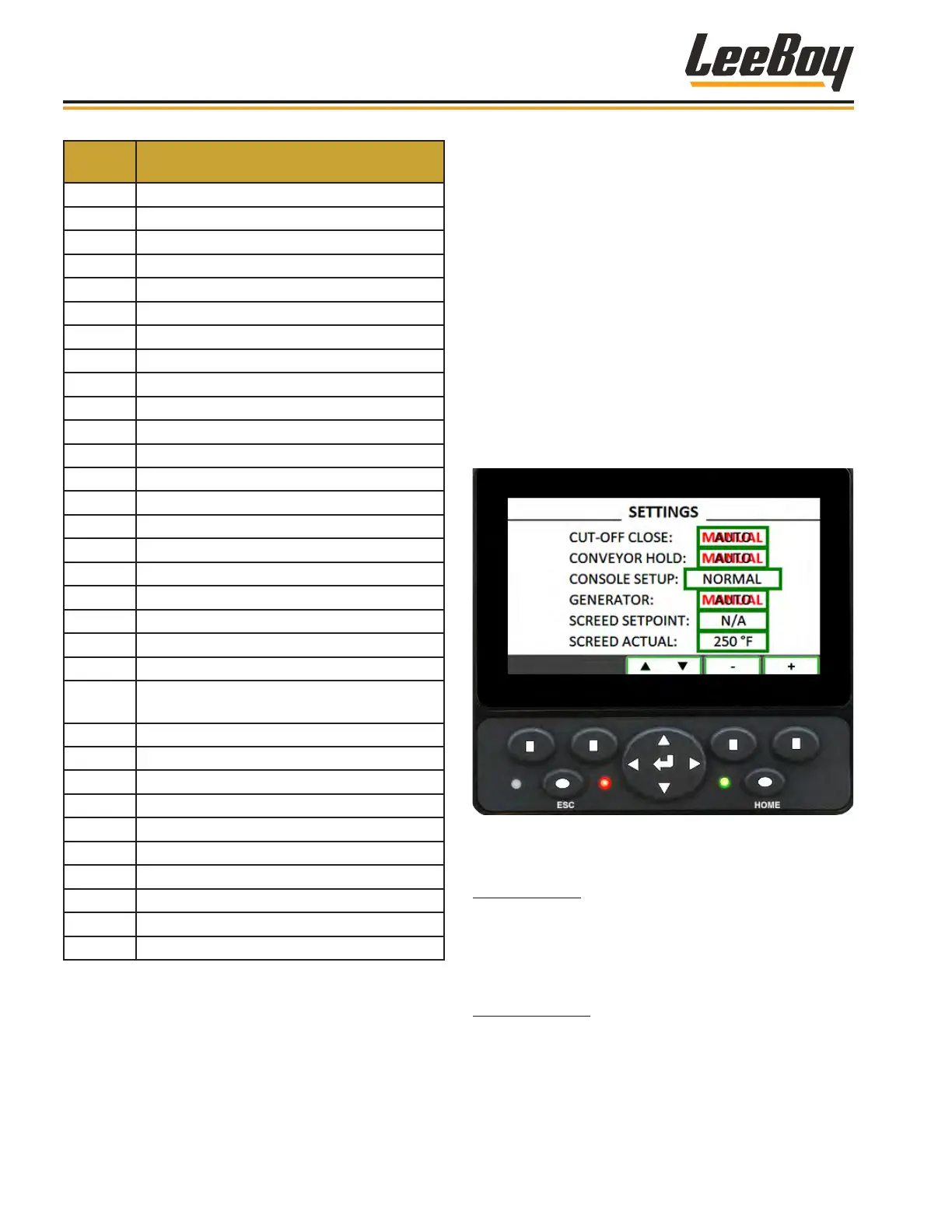
Navigate to the Operator Settings screen to set
paving controls by pressing left or right on the screen
navigation button. (Figure 4-33)
Use this screen to select manual or AUTO mode for
operating the under auger material cut-off, conveyor
and generator. You can set the screed temperature for
automatic temperature control or choose to operate the
screed heat manually using the keypad. You can also
disable one or both screed control panels.
• Use the up and down arrow buttons to scroll to
each setting window.
• Press the center of the navigation button ( ) to
select desired setting when highlighted in the
window.
Figure 4-33. Operator Settings Screen
Cut-Off Close: There are two settings for the under
auger material cut-off: Manual and AUTO.
• In AUTO mode, the cut-off will automatically close
when putting the paver in reverse.
Conveyor Hold: There are two settings for the
conveyor hold: Manual and AUTO.
• In AUTO mode, the conveyors will stop when the
paver stops.
Operation
LeeBoy Model 5300B Compact Paver4-28



 To Next Page