16
0883 28 3578
Configuration
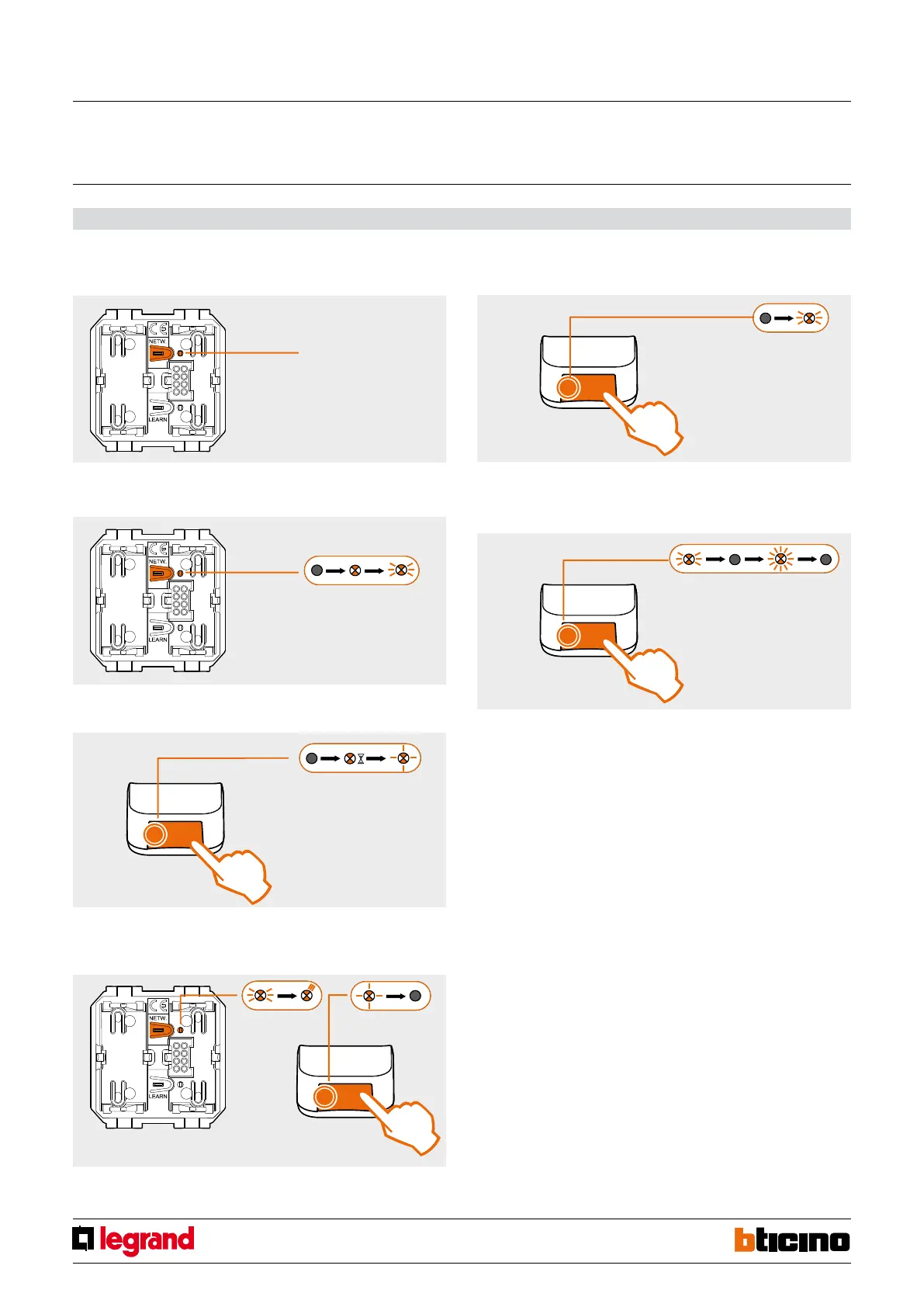
Connecting the device to the network
1. In the system identify the actuator device with “Zigbee network coordinator”
function, and press the NETWORK key for 3 seconds.
2. The NETWORK LED (yellow) will come on steady, and after a few instants will
start flashing quickly.
3. Press the NETWORK key on the interface. The NETWORK LED will come on
steady during the network search procedure and then will start flashing slowly.
4. To complete the procedure press the NETWORK KEY of the Coordinator device;
The corresponding NETWORK LED will flash three times while the interface
NETWORK LED will turn off.
Disconnecting the interface from the network
1. Press the NETWORK key on the interface. The NETWORK LED will flash quickly.
2. Press the NETWORK key again for at least 10 seconds. The NETWORK LED will
flash quickly twice and then will turn off. The interface is no longer connected to
the ZigBee network.
3 sec.
10 sec.
Open Web Net/Zigbee Gateway
MQ00493-b-EN 04/07/2013



 To Next Page