18
05/06/2014
1.5 m
12 m
1.2 m
2.3 m
12 m
90°
3 m
0.4 m
0.2 m
0.2 m
1.5 m
12 m
1.2 m
2.3 m
12 m
90°
3 m
0.4 m
0.2 m
0.2 m
12 m
90°
LEARN
NETW
DETECT
END_DETECT
L
N
L
N
LEARN
NETW
DETECT
END_DETECT
L
N
LEARN
NETW
DETECT
END_DETECT
LEARN
NETW
DETECT
END_DETECT
LEARN
NETW
DETECT
END_DETECT
L
N
L
N
LEARN
NETW
DETECT
END_DETECT
L
N
LEARN
NETW
DETECT
END_DETECT
LEARN
NETW
DETECT
END_DETECT
LEARN
NETW
DETECT
END_DETECT
L
N
L
N
LEARN
NETW
DETECT
END_DETECT
L
N
LEARN
NETW
DETECT
END_DETECT
LEARN
NETW
DETECT
END_DETECT
0882 91 3579
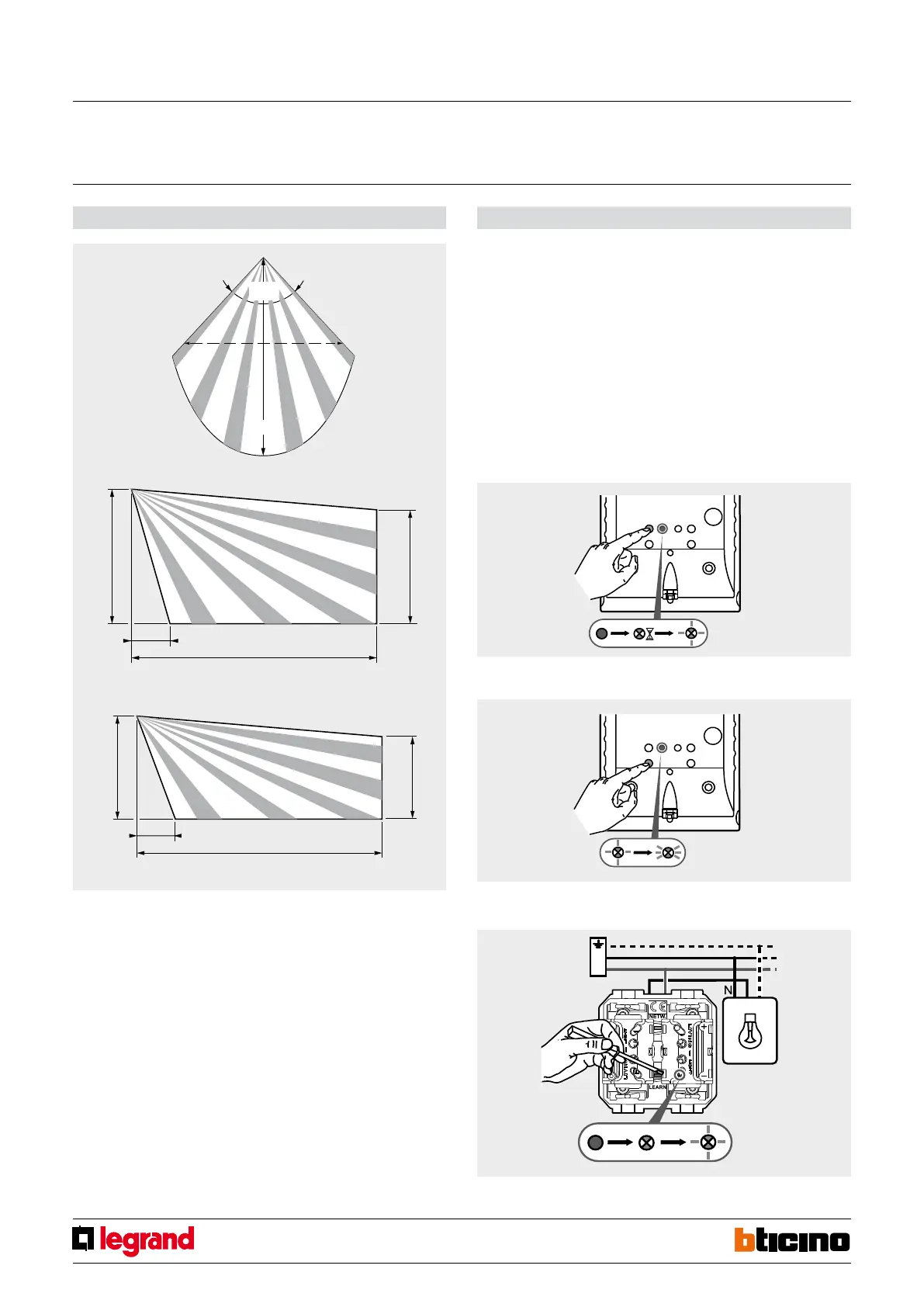
Dimensional data - IR sensor covering area Configuration
Configuration of the device inside the network: “Push and Learn” self-learning type.
Configuration of the time period, of the IR sensor sensitivity, and of the
brightness threshold.
The device is supplied with the following factory set parameters:
- AUTO mode
- Timing ON: 15 minutes
- IR sensitivity: 100%
- Brightness threshold for activation: up to 1000 lux maximum
Other modes can be configured using remote controls BMSO4001 and BMSO4003 (see
the instruction leaflet for the details).
Creation of scenario 1 – active when people are present in the area controlled by
the sensor.
1. Press the sensor LEARNING key. The LEARNING LED will come on steady, and then will
flash slowly.
2. Then press the DETECT pushbutton. The LEARNING LED will flash quickly.
3. Press the LEARNING key of the actuator used for the scenario.
The LEARNING LED will come on steady, and then will flash slowly.
Passage sensor
Installation height 2.3 m
Installation height 0.4 m
Wireless movement detector RF ZigBee surface mounting
MQ00520-c-EN



 To Next Page