19
05/06/2014
LEARN
NETW
DETECT
END_DETECT
L
N
L
N
LEARN
NETW
DETECT
END_DETECT
L
N
LEARN
NETW
DETECT
END_DETECT
LEARN
NETW
DETECT
END_DETECT
LEARN
NETW
DETECT
END_DETECT
L
N
L
N
LEARN
NETW
DETECT
END_DETECT
L
N
LEARN
NETW
DETECT
END_DETECT
LEARN
NETW
DETECT
END_DETECT
LEARN
NETW
DETECT
END_DETECT
L
N
L
N
LEARN
NETW
DETECT
END_DETECT
L
N
LEARN
NETW
DETECT
END_DETECT
LEARN
NETW
DETECT
END_DETECT
LEARN
NETW
DETECT
END_DETECT
L
N
L
N
LEARN
NETW
DETECT
END_DETECT
L
N
LEARN
NETW
DETECT
END_DETECT
LEARN
NETW
DETECT
END_DETECT
LEARN
NETW
DETECT
END_DETECT
L
N
L
N
LEARN
NETW
DETECT
END_DETECT
L
N
LEARN
NETW
DETECT
END_DETECT
LEARN
NETW
DETECT
END_DETECT
0882 91 3579
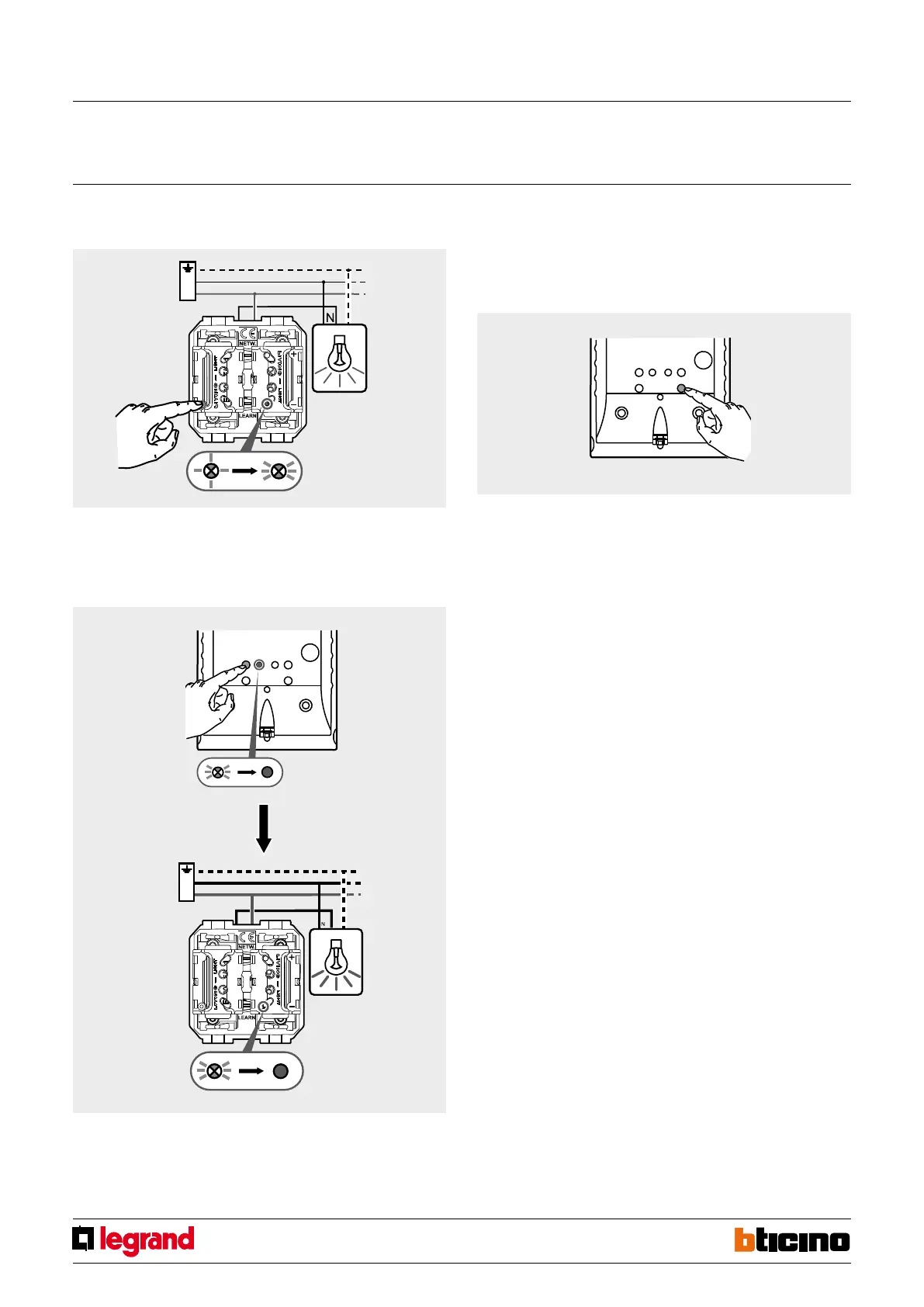
4. Press the ON pushbutton of the actuator. The connected load will come on and the
LEARNING LED will flash more quickly.
5. Repeat the procedures at points 3 and 4 for each actuator to associate to the
scenario during its creation.
6. Press the sensor LEARNING key. The corresponding LEARNING LED and those of all
the associated actuators will go off.
Creation of scenario 2 – active when people leave the area controlled by the
sensor.
1. Repeat the operations described for the creation of scenario 1, using the END
DETECT pushbutton to perform the operations described in point 2.
NOTE: For more information on the amendment of the set scenarios (addition
and removal of actuators) refer to the instruction leaflet supplied with the
sensor.
Wireless movement detector RF ZigBee surface mounting
MQ00520-c-EN



 To Next Page