32
24/09/2013
0672 63
H4595
LN4595
663096
665112
078427
079127
> 4 sec.
< 1 sec.
Shutter control
Shutter control
Use of the device in monostable mode
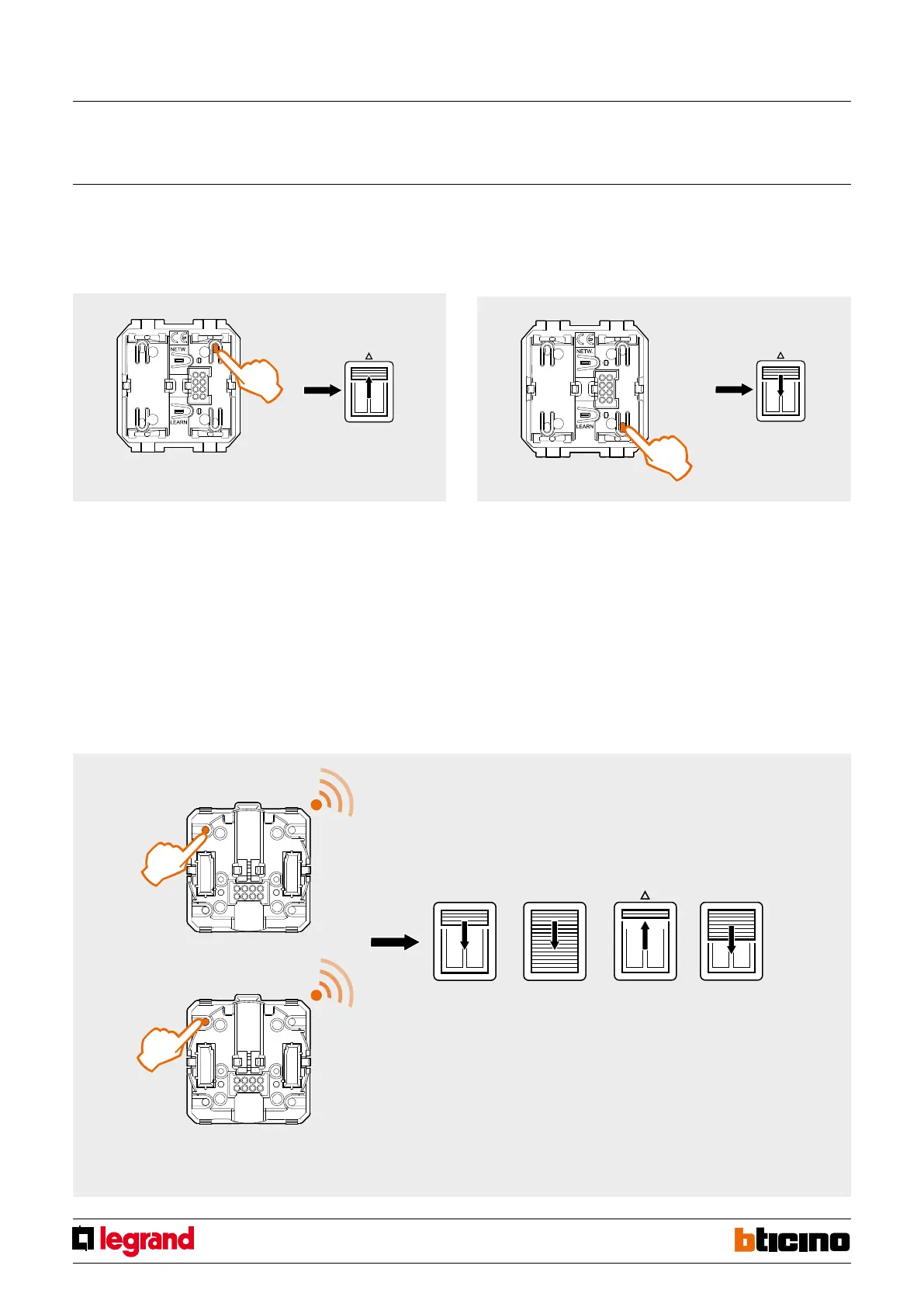
Opening and closing the rolling shutter:
Press and hold down the UP and DOWN keys until the desired rolling shutter position.
Saving of the PRESET position (opening the rolling shutter to a preset position)
In addition to the operating modes specified, this device can be used to also set the
rolling shutters to a preset position by only pressing one key.
The procedure is performed in two different stages:
- calibration of the up and down movements times of the rolling shutter;
- saving of their positions.
Calibration of the up and down movements times of the rolling shutter;
1. Check if the rolling shutter motor is equipped with a traditional, or with an electronic
“limit switch”.
2. Fully open the rolling shutter.
3. In case of traditional limit switch, press the key shown in the picture for more than 4
seconds. Press the key for less than 1 second in case of electronic limit switch.
4. The rolling shutter will close completely, will open completely, and then will move to
the half open position. During this stage do not operate the device.
5. The device has saved the rolling shutter full opening and full closing time. Now
proceed with saving the desired position (Preset).
Shutter switch RF with preset function
MQ00405-c-EN



 To Next Page