46
PL1 CPL2
SPE
M
PL2
A
PL1
2
3
4
1
3477
Description
This device lets you integrate traditional control devices (switches, pushbuttons, etc.) in
advanced systems with BUS operating logic.
Therefore, it is possible to extend the use of the BUS system in rooms where traditional
systems are already present or in historic and prestigious rooms whereby the complete
or partial remaking of the electric system would entail heavy masonry work. The old but
valuable switch with its no longer compliant wiring can therefore continue to be used
with it, as the connection to the load to be controlled is carried out safely by connecting
it with its respective interface with no-voltage contact.
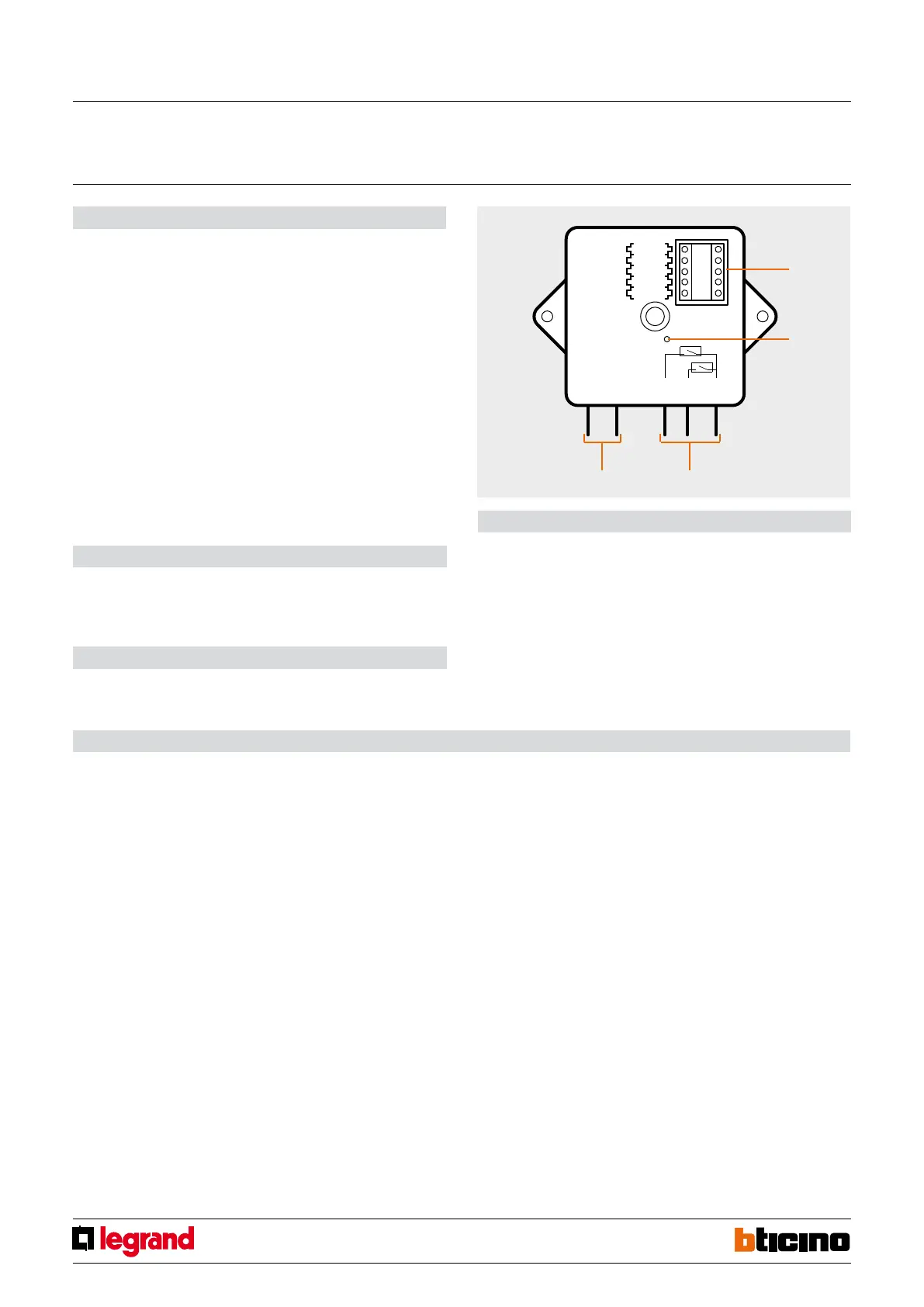
Contact PL1 controls light point PL1, contact PL2 controls light point PL2. The interface
has a LED for signalling it is working properly and three cables for connecting to
traditional devices. This device is made in a Basic enclosure and therefore features a
compact size and can be used in flush-mounted boxes, junction boxes, shutter boxes and
ducts. Particularly advantageous is the installation inside junction boxes, positioning
the item at the back of the flush-mounted box, behind lowered automation devices or
behind conventional devices (pushbuttons, switches, etc.).
Legend
1. Configurator seat (note that this must only be used in MyHome systems with the physical
configuration)
2. LED
3. Cables for connection to traditional devices
4. BUS
Technical data
Power supply via SCS BUS: 27 Vdc
Operating power supply with SCS BUS: 18 – 27 Vdc
Current draw: 3.5 mA
Dimensions
Size: basic module
Basic contacts interface
MQ00272-c-EN 07/06/2014
If the device is installed in a My Home system it can be configured in two ways:
- PHYSICAL CONFIGURATION, inserting the configurators in position.
- Configuration via MYHOME_Suite software package, downloadable from
www.homesystems-legrandgroup.com; this mode has the advantage of offering many
more options than the physical configuration.
For a list of the procedures and their meanings, please refer to the instructions in
this sheet and to the "Function Descriptions" help section in the
MYHOME_Suite software package.
When used as a component of the Lighting Management system, use the specific types
of configuration (Plug&go, Project&Download).
The interface consists of two independent control units, which are identified with the
positions PL1 and PL2 in the physical configuration and the term Module 1 and Module 2
in the MYHOME_Suite virtual configuration. The two units can send:
- commands to two actuators for two independent loads (On, Off or adjustment) identi
-
fied with the address PL1 and PL2 and the mode specified in M or;
- a command to the F420 scenario module;
- a double command intended for a single load (motor for blinds Up-Down, curtains
Open-Close) identified with the address PL1=PL2 and specified Configuration mode M.
The interface has an LED for indicating proper operation and three terminals for connec
-
tion to traditional devices such as:
- two N/O (normally open) and N/C (normally closed) traditional switches or buttons;
- a switch.
Configuration
List of Functions
The device performs the following functions:
1. LIGHT SWITCH
2. AUTOMATION CONTROL
3. DEVICE LOCKING/UNLOCKING
4. SCENARIO MODULE CONTROL
5. PROGRAMMED SCENARIO ACTIVATION
6. PLUS PROGRAMMED SCENARIO ACTIVATION
7. AUXILIARY CONTROL
8. SOUND SYSTEM CONTROL
See the following pages for the configuration procedures.



 To Next Page