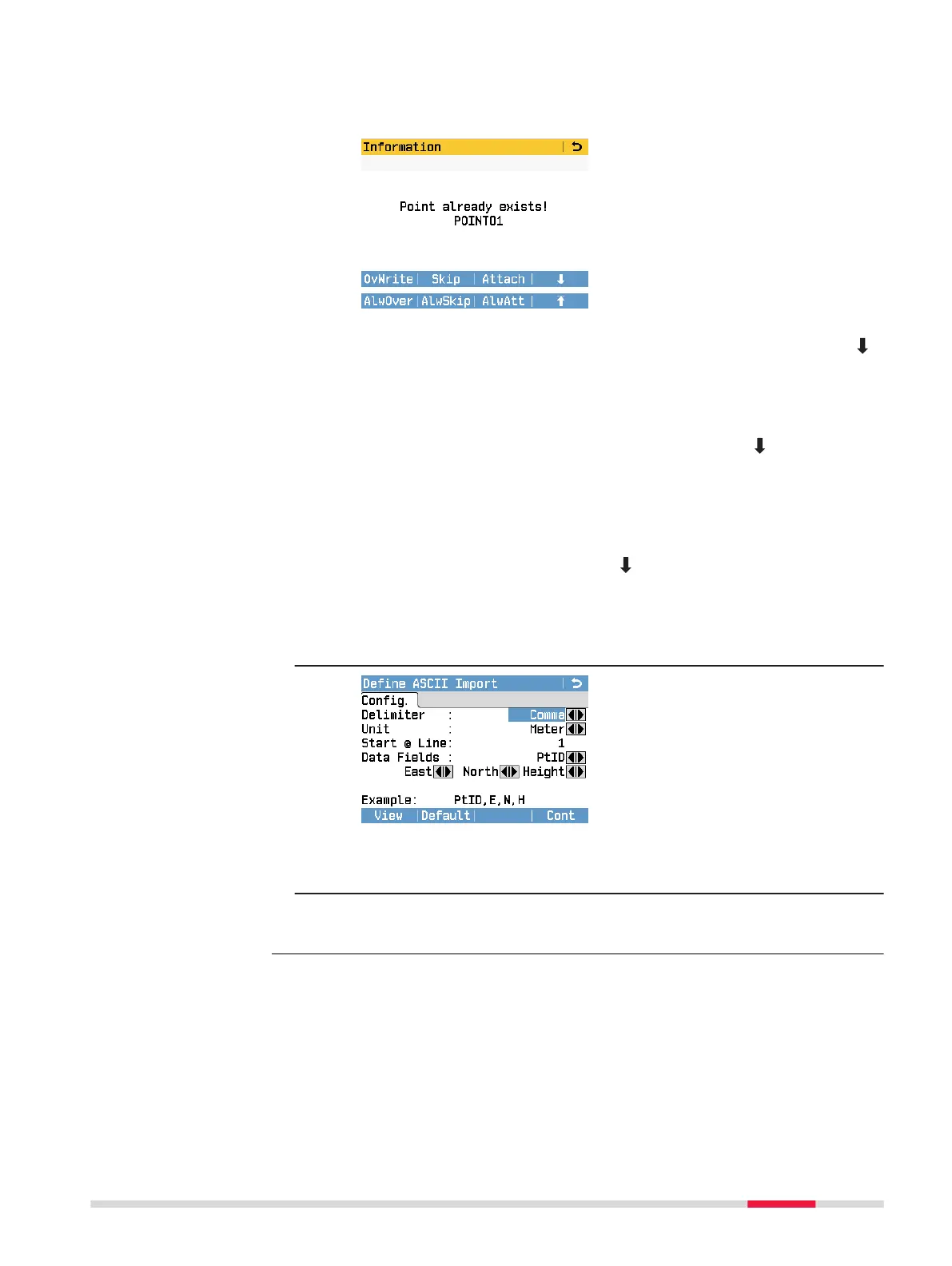
5. If you attach new points to the current job and a point with the
same point ID already exists, the following information message is
displayed:
OvWrite
To overwrite the point with the currently displayed point ID. Press
(F4) and AlwOver to overwrite all duplicate point IDs with the new
points.
Skip
To skip the point with the currently displayed point ID. The new
point is ignored and the existing point is kept. Press
(F4) and
AlwSkip to skip all duplicate points.
Attach
To attach the new point to the current job and keep the existing
point. The existing point ID is renamed with a numerical sufx. For
example, Point23 is renamed to Point23_1. The maximum renamed
sufx is 10, e.g. Point23_10. Press (F4) and AlwAtt to attach all
duplicate points to the current job.
For a backup folder:
Take note of the warning message displayed and press Cont to pro-
ceed and import the folder.
6.
If the le is an ASCII le, the Dene ASCII Import screen is dis-
played. Dene the delimiter value, the units and the data elds of
the le and press Cont to continue.
7. Once the le or backup folder has been successfully imported, a
message is displayed.
Data Management 93



 To Next Page