Prerequisitesfortheprocedure
Whenreplacingthedrive,besuretofollowtheprecautions.
Attention:
•Donotdroptheharddiskdriveorsubjectittophysicalshocks.Putthedriveonamaterial,suchassoft
cloth,thatabsorbsanyphysicalshocks.
•Donotapplypressuretothecoverofthedrive.
•Donottouchtheconnector.
Thedriveisverysensitive.Incorrecthandlingcancausedamageandpermanentlossofdata.
Beforeremovingtheharddiskdrive,makeabackupcopyofalltheinformationonit,andthenturnthe
computeroff.
Neverremovethedrivewhilethesystemisoperating,insleep(standby)mode,orinhibernationmode.
Replacingtheharddiskdrive
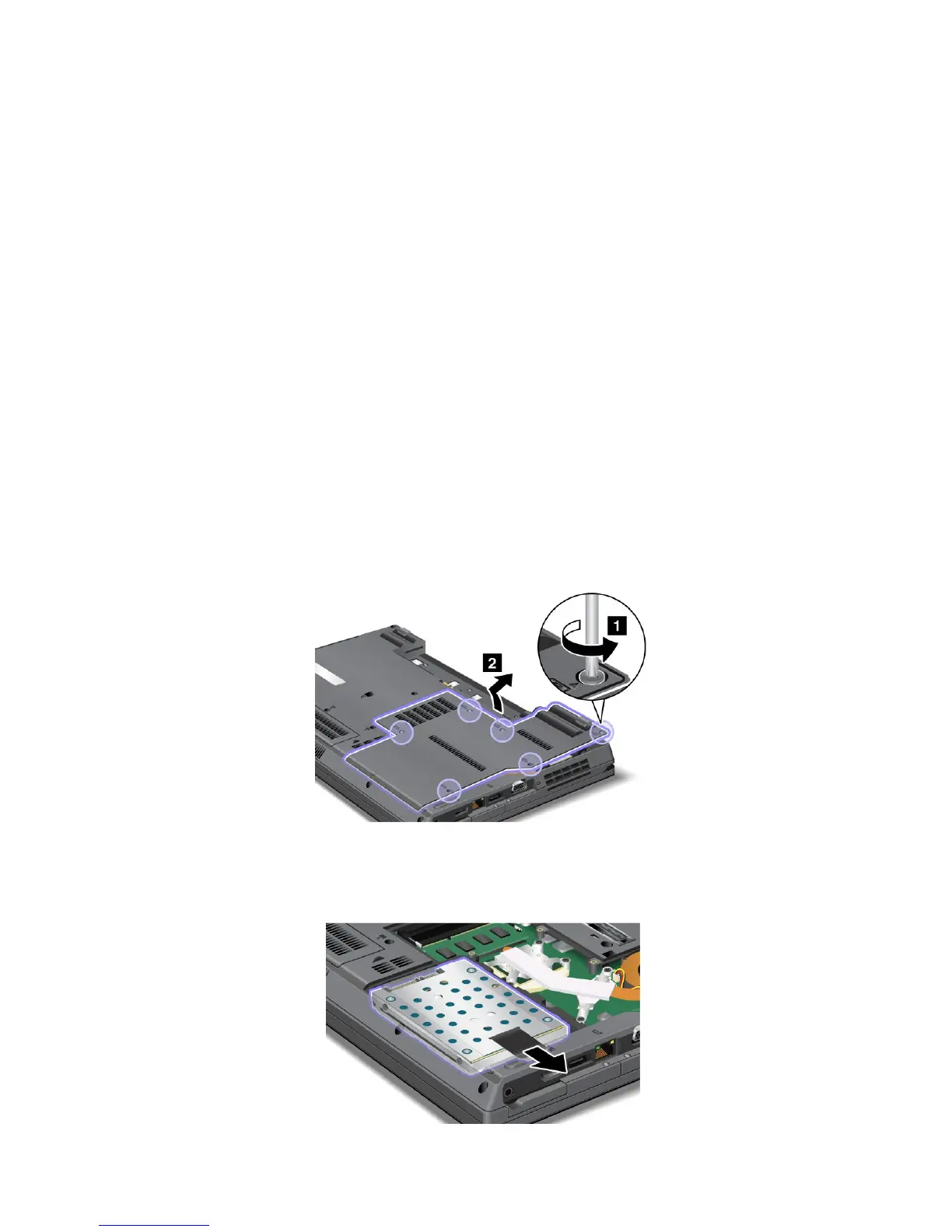
Toreplacetheharddiskdrive,dothefollowing:
1.Turnoffthecomputer,thendisconnecttheacpoweradapterandallcablesfromthecomputer.
2.Closethecomputerdisplay,andturnthecomputerover.
3.Removethebattery.See“Replacingthebattery”onpage89.
4.Loosenthescrewsandremovethecover.
Attention:Donottouchanyexposedpartsotherthanthosereferredtointhisprocedure.Unnecessary
contactswiththeelectricandelectroniccomponentsmightcauseyourcomputertomalfunction.
5.Pulltheharddiskdrivetotheright.
94UserGuide















 To Next Page