2Securitykeyhole
Yourcomputercomeswithasecuritykeyhole.Youcanpurchaseasecuritycableandlocktotthiskeyhole.
Note:Forsomemodels,thesecuritykeyholeisattherightsideofthecomputer.
3Fanlouvers(rear)
Theinternalfanandlouversenableairtocirculateinthecomputerandcoolthecentralprocessor.
Note:Toavoidimpedingairow,donotplaceanyobstacleinfrontofthefan.
Statusindicators
Thestatusindicatorsshowthecurrentstatusofyourcomputer.
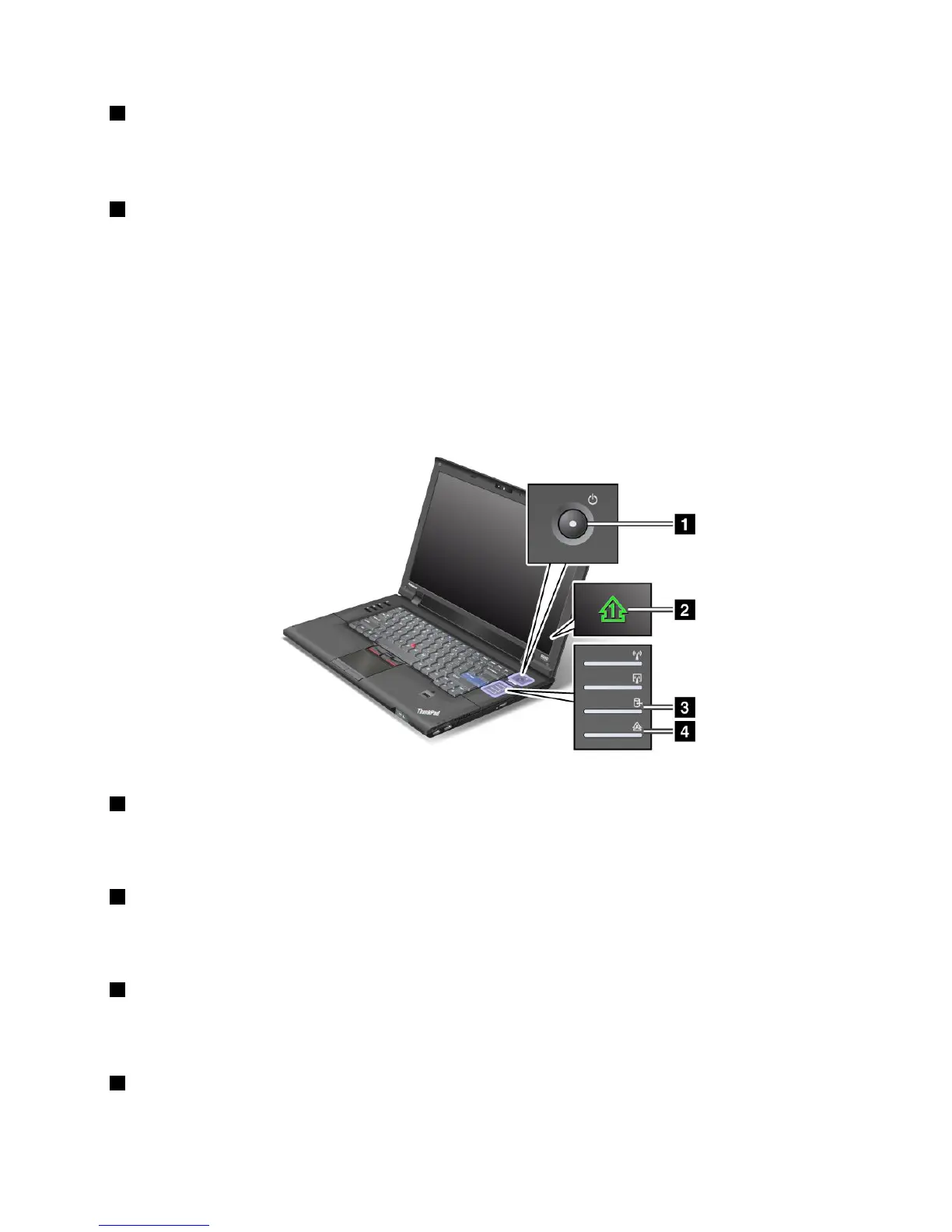
System-statusindicators
Yourcomputerhassystem-statusindicators.Thefollowingshowsthelocationandthemeaningofeach
indicator:
1PowerOn
Thecomputerisonandreadytouse.Thepowerswitchstayslitwheneverthecomputerisonandisnot
litwhenthecomputerisinsleep(standby)mode.
2Numericlock
Bydefault,whenthenumericlockison,thenumericlockindicatorisdisplayedonthescreen.Tochangethe
settingsofthenumericlockindicator,see“Changingdisplaysettings”onpage48
.
3DeviceAccess
Aharddiskdriveisbeingusedtoreadorwritedata.Whenthisindicatorisblinking,donotputthe
computerintosleep(standby)modeorturnitoff.
4CapsLock
Chapter1.ProductOverview9















 To Next Page