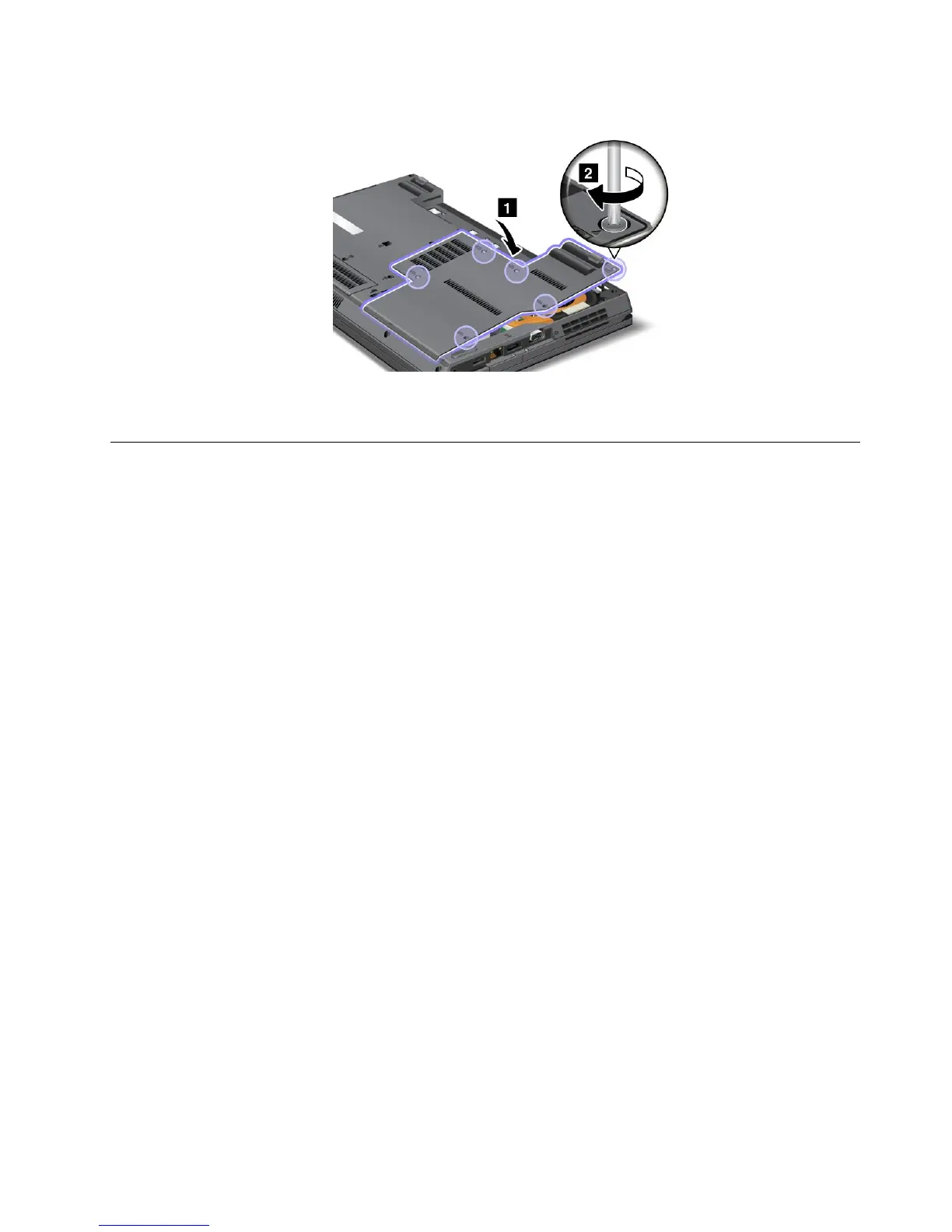
13.Putthecoverbackinplace,andtightenthescrews.
14.Reinstallthebatteryandturnthecomputeroveragain.Thenreconnecttheacpoweradapterand
thecables.
InstallingandreplacingthemSATAsolidstatedrive
SomeThinkPadmodelshaveanmSATAsolidstatedrive,whichisinstalledatthePCIExpressMiniCard
slot.YoucanreplacethemSATAsolidstatedrivewithanewonewhichcanbepurchasedfromyour
Lenovoreselleroramarketingrepresentative.ToreplacethemSATAsolidstatedrivewithanewone,
readthefollowingprerequisites.
Notes:
•YoucanalsoreplacethemSATAsolidstatedrivewithaWirelessPCIExpressMiniCardforWirelessWAN.
•ReplacethemSATAsolidstatedriveonlyifyouneedtohaveitrepaired.TheslotofthemSATAsolidstate
drivewerenotdesignedforfrequentchanges,ordriveswapping.
Prerequisitesfortheprocedure
Whenreplacingthedrive,besuretofollowtheprecautions.
Attention:HandlinganmSATAsolidstatedrive
•Donotdropthedriveorsubjectittophysicalshocks.Putthedriveonamaterial,suchassoftcloth,that
absorbsanyphysicalshocks.
•Donotapplypressuretothecoverofthedrive.
Thedriveisverysensitive.Incorrecthandlingcancausedamageandpermanentlossofdata.
BeforeremovingthemSATAsolidstatedrive,makeabackupcopyofalltheinformationonit,andthen
turnthecomputeroff.
Neverremovethedrivewhilethesystemisoperating,insleep(standby)mode,orinhibernationmode.
ReplacingthemSATAsolidstatedrive
Beforeyoustart,printtheseinstructions.
ToreplacethemSATAsolidstatedrive,dothefollowing:
1.Turnoffthecomputer,thendisconnecttheacpoweradapterandallcablesfromthecomputer.Before
youstartthefollowingprocedures,waitforafewminutestilltheinsideofthecomputercools.
Chapter6.Replacingdevices101








 To Next Page