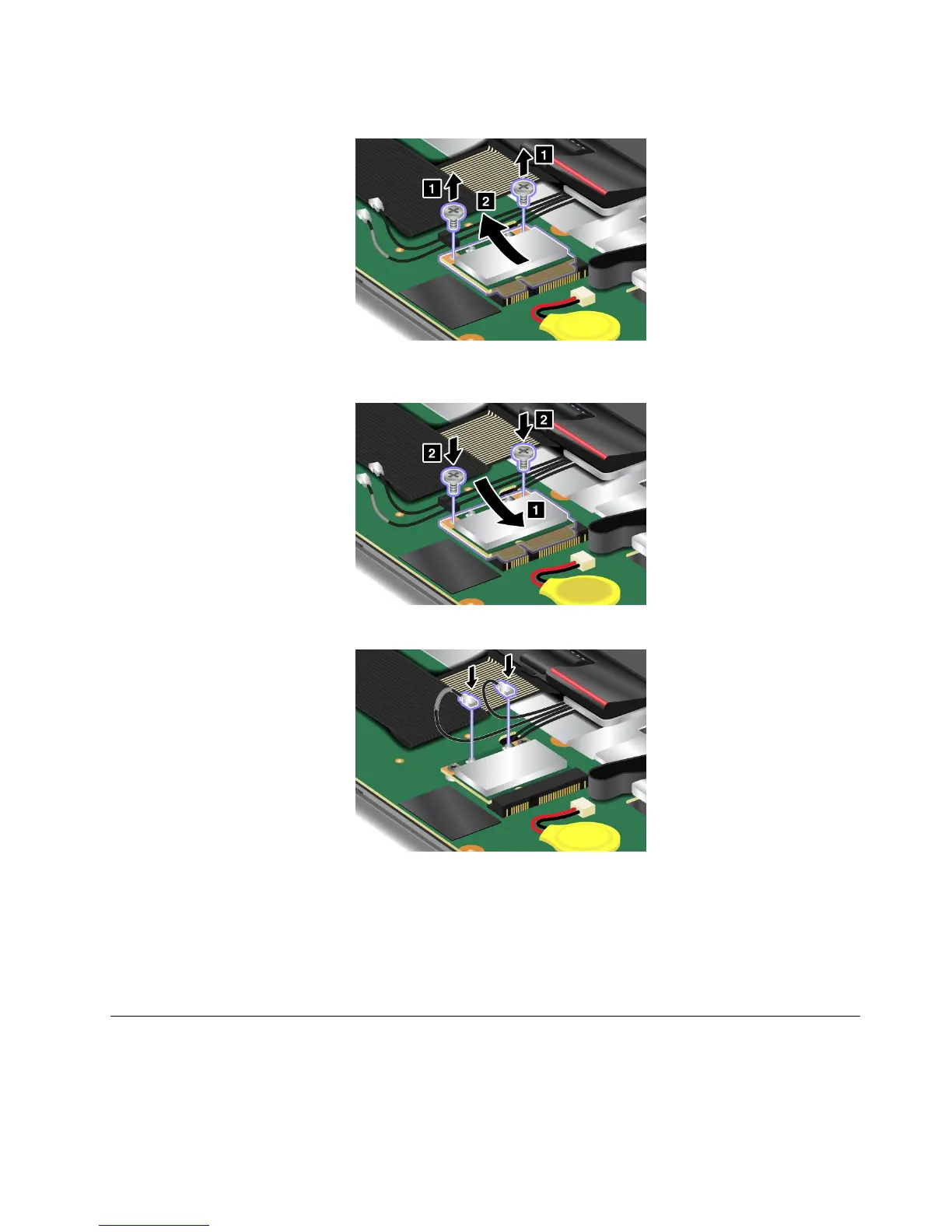
7.Removethescrewsandthecardpopsup.Removethecard.
8.Alignthecontactedgeofthenewcardwiththecorrespondingsocketcontactofthecomputer.Pivot
thecarduntilyoucansnapitintoplaceandsecurethecardwiththetwoscrews.
9.ConnectthecablestothenewPCIExpressMiniCard.
Note:Besuretoattachthegraycabletotheconnectormarked“MAIN”onthecardandtheblack
cabletotheconnectormarked“AUX”.
10.Reinstallthepalmrest.
11.Reinstalltheopticaldrive.
12.Reinstallthebatteryandturnthecomputeroveragain.Thenreconnecttheacpoweradapterand
thecables.
InstallingandreplacingthePCIExpressMiniCardforwirelessWAN
connection
SomeThinkPadmodelshaveaPCIExpressMiniCardslotforconnectiontoawirelessWAN.Toreplacethe
PCIExpressMiniCardwithanewone,readthefollowingprerequisitesrst.
Chapter6.Replacingdevices111















 To Next Page