15Bluetoothantenna(somemodels)
IfyourcomputercomeswiththeIntegratedBluetoothfeatures,theantennaislocatedundertheright
sideofthepalmrest.
16PCIExpressMiniCardslotforwirelessLAN/WiMAX(somemodels)
YourcomputermightincludeaPCIExpressMiniCardforwirelessLAN/WiMAXinthePCIExpressMiniCard
slotwhichenableswirelessLAN/WiMAXcommunications.
19Fnkey
UsetheFnkeytotakeadvantageofThinkPad
®
functions.TouseThinkPadfunctions,pressFn+therequired
functionkeymarkedinblue.
20Volumecontrolbuttons
Thebuilt-involumebuttonsenableyoutoquicklyadjustthevolumeofthesoundfromyourcomputer,mute
thesoundentirely,orsetthemicrophonetomute.
Fordetails,refertotheinstructionsin“Volumeandmutebuttons”onpage30.
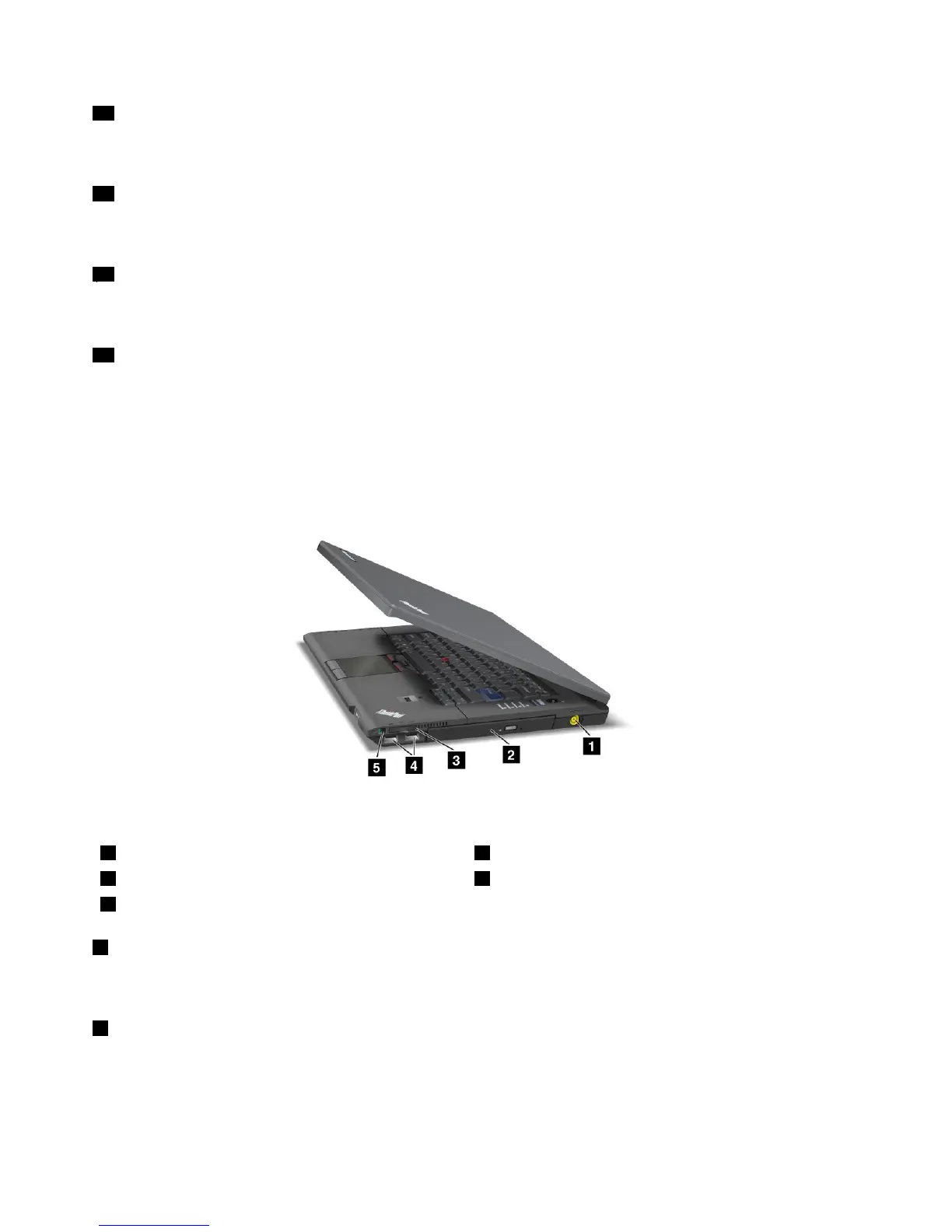
Right-sideview
Figure2.ThinkPadL420andL520right-sideview
1Powerjack
2Opticaldrive
3Mediacardreader
4USBconnectors(right)
5Wirelessradioswitch
1Powerjack
Theacpoweradaptercableconnectstothecomputerpowerjacktoprovidepowertothecomputerand
chargethebattery.
2Opticaldrive
Yourcomputerhasaslotforanopticaldrive.
4UserGuide















 To Next Page