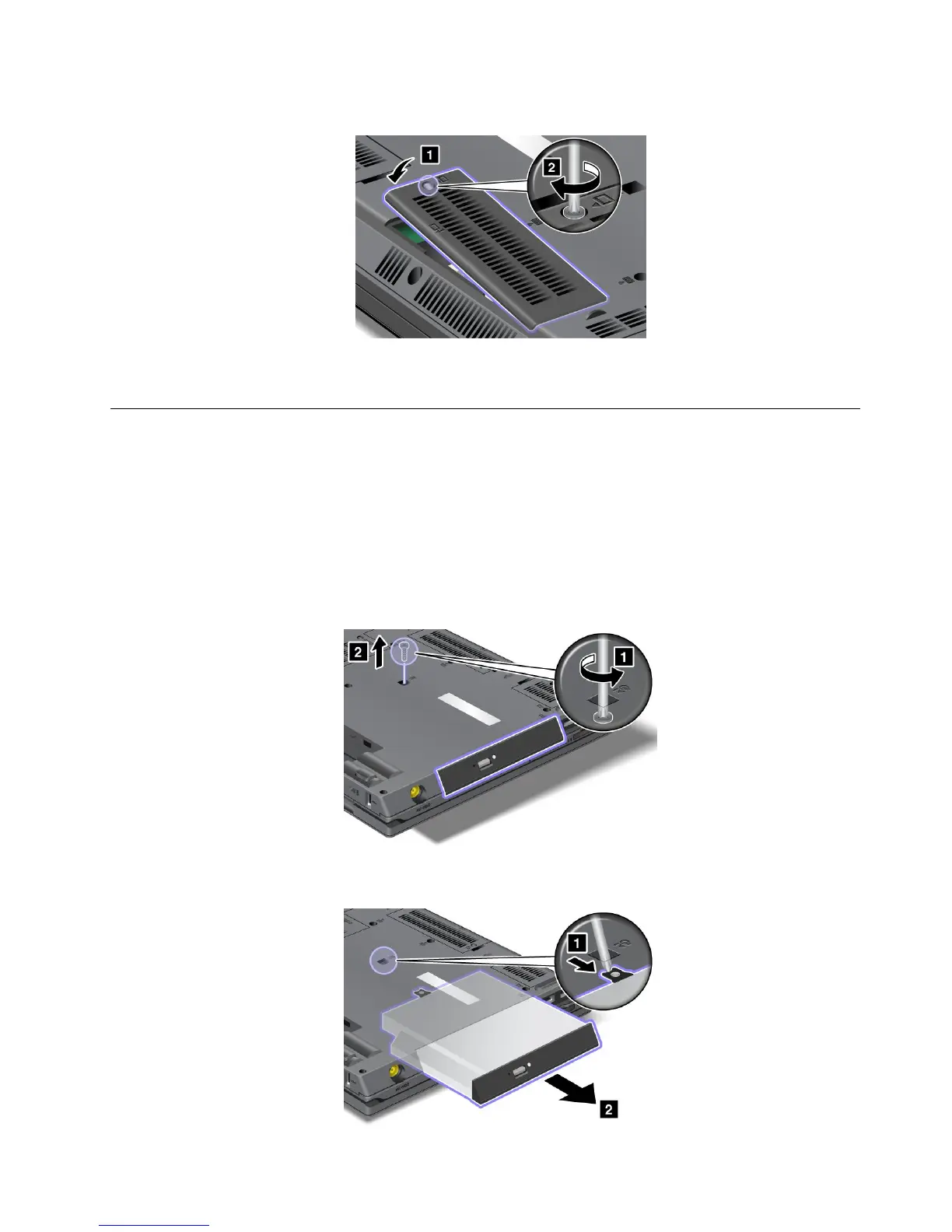
7.Reinstalltheslotcover.
8.Reinstallthebatteryandturnthecomputeroveragain.Thenreconnecttheacpoweradapterand
thecables.
Replacingtheopticaldrive
Beforeyoustart,printtheseinstructions.
Anopticaldriveispreinstalledinthebay.Ifitneedstoberepaired,removeitasfollows:
1.Turnoffthecomputer,thendisconnecttheacpoweradapterandallcablesfromthecomputer.Waitfor
afewminutes,tilltheinsideofthecomputercools,beforeyoustartthefollowingprocedures.
2.Removethebattery.See“Replacingthebattery”onpage89.
3.Closethecomputerdisplay,andturnthecomputerover.
4.Loosenthescrewthatsecuresthedriveandremoveit.
5.Presstheedgeofthedriveoutwards,usingthetipofathinscrewdriverasshowninthedrawing
andthenpulloutthedrive.
Chapter6.Replacingdevices103





 To Next Page