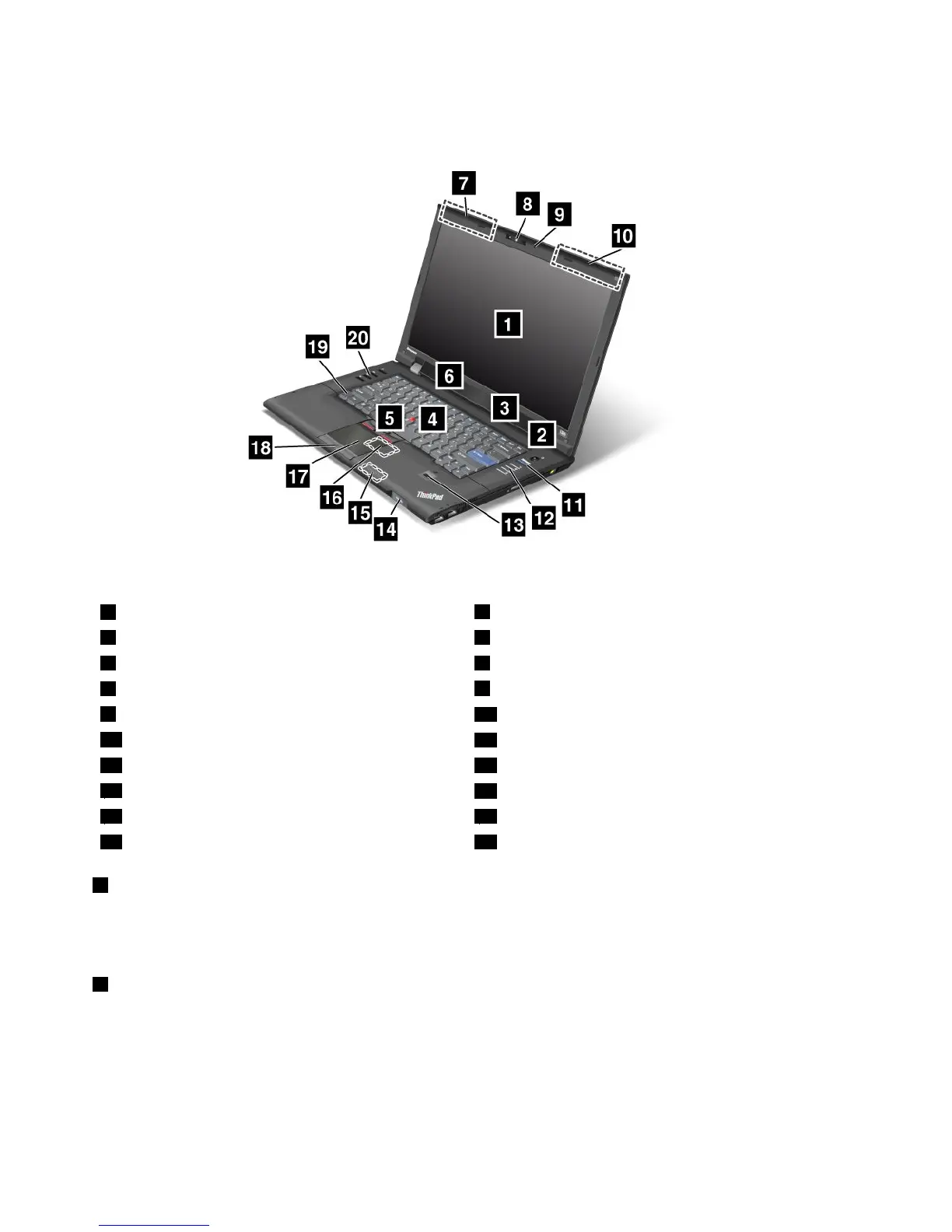
Frontview
Figure1.ThinkPadL420andL520frontview
1Computerdisplay
2Powerswitch
3Built-instereospeakers4TrackPointpointingstick
5TrackPointbuttons6Built-instereospeakers
7UltraConnectwirelessantennas(left)
8Integratedcamera
9Built-inmicrophone
10UltraConnectwirelessantennas(right)
11ThinkVantagebutton
12System-statusindicators
13Fingerprintreader14Power-statusindicators
15Bluetoothantenna
16PCIExpressMiniCardslotforwirelessLAN/WiMAX
17Touchpad18Touchpadbuttons
19Fnkey20Volumecontrolbuttons
1Computerdisplay
Thehigh-resolution,thin-lmtransistor(TFT)displayprovidesclearandbrillianttextandgraphics.
Fordetails,refertotheinstructionsin“Changingdisplaysettings”onpage48.
2Powerswitch
Thepowerswitchislitwheneverthecomputerisonandisnotlitwhenthecomputerisinsleep(standby)
mode.
Usethepowerswitchtoturnonthecomputer.Toturnoffyourcomputer,usetheStartmenushutdown
options.
Ifyoucannotturnoffthecomputerbythismethod,pressandholdthepowerswitchfor2seconds.
2UserGuide















 To Next Page